How to Track Facebook Marketplace Orders in 2026
Updated November 23, 2026
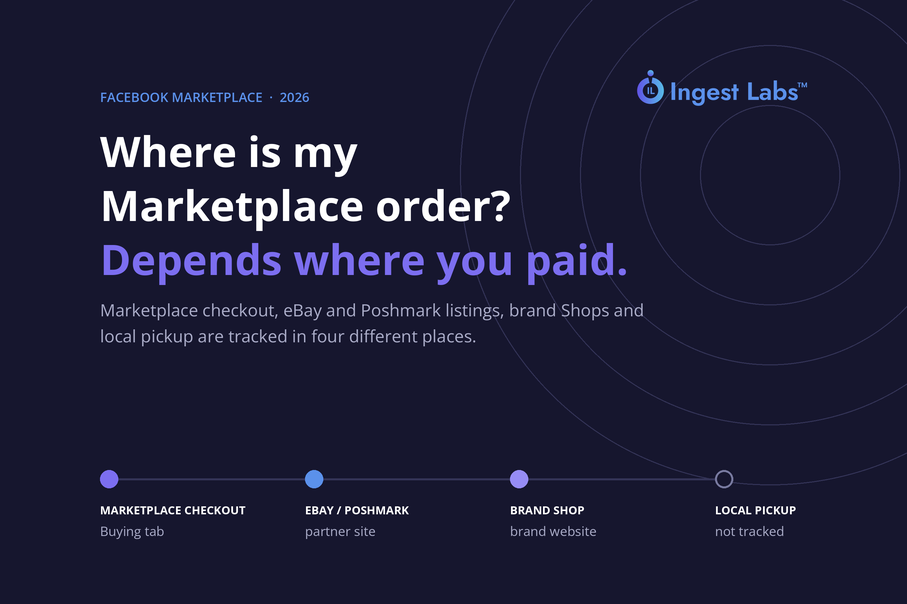
Short answer: To track a Facebook Marketplace order, open Marketplace, tap your profile icon, choose Buying, and select the order. Shipped purchases made through Marketplace checkout show the carrier and tracking number there, and Facebook sends a notification each time the order status changes. Where you track depends on where you paid. Partner listings from eBay and Poshmark are bought and tracked on the partner's own site, because checkout happens there. Products from a brand's Facebook Shop are tracked on that brand's website, since Meta ended Shops checkout on Facebook and Instagram on September 4, 2025. Local pickup deals have no tracking at all. If a seller does not resolve a problem within 2 business days, Meta's guidance is to contact Facebook support. For brands, the job is different: the order now lands on your own checkout, so the Purchase event your server sends to Meta becomes the record that ad reporting depends on.
Where your Marketplace order is tracked
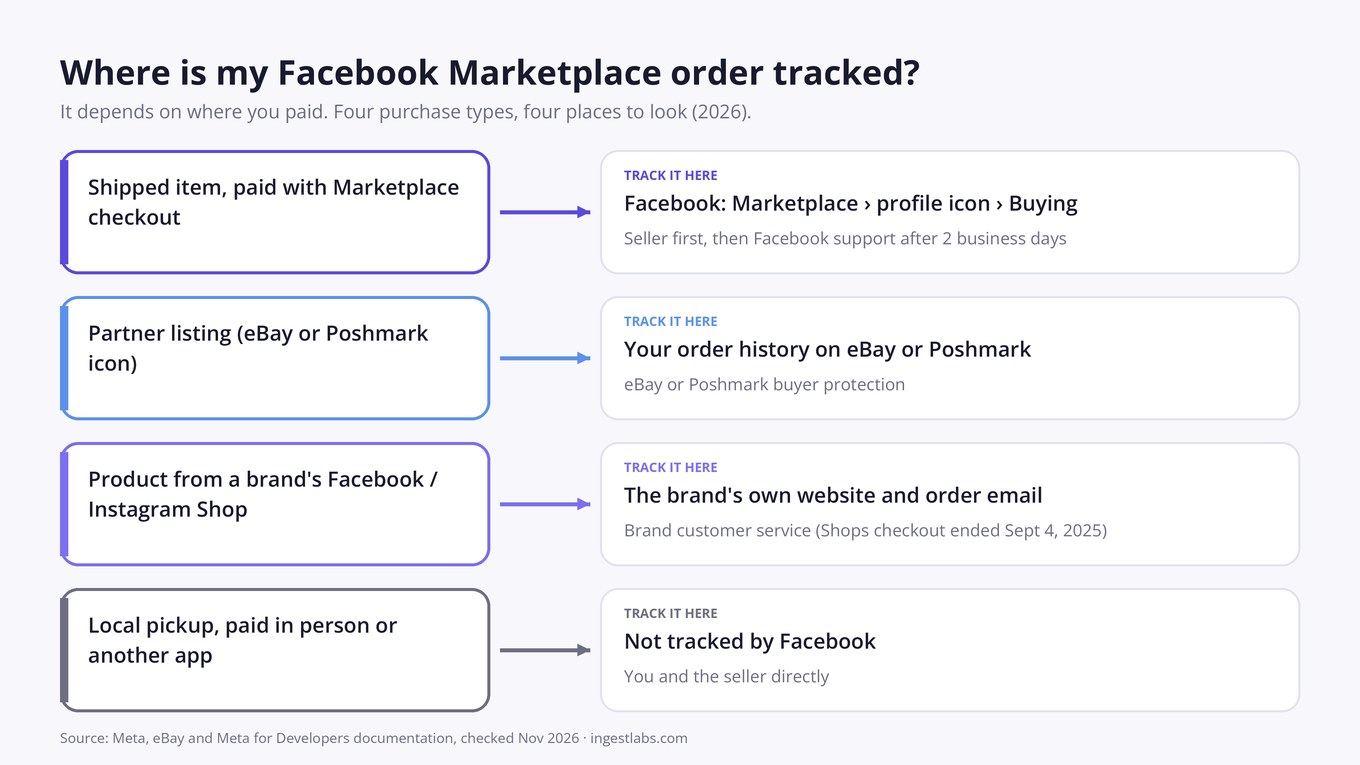
Marketplace now mixes four kinds of purchase in one feed, and each one is tracked in a different place. Start by working out which kind you made.
| How you bought it | Where to track it | Who handles problems |
|---|---|---|
| Shipped item, paid through Marketplace checkout | Marketplace → profile icon → Buying → the order | The seller first, then Facebook support |
| Partner listing (eBay or Poshmark icon on the photo) | Your order history on eBay or Poshmark | eBay or Poshmark, under their own buyer protection |
| Product from a brand's Facebook or Instagram Shop | The order confirmation email and account page on the brand's website | The brand's customer service |
| Local pickup, paid in person or by another app | Not tracked by Facebook | You and the seller directly |
Partner listings matter more than most guides admit. Meta began showing eBay listings on Marketplace in a test across the US, Germany and France in January 2025, and added Poshmark later that year. Both sit in the normal feed, marked with a small partner icon.
How to track a shipped Marketplace order, step by step
These steps apply only to items you paid for through Marketplace checkout. Menu labels shift slightly between app versions, but the path is the same.
In the Facebook app (iOS or Android)
-
Tap Marketplace (the shop icon, or find it under Menu).
-
Tap your profile icon at the top of Marketplace.
-
Tap Buying, then open the order you want.
-
Read the carrier name and tracking number in the order details. Tap the tracking number to open the carrier's page.
On a computer (facebook.com)
-
Click Marketplace in the left-hand menu.
-
Click Buying.
-
Select the order to see its status, carrier and tracking number.
Since November 2025, Marketplace checkout shows the full cost, including shipping and tax, before you pay, and sends a notification each time the order status changes. If you turned those notifications off, the Buying tab still shows the latest status.
When tracking is missing or the order is late
Most "where is my order" problems come down to the seller not marking the item as shipped or not adding a tracking number. Work through these steps in order:
-
Check the purchase type. If the listing carried an eBay or Poshmark icon, Facebook has no tracking data for it. Check your account on the partner site.
-
Message the seller from the order. Opening the conversation from the order details attaches the order to the thread, which helps if you escalate later.
-
Wait 2 business days. Meta's Marketplace safety guidance asks buyers to contact the seller first and contact Facebook support if the seller does not reply or resolve the issue within 2 business days.
-
Escalate from the order. Use the help option on the order to report an item that did not arrive or does not match the listing. Keep screenshots of the listing, the messages and any delivery photos.
-
Check the carrier directly. A tracking number that shows "label created" for several days usually means the parcel has not been handed over yet.
What changed in 2025 and 2026, and why older guides are wrong
Many tracking guides, including the earlier version of this page, describe features that no longer exist. Four changes explain the gap:
-
Shops checkout ended on September 4, 2025. Meta began moving Facebook and Instagram Shops to website checkout in June 2025. After the switch, order management, returns, disputes and payouts for new Shop orders left Commerce Manager and moved to each brand's own store.
-
Partner listings arrived. eBay listings began appearing on Marketplace in January 2025, followed by Poshmark. Checkout, and therefore tracking, stays on the partner's site.
-
Marketplace checkout added status notifications. Meta's November 13, 2025 update added upfront shipping and tax costs and order-status notifications for shipped purchases. Meta also reported that one in four young-adult daily Facebook users in the US and Canada uses Marketplace each day.
-
The order APIs were switched off. On July 29, 2026, Graph API v26.0 blocked 47 Commerce Order Management endpoints, including shipment tracking and order listing. Calls on older API versions stop working after October 27, 2026, and Meta lists no replacement.
There is also no Marketplace feature that exports order data for business reporting, despite claims in older articles. Sellers who need records should keep them in their own order system.
For brands: tracking orders that start on Marketplace or Shops
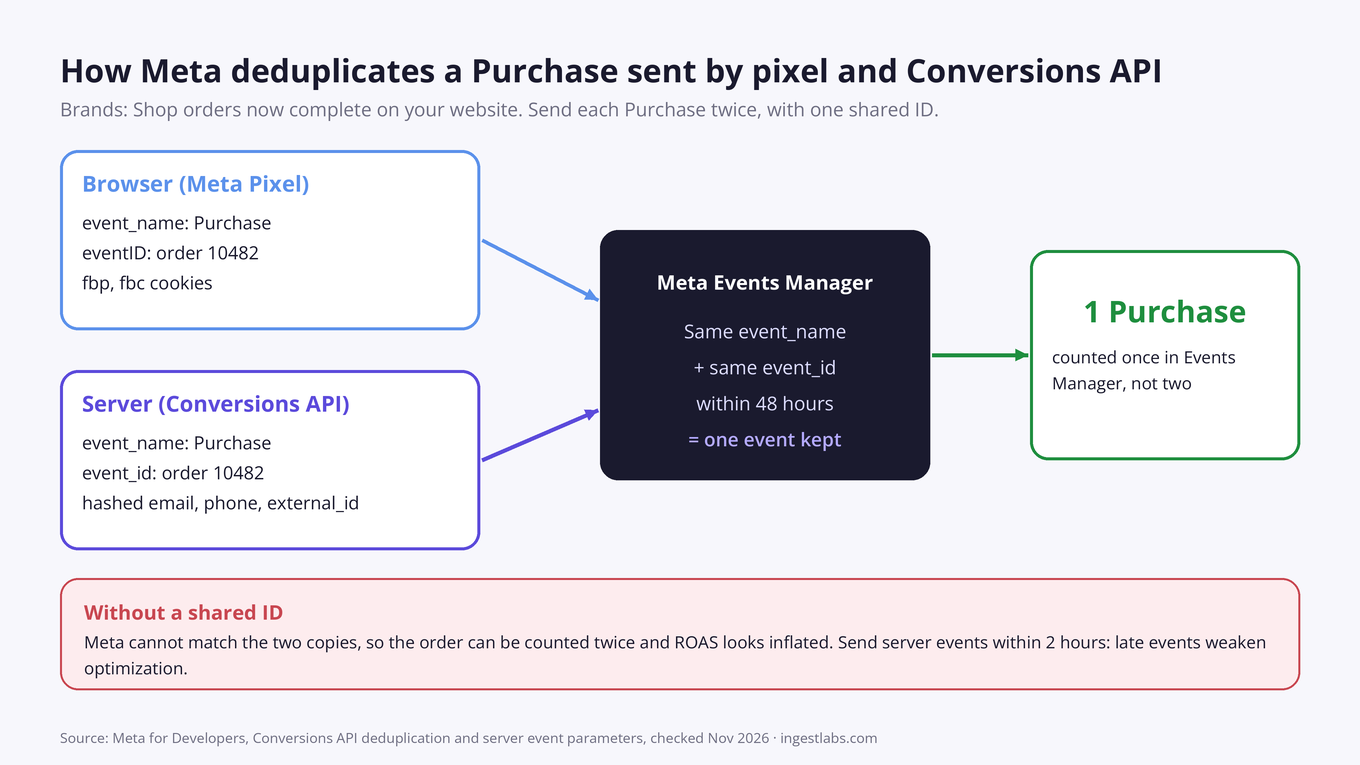
For a brand, "tracking a Marketplace order" has stopped being a logistics question. Every Shop order now completes on your website, so Meta only knows a sale happened if your site tells it. Meta has retired the in-app "Meta purchases" and "Meta checkouts initiated" metrics, and the Website conversion location replaced the old "Website and shop" option in ad set-up. If the Purchase event is lost, Meta under-reports the sale, and campaign optimization learns from a smaller and noisier set of conversions.
This is the set-up we recommend to performance teams:
| Signal | What to configure | Why it matters |
|---|---|---|
| Checkout URL and source tag | Add your checkout URL in Commerce Manager. Tag Shop and Marketplace traffic with consistent UTM or order-source parameters | Lets your order system and analytics separate Meta-sourced orders from the rest |
| Pixel and Conversions API together | Send each Purchase from the browser and the server with the same event_name and event_id | Meta keeps the first copy that arrives within 48 hours and drops the duplicate. Without a shared ID, sales count twice |
| Order ID as the event ID | Use the order number from your store as event_id and order_id | Purchases can be deduplicated over a 48-hour or 28-day window, and finance can reconcile each order |
| Speed of delivery | Send server events in real time, not as a nightly batch | Meta warns that events sent more than 2 hours late reduce performance, and a delay of 24 hours or more can cause significant attribution and delivery problems |
| Customer information | Send hashed email, phone, external_id and the fbp/fbc browser IDs with each Purchase | Raises Event Match Quality, which Meta scores from 1 to 10 in Events Manager |
Check two things every week. First, compare Purchases in Events Manager with Meta-sourced orders in your store, and investigate any gap. Second, look at deduplication in the Events Manager overview: if browser and server counts are both high and the deduplicated total is close to their sum, your event IDs do not match.
How Ingest Labs fits
Ingest IQ runs server-side tagging, sending Purchase events to the Meta Conversions API from your server with the order ID as event_id, so browser and server copies deduplicate cleanly. Ingest ID keeps a durable first-party identifier that travels with each event as external_id, which helps match quality. Event IQ puts platform-reported conversions next to your order data, so the weekly reconciliation above is a report rather than a spreadsheet exercise. For a step-by-step set-up, see our Meta CAPI implementation guide and our guide to improving Event Match Quality.
FAQ
How do I see my Facebook Marketplace purchases?
Open Marketplace in the Facebook app or on facebook.com, select your profile icon, and choose Buying. This list holds shipped purchases paid through Marketplace checkout, with the status, carrier and tracking number for each. Partner listings bought on eBay or Poshmark, and products bought on a brand's own website, do not appear here. Track those on the site where you paid.
Why is there no tracking number on my Marketplace order?
The seller has not yet marked the item as shipped or added a tracking number. Message the seller from the order details. If they do not reply or resolve it within 2 business days, contact Facebook support from the order. Local pickup deals never carry tracking, because Facebook does not handle that payment.
Can I track an eBay item I found on Facebook Marketplace?
Yes, but on eBay rather than Facebook. eBay listings on Marketplace carry a partner icon, and buying one sends you to eBay's checkout. The order, its tracking and any return or refund are handled in your eBay account under eBay's own buyer protection. The same applies to Poshmark listings.
Can I still check out inside a Facebook or Instagram Shop?
No. Meta ended checkout on Facebook and Instagram Shops on September 4, 2025. Buyers now complete Shop purchases on the brand's own website, and that website sends the order confirmation, tracking and returns information. Commerce Manager no longer manages new Shop orders.
How should a brand measure sales that come from Marketplace or Shops?
Treat them as website sales. Tag Meta-sourced traffic with consistent UTM or order-source parameters. Send each Purchase to Meta from both the browser pixel and the Conversions API, using the store's order number as the shared event_id. Send server events in real time, include hashed customer information, and reconcile Events Manager against your order system weekly.
Sources
-
Meta, "Facebook Marketplace Gets a Glow Up," November 13, 2025: about.fb.com/news/2025/11/facebook-marketplace-gets-a-glow-up/ (checked November 23, 2026)
-
Meta, Trust and safety on Marketplace: meta.com/safety/scam-prevention/marketplace-safety/ (checked November 23, 2026)
-
Meta for Developers, Commerce Platform project guide (Shops checkout ends September 4, 2025): developers.facebook.com/documentation/ads-commerce/commerce-platform/project-guide (checked November 23, 2026)
-
Meta for Developers, Conversions API end-to-end implementation, deduplication and server event parameters: developers.facebook.com/documentation/ads-commerce/conversions-api/ (checked November 23, 2026)
-
eBay Seller Center, "More visibility through Facebook Marketplace," April 2025: ebay.com/sellercenter/news/2025-april/facebook-marketplace (checked November 23, 2026)
-
Fortune, "EBay added $3 billion in market value in one day," January 8, 2025 (US, Germany and France test)
-
Value Added Resource, "Meta Phases Out Native Checkout Experience For Facebook & Instagram Shops," 2025 (Commerce Manager features discontinued)
-
Feedonomics, Meta website checkout transition, 2025 (retired Meta purchases and checkouts-initiated metrics)
-
PPC Land, "Meta blocks 47 commerce endpoints as Graph API v26.0 lands," July 30, 2026