LinkedIn Conversions API: Server-Side Setup Guide
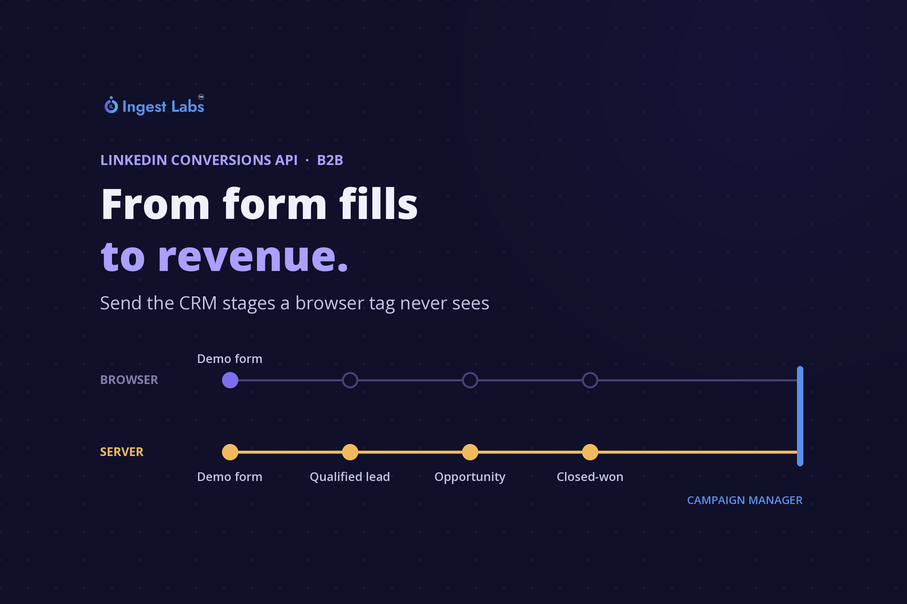
Short answer: The LinkedIn Conversions API lets you send conversion events from your own server or CRM straight to LinkedIn, alongside or instead of the browser-based Insight Tag. The core setup: turn on enhanced conversion tracking so LinkedIn adds the li_fat_id click ID to landing page URLs. Capture that ID with each lead. Create a conversion rule for each event you want to send. Send events with hashed email, the click ID and contact details, within 90 days of the conversion. Then check match rates and deduplication in Campaign Manager. For B2B teams, the bigger change is what you can send. Pipeline stages, qualified leads and closed-won deals from your CRM become conversions LinkedIn can attribute and optimize toward, which a browser tag on a thank-you page never sees. That moves campaign reporting from form fills toward revenue.
What the Conversions API does, and what it doesn't replace
The Insight Tag runs in the visitor's browser. It records what happens on your website: a demo request, a content download, a trial sign-up. The Conversions API is a server-to-server connection. Your server or CRM sends the conversion to LinkedIn directly, so it can report events the browser never sees.
LinkedIn's own guidance is to run both. Its documentation recommends sending conversions through the Insight Tag and the Conversions API together "for increased reliability", with deduplication so the same event isn't counted twice. Treat the API as the second channel that carries what the tag can't, rather than a replacement for it.
For B2B, that second channel matters because most of the events that predict revenue happen after the website visit:
| Event | Where it happens | Can the Insight Tag see it? |
|---|---|---|
| Demo request, content download | Your website | Yes |
| LinkedIn Lead Gen Form submission | Already in Campaign Manager | |
| Marketing qualified lead (MQL) | Your CRM or marketing automation | No |
| Sales qualified lead (SQL), opportunity created | Your CRM | No |
| Closed-won deal, with value | Your CRM | No |
What changes for B2B teams
Pipeline stages become conversions
LinkedIn's use-case documentation recommends creating multiple conversion rules to measure campaigns against "different sales stages in CRM that represent both pipeline and closed won deals". Once those stages arrive as conversions, you can report cost per opportunity rather than cost per form fill.
For closed-won deals, you can pass the deal value with the event. LinkedIn notes this lets you calculate return on ad spend as total conversion value divided by spend. For a B2B team, that's the first time LinkedIn reporting and the revenue number come from the same source.
Campaigns can optimize toward qualified leads
If you create a conversion rule with the QUALIFIED_LEAD type, LinkedIn can use it as an optimization goal for lead generation campaigns. Two timing rules apply, according to LinkedIn's documentation:
-
Qualified leads must reach LinkedIn within 30 days to be included in optimization. LinkedIn recommends sending them as soon as you know.
-
During the learning phase, LinkedIn recommends sharing five or more qualified leads within two weeks.
That makes speed a process question. If qualification happens in a weekly sales meeting and someone exports a spreadsheet at month end, the signal arrives too late to shape the campaign. Push the CRM status change to LinkedIn when it happens.
Long sales cycles have hard limits
Two time limits decide which deals LinkedIn can credit:
-
When you send it. Each event's conversion timestamp must fall within the past 90 days, or the API rejects it.
-
How far back LinkedIn looks. Conversions can be attributed for up to 180 days in total for most conversion types: up to 90 days between the conversion and the upload, plus up to a 90-day attribution lookback. For lead, qualified lead, purchase, add-to-cart and application conversions, the total can extend to 365 days.
A nine-month enterprise deal will often close after the ad engagement that started it has aged out. Send the earlier stages too, such as qualified lead and opportunity. They fall inside the window, and they tell LinkedIn which audiences produce pipeline long before the contract is signed.
Lead Gen Form leads can be matched directly
If a lead came from a LinkedIn Lead Gen Form, you can send the form response ID (the lead field) with the conversion event. The API accepts it as an identifier on its own, so a qualified-lead update from your CRM can point straight back to the LinkedIn form that created it.
How to set it up
1. Turn on enhanced conversion tracking
Enhanced conversion tracking makes LinkedIn add a click ID parameter, li_fat_id, to your landing page URLs every time someone clicks one of your ads. LinkedIn's documentation says this is on by default for recently created Insight Tags. Check the setting on your tag in Campaign Manager.
2. Capture the click ID with each lead
There are two ways to capture li_fat_id:
-
From the landing page URL. This works even without the Insight Tag installed, though LinkedIn notes view-through attribution may be limited.
-
From the li_fat_id cookie that the Insight Tag sets. LinkedIn says the cookie persists for 30 days from the most recent ad click.
Either way, pass the value into a hidden field on your forms so it's stored with the lead in your CRM. LinkedIn keeps the mapping from a click ID to a member profile for 365 days, so the ID still works for matching after the browser cookie has expired. That's what makes it useful for a closed-won event sent months later.
The same principle applies to Google's click IDs. If you've worked through missing Google Ads click IDs, the same redirect and form-handoff checks apply to li_fat_id.
3. Create conversion rules
Create one conversion rule for each event type you want to send, with the conversion method set to the Conversions API, and associate it with the campaigns you want it to measure. If you send the same event from the browser and the server, LinkedIn requires a separate conversion rule for each source.
4. Build each event
Every event needs the conversion rule, a timestamp and at least one way to identify the person. Send every identifier you have. LinkedIn's documentation says this increases match rates, and only matched events can be used for attribution and optimization.
| Field | What to send | Notes |
|---|---|---|
| Conversion rule | The rule's URN | One rule per event type and per source |
| Conversion time | Epoch time in milliseconds | Must be within the past 90 days; multiply seconds by 1,000 |
| Hashed email | SHA-256, no salt | Trim spaces and lowercase the address before hashing |
| Click ID | li_fat_id as LINKEDIN_FIRST_PARTY_ADS_TRACKING_UUID | Captured in step 2 |
| Contact details | First name and last name, plus company, job title and country code | First and last name must be sent together; from API version 202609 they can also be sent hashed |
| Lead Gen Form ID | The form response URN | For leads from LinkedIn Lead Gen Forms |
| Value | Currency code and amount | Use for opportunities and closed-won deals |
| Event ID | A unique ID per event | Needed for deduplication with the Insight Tag |
5. Send events promptly, and in valid batches
LinkedIn asks for conversions in real time, or at least within a day. Batches can carry up to 5,000 events, and the API allows up to 600 requests a minute and 500,000 a day per access token.
If you connect directly rather than through a partner, store the access token securely. LinkedIn says tokens generated in Campaign Manager don't expire, and Campaign Manager doesn't keep a copy.
One invalid record fails the whole batch. A missing field or a wrong data type means you correct the data and resubmit everything, so validate events before you send them.
6. Set up deduplication
If an event goes through both the Insight Tag and the API, send the same event ID from both. LinkedIn then discards the Conversions API copy and counts the Insight Tag event. Pick the ID up from the browser when the conversion happens and pass it to your server with the event.
7. Verify in Campaign Manager
LinkedIn says ingestion takes up to 24 hours and reporting up to another 48, so allow up to 72 hours before judging the results. Then check three things:
-
Match rate status on each conversion rule. LinkedIn flags rules with a low match rate. If you see that, add identifiers, starting with the click ID and lowercased hashed email.
-
Deduplication. For events sent from both sources, the Insight Tag rule should normally show the higher count.
-
Stage counts against your CRM. Each pipeline stage in Campaign Manager should roughly follow the same stage in your CRM for LinkedIn-sourced leads.
Mistakes that cost B2B teams the most
-
Sending closed-won only. It is the most valuable event and the most likely to fall outside the time limits. Send the stages before it as well.
-
Exporting CRM data monthly. LinkedIn only includes qualified leads shared within 30 days in optimization, and rejects events with a conversion timestamp older than 90 days.
-
Hashing emails without trimming and lowercasing them. The hash changes and the match fails.
-
Sending timestamps in seconds. The API expects milliseconds.
-
Losing the click ID at the form. If the hidden field isn't populated, or a redirect strips the parameter, every later CRM event has to match on email alone.
-
Leaving the integration on an old API version. LinkedIn versions its Marketing API and retires older versions on a published schedule; version 202511, for example, is due to be retired on 16 November 2026. Check the version your integration uses when LinkedIn announces a sunset date.
Consent and data handling
LinkedIn's Conversions API documentation describes the data you can send. It doesn't decide what you're allowed to send. That depends on the consent you've collected and the law in each market where your buyers sit, such as GDPR in Europe or the DPDP Act in India. Send only the events and identifiers your consent records allow, and make the server-side pipeline read the same consent state as your website.
For more on that, see what you need to know about consent management and our guide to what a DPDP consent manager is and isn't.
How Ingest Labs approaches this
Our LinkedIn integration sends conversion events to the LinkedIn Conversions API server-side, through Ingest IQ, our server-side tagging product. Ingest ID handles identity resolution, so a lead captured on your website can be connected to the CRM stages that follow it. Before we switch anything on, we check the basics above: whether the click ID survives to the form, whether consent is respected server-side, and which CRM stages are worth sending. To see how the rest of your tracking holds up first, Site Intelligence gives you a free audit of the tags firing on your site.
For how LinkedIn data fits alongside your other channels, see our complete guide to marketing attribution.
Frequently asked questions
What is the LinkedIn Conversions API?
It is a server-to-server connection that sends conversion events from your server or CRM to LinkedIn, so they can be attributed to your campaigns and used for optimization. It works alongside the Insight Tag, which records conversions in the visitor's browser.
Do I still need the LinkedIn Insight Tag if I use the Conversions API?
LinkedIn recommends using both. Send website conversions through both channels with a shared event ID, so LinkedIn counts each conversion once, and send CRM events such as qualified leads and closed-won deals through the API.
What is li_fat_id?
It is LinkedIn's first-party click ID. With enhanced conversion tracking on, LinkedIn adds it to your landing page URLs when someone clicks an ad. Capture it with each lead and send it with later conversion events to improve match rates.
How far back can I send LinkedIn conversions?
The conversion timestamp must be within the past 90 days. LinkedIn can attribute conversions for up to 180 days in total for most conversion types, and up to 365 days for lead, qualified lead, purchase, add-to-cart and application conversions.
Can LinkedIn optimize campaigns for qualified leads?
Yes. Create a conversion rule with the qualified lead type and send qualified leads through the Conversions API. LinkedIn only includes qualified leads shared within 30 days in optimization, and recommends sending five or more within two weeks during the learning phase.
How long until Conversions API data appears in Campaign Manager?
LinkedIn says ingestion can take up to 24 hours and reporting up to another 48 hours, so complete data can take up to 72 hours to appear.
Sources
-
LinkedIn Marketing API, Conversions API overview (checked 2026-10-22): Server-to-server connection; reporting in Campaign Manager; tokens generated in Campaign Manager don't expire and aren't stored there; version 202511 sunset on 16 November 2026
-
LinkedIn Marketing API, Conversions API reference (checked 2026-10-22): Send multiple identifiers to increase match rates; only matched events used; conversion rules with the Conversions API method; 90-day timestamp; 5,000 events per batch; 600 requests a minute and 500,000 a day; one invalid record fails the batch; older API versions retired on a published schedule
-
LinkedIn Marketing API, Conversions API schema (checked 2026-10-22): Supported identifiers; userInfo fields, first and last name rule and hashed names from 202609; email trimming and lowercasing; Lead Gen Form lead field; event ID; conversion value; milliseconds timestamp
-
LinkedIn Marketing API, Conversions FAQ (checked 2026-10-22): Real time or within a day; up to 72 hours to report; attribution up to 180 days and 365 days for listed types; SHA-256 without salt; lowercase before hashing; li_fat_id definition; identity and attribution match rates
-
LinkedIn Marketing API, Conversions API use cases (checked 2026-10-22): Use both Insight Tag and Conversions API; CRM pipeline and closed-won rules; ROAS from conversion value; QUALIFIED_LEAD, 30-day and five-in-two-weeks guidance; low match rate status
-
LinkedIn Marketing API, Deduplication (checked 2026-10-22): Separate conversion rule per source; same event ID; Conversions API event discarded and Insight Tag counted; Insight Tag count normally higher
-
LinkedIn Marketing API, Enabling click IDs (checked 2026-10-22): li_fat_id URL parameter and cookie; on by default for recent tags; 30-day cookie; 365-day mapping; URL capture limits view-through