Mastering Shopify Webhook Pricing Logs for Effective Troubleshooting
Modern eCommerce depends on systems that update in real time. Product changes, price updates, and campaigns must stay aligned across every channel.
Shopify handles these updates through webhooks, which pass changes the moment they happen. This keeps storefronts, marketing tools, and analytics in sync.
But when pricing changes don’t behave as expected. Discounts fail, variant prices mismatch, or storefront and ad prices drift. Teams often struggle to pinpoint the cause.
The issue usually isn’t Shopify. It’s the lack of visibility into webhook pricing events. Shopify webhook pricing logs help teams see when a price changed, what triggered the update, and whether it reached every system.
This guide explains how Shopify webhook pricing logs work, why native logging falls short, and how teams use them to troubleshoot pricing issues without adding engineering effort or privacy risk.
Key Takeaways
- Shopify webhook pricing logs are essential for troubleshooting pricing issues, helping teams trace when price changes occur, how they propagate, and where failures happen.
- Shopify’s native tools lack pricing visibility, offering no delivery logs, retry history, or event sequencing, which makes diagnosing pricing mismatches difficult.
- Structured webhook pricing logs reduce revenue and attribution risks by exposing delayed, failed, or out-of-order pricing updates across systems.
- Effective troubleshooting relies on timing, sequencing, and cross-system correlation, not assumptions or manual debugging.
- Ingest Labs brings clarity to Shopify webhook pricing logs by turning pricing events into structured, privacy-compliant data that supports accurate pricing and reliable marketing performance.
What are Shopify Webhooks?
Shopify webhooks are HTTP callbacks that notify external systems when specific events occur in a store. Instead of repeatedly polling Shopify’s API for changes, webhooks push updates in real time, making integrations faster and more efficient.
What Shopify Webhooks Track
Webhooks cover many store actions, including:
- Product and variant updates: Changes to product details, options, or prices
- Pricing and discount changes: Price edits, sale rules, and promotion updates
- Inventory updates: Stock level changes across locations
- Order creation and fulfillment: New orders, shipping updates, and status changes
- Customer and cart events: Account activity and checkout actions
For pricing-related workflows, webhooks are especially important because price accuracy directly affects conversions, trust, and Return on Ad Spend (ROAS).
How Shopify Webhooks Work
When a pricing-related event occurs, such as a product price update, Shopify sends an HTTPS POST request to a configured endpoint. This request includes:
- A JSON payload with event data
- Headers identifying the event topic and shop
- An HMAC signature for security verification
Your endpoint must acknowledge receipt with a 200 OK response within five seconds, or Shopify treats the delivery as a failure. And this is where most pricing issues begin.
Once a webhook leaves Shopify, visibility drops. The next section explains why Shopify webhook pricing logs are essential when something goes wrong.
Why Shopify Webhook Pricing Logs Matter
Shopify webhook pricing logs, when captured externally, provide a clear record of pricing events. They show when a price changed, what triggered the update, and whether the data reached every connected system.
Without these logs, teams are left guessing. Here’s why Shopify webhook pricing Logs are essential
- They confirm pricing updates actually happened: Logs verify that Shopify sent the pricing event and when it occurred.
- They reveal delivery failures and delays: Teams can see if a webhook was dropped, retried, or delayed in transit.
- They help trace pricing mismatches across tools: Logs make it easier to spot where storefront, ads, or analytics went out of sync.
- They reduce troubleshooting time: Clear event records replace manual checks and back-and-forth between teams.
- They support audit and accountability: Logs create a timestamped history of pricing changes for reviews and reporting.
Pricing logs turn invisible events into visible signals. But the challenge is understanding the specific pricing problems these logs help uncover, and why they are so hard to diagnose without them.
6 Common Shopify Pricing Issues That Webhook Logs Help Diagnose
Pricing issues rarely appear as a single failure. They usually form through small gaps that compound across systems. Shopify webhook pricing logs help teams trace these gaps step by step.
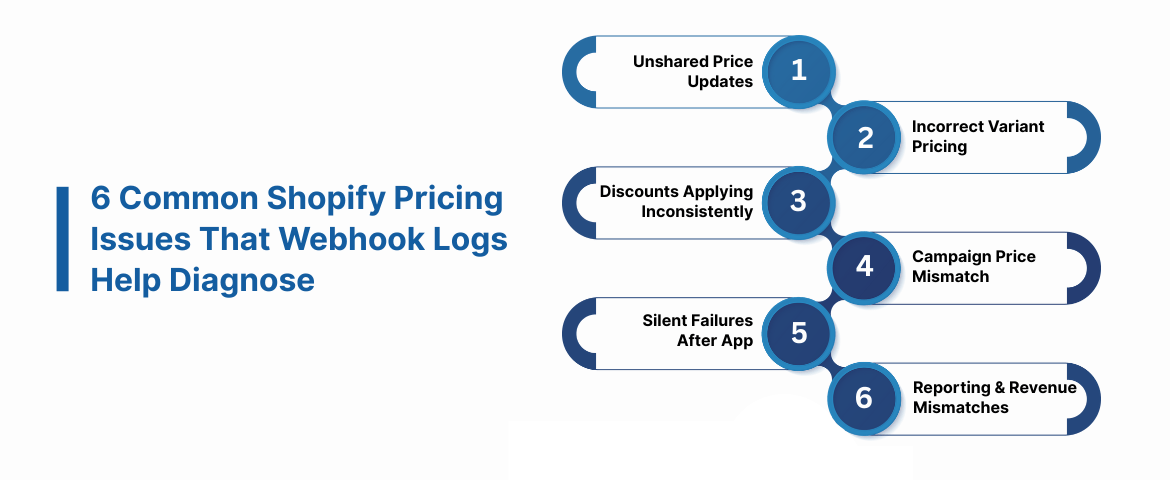
1. Price Updates That Never Reach External Systems
A price may update correctly inside Shopify but fail to reach ads, analytics, or email tools. This often happens when a webhook delivery fails or times out. Shopify sends the event, but the receiving system does not confirm receipt in time.
Without pricing logs, teams cannot tell whether Shopify sent the update or where the delivery stopped. Logs confirm the exact moment the price change occurred and whether it was delivered successfully.
2. Variant Prices Updating Incorrectly
Products with multiple variants create complexity. A change to one variant can affect others if the mappings are incorrect.
Webhook pricing logs show which variant triggered the event and what data was included in the payload. This helps teams verify whether the correct variant price was sent and processed downstream.
3. Discounts Applying Inconsistently
Discount rules may appear active but fail to apply at checkout or in campaign feeds. This happens when pricing and discount events fire separately and arrive out of order.
Pricing logs reveal the sequence of events. They show whether the discount update arrived before or after the base price change. That sequence often explains why prices look correct in one place but wrong in another.
4. Storefront Prices Not Matching Ad Campaigns
Ad platforms rely on timely pricing data. If webhook deliveries lag, ads may display outdated prices. Webhook pricing logs expose delivery delays that are otherwise invisible.
Teams can match the timestamp of a price change with when ad platforms received the update. This helps explain pricing drift without blaming campaigns or creatives.
5**. **Silent Failures After App or Integration Changes
Installing or updating apps can alter pricing behavior without clear warnings. Some apps trigger additional pricing events. Others intercept or modify webhook data.
Logs help teams trace which event caused the final price state and when that change occurred. This reduces guesswork after integrations change.
6**. **Reporting and Revenue Mismatches
When pricing data is incomplete, revenue reports often stop aligning across tools. Webhook pricing logs provide a shared source of truth for pricing events. They allow teams to confirm whether reporting errors began with a missed or altered price update.
Understanding these issues is critical. But diagnosing them consistently requires more than knowing what went wrong.
Also Read: How to Set Up Webhooks in Shopify Step by Step
The next section explains why Shopify’s native tools cannot provide this visibility and where most teams hit a hard limit.
The Logging Gap in Shopify Webhook Pricing
Despite heavy reliance on webhooks, Shopify provides minimal native visibility into webhook behavior.
Shopify’s admin interface does not show:
- Delivery success or failure history
- Retry attempts or failure reasons
- Payload inspection
- Event processing latency
This lack of visibility makes it difficult to correlate delayed or failed webhook deliveries with pricing mismatches in storefronts, advertising campaigns, or analytics dashboards. Even minor delays or missed updates can distort prices, misalign marketing campaigns, and erode customer trust.
Shopify’s native interface also lacks the granularity needed to identify:
- Which webhook payloads failed
- Whether variant prices were delivered correctly
- The timing sequence of price and discount updates
Without this insight, teams cannot reliably detect the root cause of pricing discrepancies.
The gap leaves organizations exposed to hidden errors that escalate over time.
To solve this, businesses need structured, external logging that captures every pricing event, records delivery status, and surfaces actionable insights.
How to Build Effective Shopify Webhook Pricing Logs: 7 Steps
Once you understand the delivery challenges, the next step is capturing pricing events reliably. Effective logs turn invisible webhook activity into actionable data.
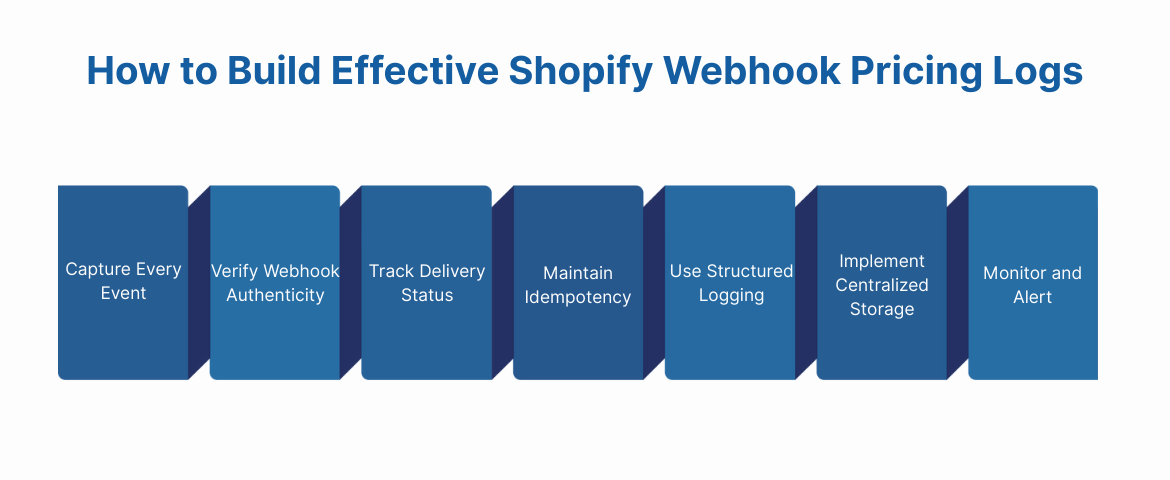
1. Capture Every Event
Every webhook payload should be recorded the moment it arrives. Include:
- Event timestamp
- Webhook topic (e.g., products/update, variants/update)
- Shop domain and store ID
- Full payload data
- Response status from your endpoint
Capturing this information ensures you know what Shopify sent and what your system received. It forms the foundation for all troubleshooting.
2. Verify Webhook Authenticity
Always validate the HMAC signature Shopify includes with each webhook. This confirms the event actually came from Shopify.
Log any verification failures separately. These records help detect misconfigurations or potential security issues without interrupting regular processing.
3. Track Delivery Status and Timing
Record when the webhook was received, when processing started, and when it finished.
This enables teams to identify slow endpoints, timeout patterns, or repeated failures that might block price updates from reaching other systems.
4. Maintain Idempotency
Webhooks may be delivered more than once. Without idempotent processing, duplicate updates can create pricing errors or misaligned reporting.
Use unique identifiers like webhook ID or a combination of shop domain, topic, and resource ID to check whether the event has already been processed.
5. Use Structured Logging
Store logs in a structured format, like JSON, rather than plain text.
Structured logs make it easier to search, filter, and analyze events programmatically. Teams can quickly identify failed updates, sequence issues, or variant mismatches.
6. Implement Centralized Storage
Consolidate webhook logs in a single location, separate from application or database logs.
Centralized storage ensures that all pricing events, including failed deliveries or retries, are visible. It also allows teams across marketing, analytics, and engineering to collaborate effectively.
7. Monitor and Alert
Set up monitoring for key metrics, including:
- Delivery success rates
- Processing time per webhook
- Frequency of retries or failures
Alerts should trigger when thresholds are crossed, allowing teams to investigate before pricing errors affect storefronts or campaigns.
With these steps, Shopify webhook pricing logs become more than just a record. They become a proactive troubleshooting tool.
Also Read: Complete Webhooks Monitoring Guide for Modern Data Teams
The next challenge is applying these logs to solve real-world pricing issues efficiently, without relying on manual debugging or heavy engineering effort. That’s where platforms like Ingest Labs simplify monitoring and analysis.
How to Use Webhook Pricing Logs Step by Step for Troubleshooting
Collecting webhook pricing logs is only useful when teams know how to read and apply them correctly. This section explains how logs turn unclear pricing issues into traceable events.
Start With Delivery Status and Timing
Begin by reviewing whether pricing webhooks were delivered successfully and how long processing took. Delayed or failed deliveries often explain why storefront prices differ from ads, reports, or discount rules.
Timing data shows whether the issue happened upstream or downstream. This step helps teams eliminate false assumptions and focus on real delivery problems first.
Follow the Exact Sequence of Pricing Changes
Pricing rarely changes in isolation. Discounts, variants, and promotions often update within seconds of each other. Webhook pricing logs reveal the exact order of events.
Teams can see which price update arrived first and which arrived last. This sequencing matters. If discounts arrive before base prices, storefront pricing can display incorrect values, either temporarily or permanently.
Match Pricing Logs With External Systems
Pricing issues often surface outside Shopify. Marketing platforms, analytics tools, and data warehouses reflect pricing mismatches quickly.
By matching webhook timestamps with external system logs, teams can identify where pricing updates stopped or arrived late. This approach avoids blind debugging and shortens resolution time significantly.
Look for Repeating Failure Patterns
One-off errors are easy to fix. Repeating failures signal deeper system issues. Webhook pricing logs help teams detect patterns like frequent delays during peak traffic or failures tied to specific product updates. Pattern analysis enables preventive fixes instead of reactive firefighting.
Reprocess Pricing Events Safely
Sometimes pricing errors require reprocessing historical events. Webhook logs allow teams to replay pricing updates exactly as they were received, without guessing payload content.
Replaying events in a controlled environment confirms fixes before they reach live storefronts or campaigns.
When teams use Shopify webhook pricing logs methodically, pricing errors become measurable, explainable, and solvable.
Also Read: Guide to Effective Shopify API Integration
Next, we’ll look at how platforms like Ingest Labs simplify webhook monitoring, logging, and troubleshooting at scale, without adding operational burden or privacy risk.
Beyond Native Shopify Webhooks: Monitoring Pricing Events with Ingest Labs
As webhook volume increases, pricing updates become harder to track. Failures go unnoticed. Events arrive out of order. Teams only discover issues after prices drift across storefronts, ads, or reports.
Instead of treating pricing events as isolated technical signals, Ingest Labs captures them within a structured data layer. This allows teams to connect pricing updates with marketing performance, analytics, and customer behavior, without custom code or complex infrastructure.
We offer:
- Server-side tracking with Ingest IQ: Captures pricing-related webhook events reliably, even when browser-based tracking fails or data loss occurs.
- First-party identity with Ingest ID: Links pricing updates to consistent visitor identifiers, improving attribution accuracy and ROAS analysis.
- Unified event intelligence with Event IQ: Consolidates pricing events, marketing data, and behavioral signals into a single, analyzable timeline.
- Structured data integration: Streams webhook pricing logs into analytics tools, CDPs, or data lakes for consistent reporting and analysis.
- Privacy-first data handling: Supports GDPR, CCPA, and consent-driven data practices without disrupting pricing visibility or measurement.
- Cross-channel alignment: Helps teams verify that pricing updates propagate correctly across storefronts, campaigns, and analytics systems.
By transforming Shopify webhook pricing logs into structured, privacy-compliant data, Ingest Labs enables teams to understand pricing behavior clearly, resolve discrepancies faster, and maintain consistency across every customer touchpoint.
Conclusion
Shopify webhooks keep pricing systems updated, but without visibility, pricing errors become hard to trace and harder to fix. Shopify webhook pricing logs provide the clarity teams need to understand when prices change, how updates move across systems, and where failures occur.
As pricing workflows grow and privacy expectations rise, reliable first-party data and server-side tracking become essential. Teams need visibility without added complexity.
Ingest Labs helps teams bring structure and clarity to Shopify webhook pricing logs while maintaining compliance and marketing performance in a cookieless environment.
If pricing accuracy, attribution confidence, and operational visibility matter to your business, explore how Ingest Labs supports webhook-driven workflows.
FAQs
1. How do I check if a Shopify price update webhook failed?
Shopify does not show webhook delivery failures in the admin. You need external webhook pricing logs to confirm whether the event was sent, received, or dropped.
2. Why do Shopify prices change but not reflect in ads or analytics?
Pricing updates may fail to reach connected platforms due to webhook delivery errors, delays, or processing issues. Shopify webhook pricing logs help identify where the sync broke.
3. Can Shopify webhooks delay pricing updates?
Yes. If the receiving endpoint is slow or unavailable, Shopify may retry or stop delivery. Without logs, these delays are difficult to detect.
4. Do Shopify webhook failures affect conversion tracking?
Indirectly, yes. If pricing data is inconsistent, conversion value and campaign reporting can become inaccurate across marketing platforms.
5. Are Shopify webhook pricing logs required for large catalogs?
For stores with frequent price changes or multiple variants, webhook pricing logs are essential to trace errors across systems at scale.