Server-Side Tracking vs Client-Side Tracking: Fixing Lost Conversions
You set the budget. You approved the creative. The campaign launches. Clicks come in, but the conversions don’t add up. Those missing conversions often didn’t disappear. They were real customers, but parts of your marketing stack never recorded them.
In 2026, ad blockers and browser privacy controls significantly disrupt client-side tracking, creating major gaps in attribution and performance reporting. What looks like lost data can quickly translate into lost revenue: budgets shift to the wrong channels, winning campaigns get cut, and ad algorithms learn from incomplete signals.
For years, the industry response was simple: add more pixels. That approach no longer works.
The future increasingly depends on server-side tracking. But not just any server-side tagging setup. Many implementations operate as black boxes, leaving teams blind when data fails to reach ad platforms.
This guide explains why modern tracking breaks, why server-side tracking and tagging are now essential, and how Ingest Labs restores visibility, control, and recoverability across the entire data pipeline.
Key takeaways
- Client-side tracking is increasingly unreliable in isolation due to ad blockers, browser privacy controls, and fragile JavaScript pixels, causing lost conversions and inaccurate attribution.
- Server-side tracking (also called server-side tagging) moves data collection to secure, first-party servers, restoring lost signals and improving measurement accuracy.
- Most server-side setups remain opaque, making it hard to detect, debug, or recover failed events.
- Ingest Labs adds visibility, control, and replay functionality, helping marketing teams capture and recover events more reliably
- The result is more accurate ROAS, more reliable attribution, and smarter budget decisions.
Why “Lost Data” Becomes Lost Revenue
When your tracking breaks, three things happen immediately:
1. Attribution collapses: Revenue gets misattributed to “Direct” or “Organic,” hiding what actually worked.
2. Algorithms learn from incomplete signals: Meta and Google optimize based on incomplete data, pushing spend toward lower-quality audiences.
3. Growth decisions stall: Winning campaigns look unprofitable. Budgets get cut. Scaling stops.
To fix the problem, we must first look at the wreckage.
Why Client-Side Tracking Is Failing
For the last 15 years, traditional marketing measurement has relied on client-side tracking, JavaScript pixels running inside the user’s browser.
That model is collapsing under three pressures:
1. The Adblocker Wall
Here is a hard number: 42.7% of internet users worldwide use ad blockers.
If you sell to a tech-savvy audience or a younger demographic (Gen Z/Millennials), that number is even higher. On mobile devices, where most social scrolling happens, ad-blocking browsers and privacy-focused operating systems are becoming the default.
When a user with an ad blocker visits your site, that Facebook pixel script often never loads.
The user buys your product. You get the money. But Facebook sees nothing.
The result?
- Zero Attribution: You think that the sale came from “Direct Traffic” or “Organic Search.”
- Zero Improvement: Facebook’s algorithm thinks its ad failed, so it stops showing it to people like that buyer.
- Zero Retargeting: You cannot show a “Complete Your Purchase” ad to someone whose ‘cart abandoned’ event was never recorded.
2.** **The “ITP” Squeeze (Safari & Apple)
Even without ad blockers, browsers are fighting back. Apple’s Intelligent Tracking Prevention (ITP) has fundamentally changed how marketing data works. As detailed by McGaw.io, ITP restricts the lifespan of cookies set by client-side scripts.
A user sees your ad on Monday. They come back on Friday to buy. In the old world, the cookie would link those two visits.
In today’s world, Safari may delete client-side cookies after 7 days, or as little as 24 hours in certain scenarios.
If that user converts on Day 8, they look like a complete stranger. You attribute the sale to the wrong source. You may cut the budget for the ad that actually worked.
This creates a “false negative” in your data. You are making decisions based on a partial picture.
3. The Implementation Minefield
Ad blockers are external threats. But let’s be honest: many broken pixels are an “inside job.”
Marketing tags are fragile code.
- A developer changes the “Add to Cart” button ID during a site redesign. Snap. The trigger breaks.
- A race condition causes the pixel to fire before the page fully loads. Snap. The data is incomplete.
- Someone pastes the wrong Container ID. Snap. The data goes to the wrong account.
In a client-side world, these errors happen on the user’s computer. You cannot see them. You cannot fix them. You just see a drop in the charts and panic.
The industry response to widespread client-side tracking failures has been server-side tagging. Instead of asking the user’s browser to talk to Facebook, you ask the browser to talk to you.
The Server-Side Tracking Shift: Why Client-Side Tagging Is Obsolete
Server-side tracking (also called server-side tagging) moves data collection away from the browser and into a secure, first-party server environment, restoring signal loss caused by ad blockers, browser restrictions, and privacy controls.
How It Works
- First-Party Request: When a user clicks “Buy,” the browser sends that data to your secure server (e.g., metrics.yourdomain.com).
- You Own the Data: Because this request goes to your own domain (a first-party context), ad blockers and ITP are far less likely to block it. It is seen as an essential site function, not third-party tracking.
- Server-to-Server: Your server then takes that data, cleans it, and sends it to Facebook (via Conversions API), Google (via Server-Side GA4), or TikTok (via Events API).
The “Black Box” Problem
Server-side tracking solves the ad blocker issue. It restores signal loss. But it introduces a new nightmare: Blindness.
In the client-side world, you could use the “Facebook Pixel Helper” Chrome extension to see if a tag fired. You could open the browser console and see the errors.
In the server-side world, the action happens in a cloud container. You cannot see it.
If your server fails to send an event to Facebook:
- Did the browser fail to send it to the server?
- Did the server receive it but fail to parse it?
- Did the server send it, but Facebook rejected it because of a formatting error?
- Did the API key expire?
In most server-side tag managers, you are guessing. You have to wait 24 hours to see if the data matches in the ad platform. If it doesn’t, you have to involve developers, dig through raw server logs, and try to reproduce the bug.
This is where Ingest Labs steps in.
The Ingest Labs Difference: Record, Replay, Repair
Ingest Labs is not just a pipe for moving data. It acts as a command center for data governance and observability.
We built Ingest Labs because we saw marketers struggling with the “Black Box” of server-side tagging. We realized that to fix broken pixels, you need three things that traditional tools lack:
1. Visibility: The ability to see exactly what happened.
2. Memory: The ability to save failed events.
3. Control: The ability to fix and resend data without touching code.
Where traditional server-side tagging setups fail silently, Ingest Labs adds visibility through tag recording and replay, so teams can debug, fix, and recover events instead of losing them forever.
Let’s break down the core features that make Ingest Labs the ultimate triage tool for broken pixels.
1. The Flight Recorder (Tag Recording)
Imagine if every time a plane landed, the pilot wiped the flight data. That is how most tag managers work. Once the event fires (or fails), the data is gone.
Ingest Labs offers Tag Recording.
We log the full lifecycle of every single event.
- Inbound: We record exactly what the browser sent to your server. The headers, the payload, the user agent, and the cookies.
- Processing: We record how your rules changed that data. Did we hash the email correctly? Did we appropriately transform or remove sensitive data?
- Outbound: We record the exact request sent to the vendor (e.g., Meta CAPI) and the exact response they sent back.
Why this matters:
If Facebook rejects a purchase event because the “Currency” code was missing, you don’t have to guess. You can log into Ingest Labs, find the failed event, and see the error message from Facebook: Error: Missing ‘currency’ parameter.
2. Remote Debugging
Finding the bug is half the battle. Fixing it is the other half.
Usually, fixing a tracking error means:
- Brief the developer.
- Developer changes the code.
- Wait for the deployment cycle (days or weeks).
- Hope it works.
With Ingest Labs, you can debug remotely.
Because the logic lives on our server, you can modify the tag configuration in the Ingest Labs interface.
- Need to map the “price” field to “value”? Do it in the UI.
- Need to force a default currency of “USD”? Do it in the UI.
- Need to adjust hashing or transformation logic for specific destinations (where permitted)? Do it in the UI.
You can apply fixes instantly, without waiting for your engineering team to deploy a new site build.
3. Tag Replay (The Time Machine)
Let’s say you had a configuration error. For the last 48 hours, your “Purchase” events were failing to send to TikTok because of a typo in the Access Token.
In any other system, that data is lost forever. You cannot go back in time and tell the user to buy again.
In Ingest Labs, those events are recorded.
Once you fix the Access Token in the dashboard, you can select the failed events and hit Replay.
Ingest Labs will take the stored data and resend it to TikTok.
- Result: The data appears in TikTok.
- Benefit: You recover lost conversions. Your ROAS goes back up. Your report is accurate.
This ability to “backfill” data using Replay is a safety net that saves marketing teams thousands of dollars in lost attribution. Abstract features are useful, but their real value shows up under pressure, when revenue is on the line and every hour matters.
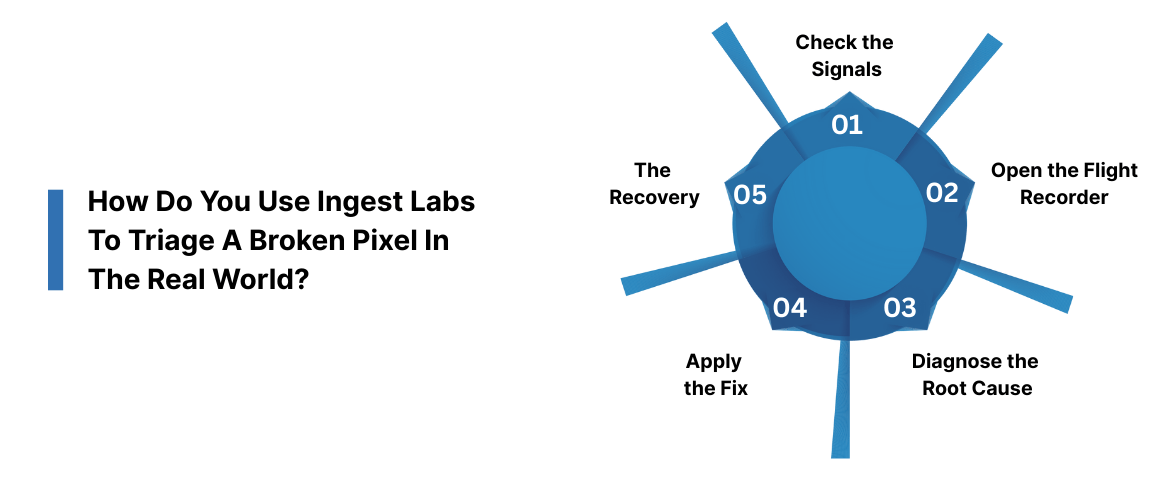
How Do You Use Ingest Labs To Triage A Broken Pixel In The Real World?
Let’s say you are running a massive Black Friday campaign. You are spending $5,000 a day on Meta Ads. Suddenly, your Meta Ads Manager shows zero purchases for the last 6 hours, even though your Shopify dashboard shows sales are booming.
Every hour this continues, Meta’s optimization models lose effective learning signals. It starts bidding on the wrong people. You are burning cash.
Step 1: Check the Signals
- You log into the Ingest Labs Dashboard.
- You see the Real-Time Monitor.
- You filter by “Destination: Meta CAPI”.
- You see a wall of red. Failure Rate: 100%.
Step 2: Open the Flight Recorder
- You click on one of the failed events to inspect the details.
- You look at the Vendor Response.
- Meta says: 400 Bad Request – Hashed PII mismatch.
Step 3: Diagnose the Root Cause
- You look at the Inbound Payload (what your website sent).
- You see the email field: john.doe@example.com .
- You look at the Outbound Payload (what Ingest Labs sent to Meta).
- You see the email field: john.doe@example.com.
- The Bug: Meta CAPI requires emails to be hashed (turned into a string of characters) before sending. Your configuration was sending raw emails. Meta rejected them for privacy reasons.
Step 4: Apply the Fix
- You don’t call a developer. You don’t panic.
- You go to the Tag Configuration in Ingest Labs.
- You find the “Customer Email” field.
- You toggle the setting: “Apply SHA256 Hash”.
- You save and publish.
- Time elapsed: 5 minutes.
New events start flowing. The monitor turns green.
Step 5: The Recovery (Replay)
- Now for the magic. You have 6 hours of failed data—about 400 purchases.
- You go to the Event Log.
- You filter for the last 6 hours where Status = Failed and Vendor = Meta.
- You select “Select All”.
- You click Replay.
- Ingest Labs takes those 400 records, applies the new rule (hashing the email), and fires them to Meta.
- Meta accepts them.
Your Ads Manager updates. Your reported ROAS reflects recovered conversion data. The algorithm gets its learning data. Total financial impact: $0 lost. Total stress is minimal.
Once tracking becomes observable and recoverable, the impact extends far beyond debugging. It changes how teams plan, spend, and scale.
What This Changes for Marketing Teams
This isn’t just a technical tool. It is a strategic asset for Marketing Operations, Analytics, and Growth teams.
1. Budget Allocation
You cannot manage what you cannot measure. If your pixel data is only 70% accurate, your budget allocation is 30% guesswork.
High-quality data from Ingest Labs gives you the confidence to scale winners and cut losers. You stop “trusting your gut” and start trusting your dashboard.
2. Vendor Accountability
Ad networks love to grade their own homework. They tell you how many conversions they drove.
With Ingest Labs, you have an independent “source of truth.” You have a record of every signal sent. If a network claims a conversion you didn’t record, you can investigate.
3. Compliance & Governance
With great power comes great responsibility. Server-side tagging gives you total control over data sharing.
- GDPR/CCPA: You can configure Ingest Labs to strip sensitive data (like IP addresses) before it gets sent to Google or Facebook.
- Consent Management: You can build rules that block specific tags based on the user’s consent choice, ensuring you never break the law.
The benefits of fixing tracking are clear. But the cost of doing nothing is often hidden — until you run the numbers.
The Cost of Inaction
Let’s look at the math.
Assume you spend $50,000/month on ads.
Assume your current client-side setup misses 20% of conversions due to ad blockers and ITP restrictions (a conservative estimate).
- Reported Revenue: $100,000 (2.0 ROAS)
- Actual Revenue: $125,000 (2.5 ROAS)
Because you see a 2.0 ROAS, you might decide to cut the budget or keep it flat.
If you saw the real 2.5 ROAS, you would scale.
By missing that 20% of data, you are not just losing visibility on $25,000 of revenue. You are losing the opportunity cost of not scaling a winning campaign. Over a year, that growth stagnation costs you hundreds of thousands of dollars.
Furthermore, consider the Algorithm Cost.
Meta and Google function on machine learning. They need at least 50 conversion events per week per ad set to exit the “Learning Phase.”
If you are actually getting 60 conversions, but your broken pixels only report 40, you are stuck in the “Learning Limited” phase. Your CPMs stay high. Your results stay poor. Fixing the signal fixes the algorithm.
Debugging is only one layer of the stack. Ingest Labs is designed to support the full lifecycle of modern, privacy-safe, server-side data infrastructure.
The Ingest Labs Ecosystem
We are not just building a debugger. We are building the infrastructure for the next decade of digital marketing.
Ingest IQ
Ingest IQ is Ingest Labs’ server-side tracking engine, built to replace fragile client-side pixels with a fully observable, first-party data pipeline. It supports 80+ pre-built templates for major vendors (Google, Meta, TikTok, Snapchat, Klaviyo, Criteo, and more).
Ingest ID
Cookies are dying. Identity is the new currency.
Ingest ID is our first-party identity graph. It stitches together user sessions across devices using durable, server-set identifiers. It helps you recognize that the person on the iPhone today is the same person who was on the desktop yesterday, dramatically improving your attribution windows.
Docs & Support
We believe in transparency. Our documentation at docs.Ingest Labs.com is written for humans, not just rocket scientists. We provide clear guides on setting up your infrastructure, configuring your DNS, and mapping your events.
At this point, the choice is no longer technical. It’s strategic. The question isn’t whether tracking will break, but whether you’ll see it when it does.
Conclusion
The era of “set it and forget it” pixels is over. The digital environment is too hostile, too fragmented, and too valuable to leave to chance.
You invest heavily in your brand, your product, and your media. Why would you skimp on the one mechanism that connects them all?
A broken pixel is a hole in your pocket. A server-side tracking setup without debugging tools is a blindfold.
Ingest Labs offers you the clarity you need.
- See more complete event data.
- Catch every error.
- Replay recoverable lost conversion events.
Don’t let ad blockers and browser updates dictate your success. Take control of your data infrastructure.