Attribution Tags in 2026: UTMs, Click IDs and Naming Rules
Updated November 23, 2026
Short answer: Attribution tags are the labels that tell your analytics and ad platforms where a visit or conversion came from. There are three kinds. UTM parameters are added to links by your team. Click IDs such as gclid, fbclid and msclkid are added automatically by ad platforms. Pixels and event tags record what happens on your site. Good tagging comes down to four habits. First, set utm_source, utm_medium, utm_campaign and utm_id on every tagged link. Second, write all values in lowercase with one separator. Third, never tag internal links. Fourth, let Google Ads auto-tagging run instead of overriding it with manual UTMs. Tags only work if they survive the trip to your systems. Capture UTMs and click IDs on the first page view, store them in a first-party cookie or server-side, and attach them to every later conversion. That includes conversions that happen days later in your CRM.
The three kinds of attribution tags
| Tag type | Who adds it | What it carries | Where it's read |
|---|---|---|---|
| UTM parameters | Your team, in the link | Source, medium, campaign, content, term and campaign ID | GA4 and most analytics tools |
| Click IDs | The ad platform, automatically | An opaque ID for one ad click | The ad platform that issued it |
| Pixels and event tags | Your site, via code or a tag manager | Page views, sign-ups, purchases and their values | Ad platforms and analytics |
UTMs describe a campaign in words you choose. Click IDs identify a single click that only the issuing platform can decode. Event tags record outcomes. Attribution needs all three: a label for the traffic, a key that links back to the ad, and a record of what the visitor did.
GA4 UTM parameters and what each one does
| Parameter | Purpose | Example value | Reported in GA4? |
|---|---|---|---|
| utm_source | Who sent the traffic | google, newsletter, linkedin | Yes |
| utm_medium | Type of channel | cpc, email, paid_social | Yes |
| utm_campaign | Campaign name | q4_retargeting_us | Yes |
| utm_id | Campaign ID | 2026_q4_rt_01 | Yes, and required for cost data import |
| utm_term | Paid keyword | server_side_tracking | Yes |
| utm_content | Creative or link variant | banner_a, footer_link | Yes |
| utm_source_platform | Buying or management platform | dv360, hubspot | Yes |
| utm_creative_format | Type of creative | video, display | Not currently reported |
| utm_marketing_tactic | Targeting approach | remarketing, prospecting | Not currently reported |
Google recommends that if you set one UTM, you also set utm_source, utm_medium, utm_campaign, utm_id and utm_source_platform. Pay attention to utm_medium in particular. GA4 builds its default channel groups mostly from source and medium. A typo such as "Email" vs "email", or a made-up medium such as "promo", can drop traffic into "Unassigned".
Click IDs by ad platform
| Platform | Click ID | Notes |
|---|---|---|
| Google Ads | gclid, plus gbraid and wbraid for some iOS traffic | Added by auto-tagging; stored by the Google tag in a first-party cookie |
| Meta | fbclid | Meta recommends setting the _fbc cookie server-side with a 90-day expiry |
| Microsoft Advertising | msclkid | Auto-tagging is on by default |
| TikTok | ttclid | Passed to the Events API for server-side matching |
| li_fat_id | Appears only when Enhanced Conversion Tracking is enabled | |
| X | twclid | Used for conversion matching |
| Snapchat | ScCid | Used for conversion matching |
| Campaign Manager 360 (Floodlight) | dclid | Used for display and video conversion matching |
Click IDs matter most for conversions that happen after the first visit, such as a sales call, a demo booked a week later or an offline purchase. If you save the click ID with the lead, you can send that conversion back to the platform later. Our GCLID guide covers the Google side in detail.
A naming convention that holds up
Most broken attribution comes from inconsistent values, not missing tags. Agree on these rules and keep them in one shared sheet or URL builder:
-
Lowercase everything. GA4 treats "LinkedIn" and "linkedin" as two different sources.
-
Pick one separator and use it everywhere. Underscores work well: q4_retargeting_us. Don't mix underscores, hyphens and spaces.
-
Use a fixed list of mediums. For example: cpc, paid_social, email, affiliate, display, referral. GA4's default channel rules expect values like these.
-
Build campaign names from fixed parts. For example, year_quarter_objective_market: 2026_q4_leadgen_in.
-
Set utm_id on every paid campaign. It's the key that joins GA4 sessions to imported cost data.
-
Don't put personal data in tags. Email addresses, phone numbers or names in a URL get logged by analytics tools and third parties. See our PII handling guide.
| Before | After |
|---|---|
| utm_source=LinkedIn&utm_medium=Social Paid&utm_campaign=Q4 Retargeting | utm_source=linkedin&utm_medium=paid_social&utm_campaign=2026_q4_retargeting_us&utm_id=li_2026_q4_rt |
| utm_source=newsletter&utm_medium=Email&utm_campaign=nov-launch | utm_source=newsletter&utm_medium=email&utm_campaign=2026_q4_launch_global&utm_id=em_2026_q4_launch |
Common tagging mistakes
| Mistake | What breaks | Fix |
|---|---|---|
| UTMs on internal links (site banners, nav) | Starts a new session and overwrites the real source | Use event parameters for internal promotions, never UTMs |
| Manual UTMs that fight Google Ads auto-tagging | In GA4, gclid takes precedence, so the manual values are ignored or confuse reports | Keep auto-tagging on; use UTMs for non-Google channels |
| Redirects that strip parameters | Traffic shows as direct or referral | Test every redirect and link shortener with a tagged URL |
| Mixed case and spelling | One campaign appears as several rows | Lowercase values and a shared builder |
| Missing utm_medium | Traffic lands in "Unassigned" | Make source, medium and campaign mandatory |
| Click IDs discarded at form submit | Offline and CRM conversions can't be sent back to ad platforms | Save click IDs in hidden form fields or server-side |
| Tags read only by browser scripts | Ad blockers and short cookie lifetimes lose the source | Capture parameters server-side on the first request |
How tags reach your reports
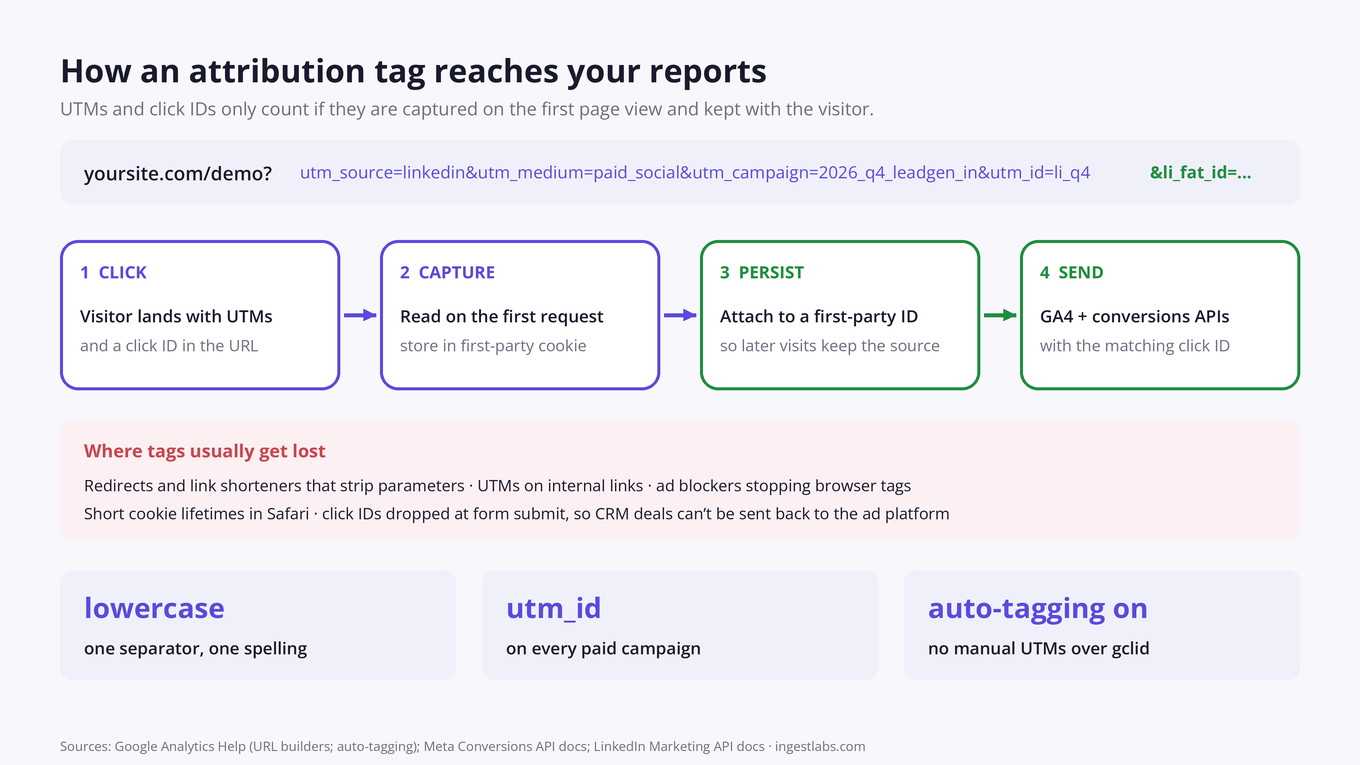
A tag is only useful if it reaches the system that reports on it. The path has four steps:
-
Click. The visitor lands with UTMs and a click ID in the URL.
-
Capture. On the first request, your site reads the parameters and stores them in a first-party cookie or a server-side session.
-
Persist. The stored values are attached to the visitor's identifier, so later page views and conversions keep the original source.
-
Send. Conversions go to GA4 and to each ad platform's conversions API with the matching click ID.
Browser-only setups often lose data between steps 2 and 3. Safari's Intelligent Tracking Prevention can cap the lifetime of script-set cookies, and ad blockers can stop the tags from loading at all. Server-side capture sets the cookie from your own domain, so the source survives longer. For more on cookie limits, see why browsers limit cookies.
Tags vs attribution models
Tags and attribution models are different things. Tags record where traffic came from and what it did. An attribution model decides how to split credit for a conversion across the touchpoints in that record, for example last click or data-driven. A good model can't fix bad tags. If half your paid social traffic is labelled "unassigned", any model will undercredit paid social. Clean up tagging before you compare models. For model choices, see our guide to Google attribution models. For journeys that cross devices, see the cross-device attribution guide.
A quarterly tagging audit
Run this check each quarter, and before any large campaign launch:
-
Export GA4 source/medium for the last 90 days and look for duplicates caused by case or spelling.
-
Check the share of sessions in "Unassigned" and "(not set)". A rising share usually means new campaigns went out untagged or mistagged.
-
Click a tagged link from every active ad and email platform and confirm the parameters survive every redirect.
-
Confirm Google Ads auto-tagging is on and that gclid appears on landing pages.
-
Submit a test lead and confirm the click IDs and UTMs reach your CRM record.
-
Compare conversions in each ad platform with GA4 and your back end. A gap of more than a few percent is worth tracing.
-
Remove pixels for platforms you no longer use. They add page weight and send data you don't need.
Where Ingest Labs fits
Ingest Labs captures UTMs and click IDs server-side on the first request and keeps them attached to the visitor:
-
Ingest IQ collects events and campaign parameters server-side from your own domain, then sends conversions to GA4 and to the Meta, Google, TikTok and LinkedIn conversions APIs with the right click IDs.
-
Ingest ID links the original source to a first-party identifier, so a visit tagged today still credits a purchase made later or on another device.
-
Event IQ checks event and parameter quality, flagging missing mediums, unexpected values and dropped click IDs before they reach your reports.
FAQ
What are attribution tags?
Attribution tags are labels and identifiers that show where traffic and conversions come from. They include UTM parameters that your team adds to links, click IDs that ad platforms add automatically, and pixels or event tags that record actions on your site. Together they let analytics and ad platforms credit the right channel and campaign.
Should I use UTMs on Google Ads if auto-tagging is on?
Usually not. In GA4, auto-tagging data from gclid takes precedence over manual UTMs, and Google says auto-tagging gives you more dimensions. Keep auto-tagging on for Google Ads. Use UTMs for channels without a direct Google integration, such as email, social, affiliates and other ad networks.
Which UTM parameters are required?
GA4 needs at least utm_source, utm_medium and utm_campaign to attribute a session properly. Google recommends also setting utm_id and utm_source_platform whenever you tag a link. utm_id is required if you import campaign cost data into GA4.
Why does my GA4 traffic show as "Unassigned"?
GA4 assigns sessions to default channel groups mostly by source and medium. Traffic becomes "Unassigned" when the medium doesn't match any rule, for example a made-up value such as "promo" or a capitalised "Email". Use a fixed list of lowercase mediums to fix it.
How long should I keep click IDs?
Keep them for at least as long as your longest conversion window and sales cycle. Meta recommends a 90-day expiry for the _fbc cookie. For B2B leads, save click IDs with the CRM record, so you can upload offline conversions when a deal closes.
Sources
-
Google Analytics Help, "URL builders: Collect campaign data with custom URLs" (accessed November 2026)
-
Google Analytics Help, "[GA4] Traffic-source dimensions, manual tagging, and auto-tagging" (accessed November 2026)
-
Google Analytics Help, "[GA4] Benefits of Google Ads auto-tagging" (accessed November 2026)
-
Meta for Developers, "ClickID and the fbp and fbc Parameters," Conversions API documentation (accessed November 2026)
-
Microsoft Learn, "Enabling Click IDs," LinkedIn Marketing API documentation (accessed November 2026)
-
Google Campaign Manager 360 Help, "Enable third-party click IDs in landing page URLs" (accessed November 2026)