Floodlight Tags Explained: CM360 Setup and Counting (2026)
Updated November 23, 2026
Short answer: A Floodlight tag is Google Marketing Platform's conversion tag. It records actions such as purchases or sign-ups on your site and reports them to Campaign Manager 360 (CM360), Display & Video 360 and Search Ads 360. Each tag belongs to a Floodlight activity. Counter activities count events using one of three methods: standard, unique per day or per session. Sales activities also record revenue, counted as transactions or items sold. Google now recommends the Google tag (gtag.js) over the older iframe and image formats. CM360 credits a conversion only if the user clicked or saw a CM360 ad within the conversion window, which defaults to 30 days and can be set up to 90. For better accuracy, enhanced conversions add SHA-256-hashed first-party data, and server-side Google Tag Manager supports Floodlight Counter and Sales tags. Server-side tagging moves tag code off your pages.
What a Floodlight tag does
Floodlight is the conversion tracking system shared by CM360, Display & Video 360 (DV360) and Search Ads 360 (SA360). One set of tags feeds all three platforms, so a purchase recorded on your site can be reported in CM360, used for bidding in DV360 and SA360, and used to build remarketing audiences.
The Floodlight configuration, the container for your tags, is always set up in CM360. Individual Floodlight conversions can be created in CM360 or SA360 and are synced between them.
The flow for each conversion is:
-
A user clicks or sees an ad served through CM360, DV360 or SA360.
-
Later, the user completes an action on your site, and the Floodlight tag on that page fires.
-
CM360 checks whether that user had a qualifying click or impression within the conversion window.
-
If so, the conversion is attributed to that ad and placement, and the data is shared with the linked products for reporting and bidding.
Counter and sales activities: the counting methods
Every Floodlight activity is either a counter or a sales activity, and each has its own counting methods.
| Activity type | Counting method | What it counts | Best for |
|---|---|---|---|
| Counter | Standard | Every conversion | Page views, content engagement |
| Counter | Unique | The first conversion per user each 24-hour day, midnight to midnight US Eastern Time | Daily active actions |
| Counter | Per session | One conversion per user per session; you define session length | Leads, sign-ups, form submissions |
| Sales | Transactions | Each sale and its revenue | Ecommerce orders, subscriptions |
| Sales | Items sold | Each item sold and its revenue | Retail with multi-item baskets |
In DV360 these appear under newer names. "One per user" corresponds to Unique, and "One per session" to Per session. Choosing the wrong method is a common cause of inflated conversion counts: a lead form tracked with Standard counting will count every page refresh as a new lead.
Floodlight tag formats
| Format | Works across Google products | Available in apps | Supports dynamic tags |
|---|---|---|---|
| Google tag (gtag.js) | Yes | No | Yes |
| Iframe tag | No | Yes | Yes |
| Image tag | No | Yes | No |
Google recommends the Google tag for website Floodlight activities, because newer features, including enhanced conversions, depend on it. The Google tag includes a noscript fallback for browsers without JavaScript. Iframe and image tags remain for apps and legacy set-ups.
With the Google tag, each event snippet uses a send_to value that routes the hit to your Floodlight configuration, activity group and activity. Sales tags also pass value (revenue) and transaction_id, and items-sold tags pass quantity. Google's terms do not allow you to pass any data it could recognise as personally identifiable information in these fields.
Conversion windows
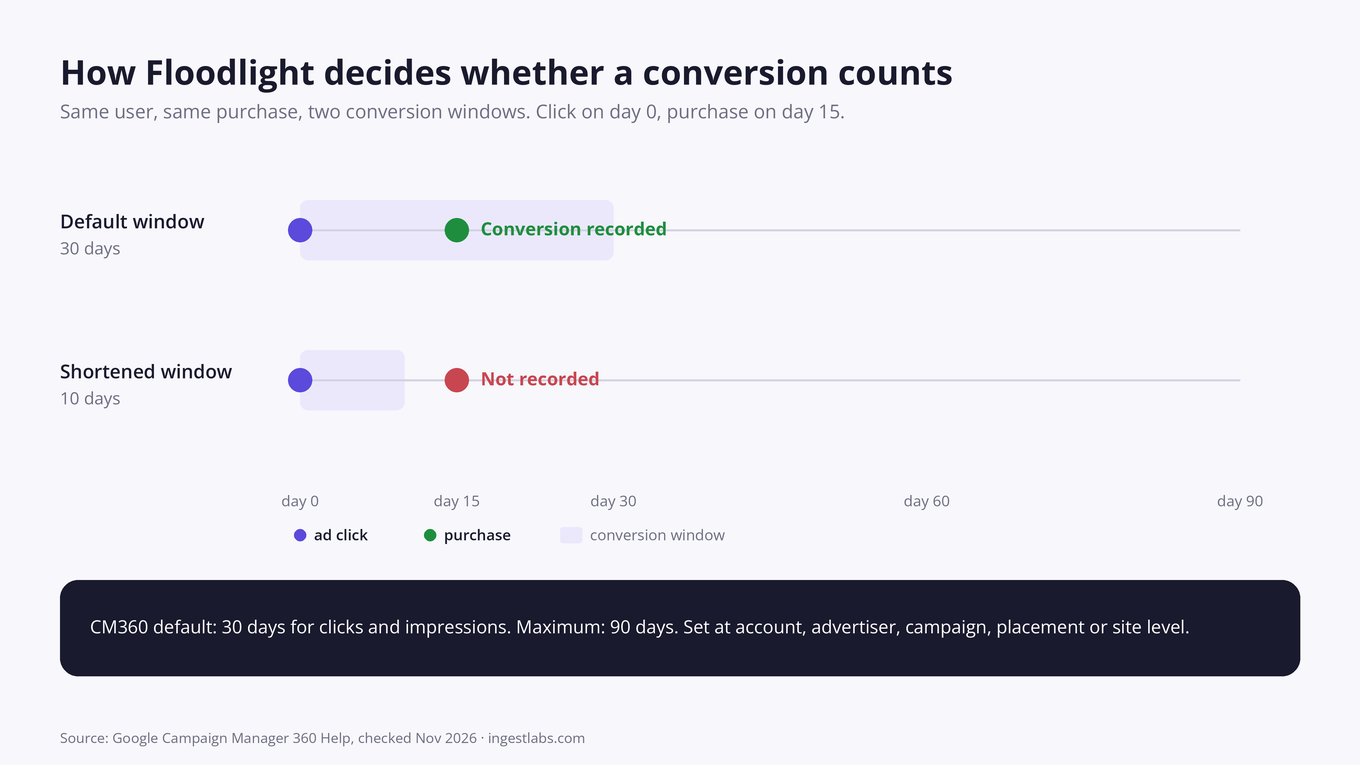
Floodlight only records conversions for users who clicked or saw a CM360 ad within the conversion window.
-
Default: 30 days for clicks and impressions, set in the advertiser's Floodlight configuration.
-
Maximum: 90 days. Windows can be set at account, advertiser, campaign, placement and site level, and setting an impression window to 0 turns off view-through conversions.
-
Which ad gets credit: if a user interacted with ads in several placements, CM360 uses the most recent click within the conversion window of the placement where that ad was served.
For example, if a user clicks an ad and buys 15 days later, but the click window is 10 days, the purchase is not recorded as a conversion. If your configuration is shared with SA360, changing the window in CM360 changes it for SA360 too.
How to set up Floodlight tags correctly
-
Define the conversion. Decide which actions matter, such as purchase, lead or demo request, and whether each is a counter or sales activity.
-
Create the activity in CM360. Go to the advertiser's Floodlight settings, create the activity, assign it to an activity group and choose the counting method.
-
Choose the Google tag format. It works across Google products and supports enhanced conversions.
-
Deploy through Google Tag Manager. You can push Floodlight tags from CM360 straight into a Tag Manager container, or add them in Tag Manager yourself. Add a Conversion Linker tag so click information is stored and read correctly.
-
Pass the right values. For sales activities, send revenue as value and a unique order number as transaction_id so duplicate fires can be removed.
-
Test before launch. Use Tag Assistant to confirm each tag fires once, on the right page, with the right values.
-
Turn on enhanced conversions. Accept the enhanced conversions terms in your Floodlight configuration, then add hashed customer data to the event snippet.
Making Floodlight more accurate
Floodlight depends on browser storage to connect an ad interaction to a later conversion. Browser restrictions shorten or block that storage: Safari blocks third-party cookies and limits how long first-party tracking cookies last. Google offers two fixes.
Enhanced conversions. At conversion, the Floodlight tag captures first-party data the customer provided, such as email, name, address or phone. It hashes the data with SHA-256 before sending it, and Google matches it to signed-in Google accounts to attribute the conversion. In DV360, enhanced conversions apply only to YouTube and eligible Demand Gen inventory. You may only send first-party data that customers shared directly with you, and Google's customer data policies apply.
Server-side Google Tag Manager. Tag Manager supports Conversion Linker, Floodlight Counter and Floodlight Sales tags in a server container. Moving Floodlight tags to the server reduces the code that runs in the browser and improves page load times. When you migrate, remove the matching tags from the web container, or each conversion will be counted twice.
| Common mistake | What goes wrong | Fix |
|---|---|---|
| Same activity fires from web and server containers | Conversions counted twice | Remove the web tag after migrating |
| Standard counting on lead forms | Refreshes and repeat submits inflate leads | Use Per session or Unique |
| No transaction_id on sales tags | Duplicate orders cannot be removed | Pass the order number |
| No Conversion Linker tag | Clicks are not linked to later conversions | Add Conversion Linker in web or server container |
| Personal data in custom variables | Breaches Google's policies | Use enhanced conversions, which hash the data |
How Ingest Labs fits
Ingest IQ runs server-side tagging, so Floodlight and other platform conversions can be sent from your server with the same order ID across tools, which keeps counts consistent. Ingest ID keeps a first-party identifier for each visitor, which supports the first-party data that enhanced conversions rely on. Event IQ brings Floodlight, ad-platform and order data into one view, so you can check CM360 conversion counts against actual orders. See our guides to server-side tracking and tag management.
FAQ
What is a Floodlight tag?
A Floodlight tag is the conversion tag used by Google Marketing Platform. It records actions such as purchases, sign-ups or page visits on your website and reports them to Campaign Manager 360, Display & Video 360 and Search Ads 360. Those products use the data for conversion reporting, attribution, automated bidding and remarketing audiences.
What is the difference between counter and sales Floodlight activities?
Counter activities count how many times an action happens, using standard, unique-per-day or per-session counting. Sales activities also record revenue, counting either transactions or items sold. Use counter activities for leads, sign-ups and page visits, and sales activities for orders and subscriptions where the value of each conversion matters.
What is the default Floodlight conversion window?
The default conversion window in Campaign Manager 360 is 30 days for both clicks and impressions, and the maximum is 90 days. A conversion is only recorded if the user clicked or saw a CM360 ad within the window. You can set windows at account, advertiser, campaign, placement and site level.
Can Floodlight tags run server-side?
Yes. Server-side Google Tag Manager supports Conversion Linker, Floodlight Counter and Floodlight Sales tags in a server container. Moving the tags to the server reduces the code running in the browser and improves page load times. Remove the equivalent tags from your web container after migrating, so conversions are not counted twice.
What are enhanced conversions for Floodlight?
Enhanced conversions add hashed first-party data, such as an email address or phone number, to your Floodlight conversion tags. The data is hashed with SHA-256 before it is sent, and Google matches it to signed-in Google accounts to attribute conversions that cookies would miss. You must accept the terms in your Floodlight configuration and use the Google tag format.
Sources
-
Google Campaign Manager 360 Help, "About Floodlight and Floodlight conversions" (checked November 23, 2026)
-
Google Campaign Manager 360 Help, "How Floodlight counts conversions" (checked November 23, 2026)
-
Google Campaign Manager 360 Help, "Create Floodlight conversions and tags" (checked November 23, 2026)
-
Google Campaign Manager 360 Help, "Use the Google tag for Floodlight conversions" (checked November 23, 2026)
-
Google Campaign Manager 360 Help, "Configure Floodlight for advertisers" and "Floodlight conversion windows" (checked November 23, 2026)
-
Google Campaign Manager 360 Help, "Allow enhanced conversions for Floodlight" and "About enhanced conversions in Display & Video 360" (checked November 23, 2026)
-
Google Tag Manager Help, "Floodlight tags" in Tag Manager (checked November 23, 2026)
-
Google for Developers, "Google Floodlight tags" for server-side Tag Manager (checked November 23, 2026)