Web vs Mobile App Analytics: Key Differences (2026)
Updated November 23, 2026
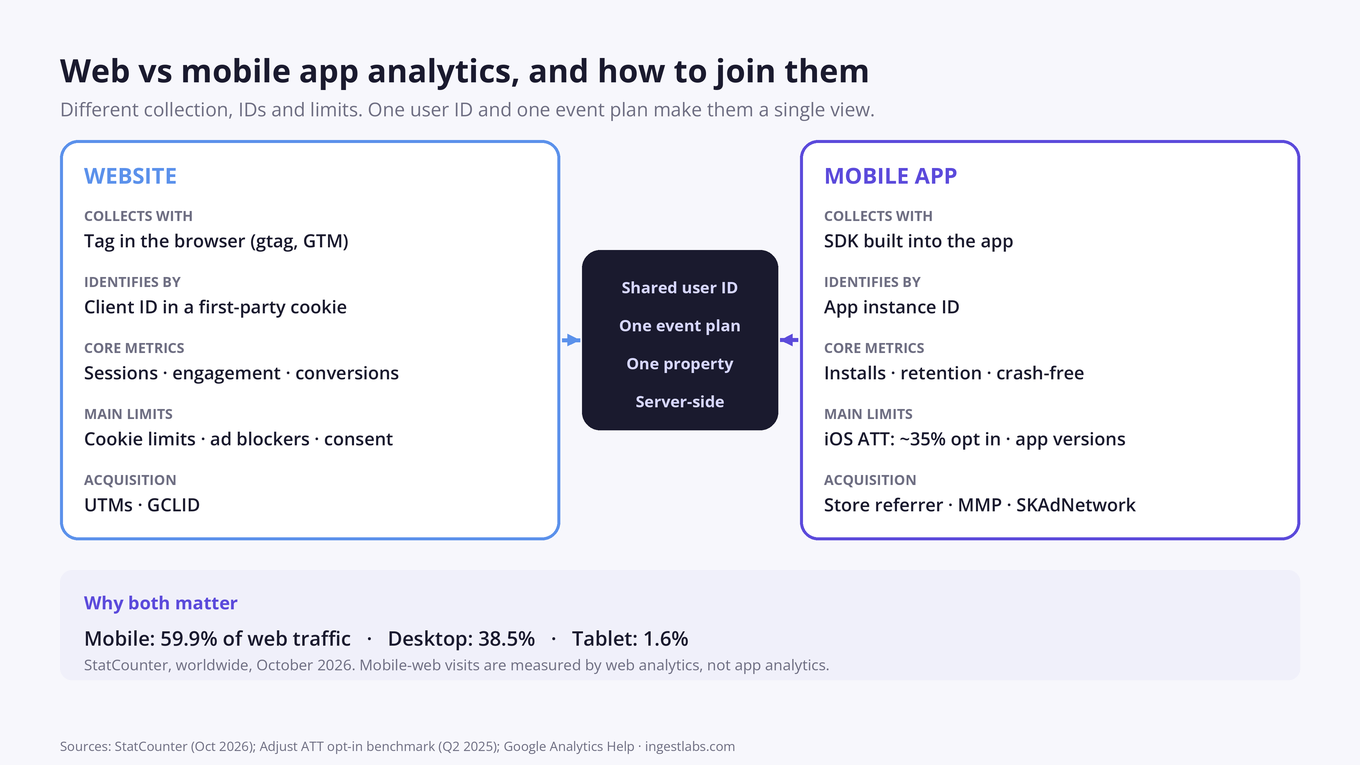
Short answer: Web analytics measures behaviour on websites through a tag or script running in the browser. It identifies visitors with first-party cookies, and its core metrics are page views, sessions, engagement and conversions. Mobile analytics measures behaviour inside iOS and Android apps through an SDK built into the app. It identifies users with app instance IDs, and its core metrics are installs, active users, retention, crash-free sessions and in-app events. Each faces different limits. Browsers restrict cookies and ad blockers strip tags. On iOS, apps must ask permission before tracking users across other apps, and only about 35% of users shown the prompt agree (Adjust, Q2 2025). Mobile is now about 60% of web traffic worldwide (StatCounter, October 2026), so most brands need both. Use one event naming plan, one property (GA4 accepts web, iOS and Android data streams together) and a shared user ID, so a customer counts as one person, not two.
What web analytics and mobile analytics measure
Web analytics tracks how people use a website, whether on desktop, tablet or a phone's browser. A tag such as the Google tag loads in the browser, records page views and events, and stores a client ID in a first-party cookie.
Mobile analytics (or mobile app analytics) tracks how people use a native iOS or Android app. An SDK, such as the Google Analytics for Firebase SDK, is compiled into the app and records screens, events, sessions and crashes against an app instance ID.
A common confusion: a visitor on a phone's browser is measured by web analytics. Mobile analytics only covers native apps.
Key differences at a glance
| Web analytics | Mobile app analytics | |
|---|---|---|
| How data is collected | Tag or script in the browser (for example gtag.js or Google Tag Manager) | SDK built into the app binary |
| Default user identifier | Client ID in a first-party cookie | App instance ID; advertising IDs only with permission |
| Unit of content | Page and URL | Screen and view |
| Typical core metrics | Page views, sessions, engagement rate, conversions | Installs, DAU/MAU, retention, crash-free sessions, in-app purchases |
| Acquisition tracking | UTM parameters, click IDs such as GCLID | App store referrer, mobile measurement partners, Apple's SKAdNetwork and AdAttributionKit |
| Main data limits | Cookie restrictions, ad blockers, consent choices | App Tracking Transparency on iOS, OS permissions, users who don't update the app |
| Deploying changes | Update the tag or tag manager, live immediately | Ship a new app version through app store review, unless using remote config |
| Offline behaviour | No data without a connection | SDK can queue events offline and send them later |
Metrics that matter on each platform
| Web metrics | What they tell you |
|---|---|
| Sessions and users | Reach and visit frequency |
| Engagement rate (GA4) | Share of sessions lasting 10+ seconds, with a key event or 2+ page views |
| Pages per session, scroll depth | Content consumption |
| Conversion rate | Share of sessions or users completing a goal |
| Traffic source and medium | Which channels bring visitors |
| Core Web Vitals | Loading speed and stability, which affect conversions and search |
| App metrics | What they tell you |
|---|---|
| Installs and first opens | Acquisition volume |
| DAU, MAU and stickiness (DAU ÷ MAU) | How habit-forming the app is |
| Day 1, day 7 and day 30 retention | Whether new users come back |
| Session length and sessions per user | Depth of engagement |
| Crash-free users and sessions | App stability, which drives ratings and churn |
| In-app purchase and subscription revenue | Monetisation |
| Push notification opt-in and open rates | Reachability |
Data limits on each platform
On the web, Safari and Firefox block third-party cookies by default, and Safari can shorten the life of cookies set by scripts. Ad blockers stop many analytics and ad tags from loading. In regions that require consent, users who decline aren't tracked. See our guide to cookie limits by browser.
In apps, the SDK isn't blocked by browser rules, but other limits apply:
-
App Tracking Transparency (ATT). Since iOS 14.5 in April 2021, apps must ask permission before tracking users across other companies' apps and websites. Adjust measured an average opt-in rate of 35% among users shown the prompt in Q2 2025.
-
Analytics without the advertising ID. First-party analytics inside your own app still works without that permission. Linking app users to ad clicks and other apps is what's restricted.
-
Version fragmentation. Tracking changes only reach users after they update the app, so old versions keep sending old events for months.
-
Consent still applies. Privacy laws such as GDPR and India's DPDP Act cover app data just as they cover website data.
So it's not true that app tracking is simply "more reliable" than web tracking. Each platform loses data in different places.
Why most brands need both, and how to combine them
Mobile devices generated about 60% of web traffic worldwide in October 2026, against about 38% for desktop (StatCounter). Many customers discover a brand on the mobile web, install the app later and buy on either. If web and app are measured separately, that customer appears as two users, and each channel's contribution looks wrong.
| Challenge | Why it happens | Fix |
|---|---|---|
| One customer counted twice | Web uses a cookie ID, the app uses an app instance ID | Send the same user ID on login in both, and set GA4 reporting identity to Blended or Observed |
| Events don't line up | Web and app teams named events differently | One shared event naming plan (for example add_to_cart, purchase) with the same parameters |
| Web-to-app journeys break | Links don't pass campaign data into the app | Deep links that carry campaign parameters; capture them on first open |
| Separate reports | Web and app sit in different tools or properties | GA4 lets you add web, iOS and Android data streams to one property |
| Revenue mismatch | Web and app purchases recorded differently | Send purchases from your server with one order ID for both |
Five steps to a cross-platform analytics setup
-
Write one tracking plan that lists events, parameters and their meanings for web, iOS and Android.
-
Use one analytics property with a web stream and app streams, so reports and audiences cover both.
-
Set a shared user ID at login or sign-up on every platform. See our cross-device attribution guide.
-
Send key conversions server-side with a single order ID, so web and app purchases are counted once.
-
Check data quality every week. Compare event volumes by platform and app version, and look for missing parameters after each release.
When to use web analytics, app analytics or both
| Your business | Focus |
|---|---|
| Website only (B2B, content, most ecommerce) | Web analytics, plus server-side tracking to protect data |
| App-first (gaming, fintech, social) | App analytics plus a mobile measurement partner for install attribution |
| Website and app (retail, travel, media) | Both, in one property with a shared user ID and one event plan |
How Ingest Labs fits
Ingest IQ collects web events server-side and accepts events from your app back end, so both platforms send data in one consistent format. Ingest ID keeps a durable first-party identifier and links web and app activity once a user logs in. Event IQ checks event volumes and parameters across platforms, so gaps show up before they reach your reports. For the identity side, see our guide to building a unified customer profile.
FAQ
What is the main difference between web analytics and mobile analytics?
Web analytics measures websites through a tag running in the browser and identifies visitors with first-party cookies. Mobile analytics measures native iOS and Android apps through an SDK built into the app and identifies users with app instance IDs. They also differ in metrics: page views and sessions on the web, against installs, retention and crash-free sessions in apps.
Can web analytics track mobile users?
Yes, when they use a website in a mobile browser. Web analytics records those visits like any other, with the device category set to mobile. It cannot see activity inside a native app. For that you need an app SDK, such as the Google Analytics for Firebase SDK, sending data to the same or a linked property.
Why do I need both web and mobile app analytics?
Customers move between your website and app. Mobile devices generated about 60% of web traffic worldwide in October 2026 (StatCounter), and many users browse on the web before installing an app. Measuring only one platform hides part of the journey and counts the same person twice. A combined setup with a shared user ID shows the full path.
How does Apple's App Tracking Transparency affect app analytics?
Since iOS 14.5, apps must ask permission before tracking users across other companies' apps and websites, and only about 35% of users shown the prompt agree (Adjust, Q2 2025). Analytics inside your own app still works. What's limited is linking app users to ad clicks and outside data, which affects attribution more than in-app reporting.
Which metrics matter most for mobile app analytics?
Start with retention, because it shows whether users find lasting value: day 1, day 7 and day 30. Then track daily and monthly active users and their ratio, crash-free sessions, and in-app conversion or subscription revenue. Acquisition metrics such as installs only matter if retention holds.
Sources
-
StatCounter Global Stats, desktop vs mobile vs tablet market share worldwide, October 2026
-
Adjust, "ATT opt-in rates 2025" (Q2 2025 data)
-
Apple, App Tracking Transparency (iOS 14.5 and later)
-
Google Analytics Help, "Advertising and attribution" and "[GA4] Automatically collected events" (checked November 23, 2026)
-
Google Ads Help, "Google Analytics 4 benefits and features to drive App campaign performance" (checked November 23, 2026)