Cross-Device Attribution in 2026: How It Works in GA4 and Adobe
Updated November 23, 2026
Short answer: Cross-device attribution credits a conversion to every ad and channel that influenced it, even when the customer switched devices along the way. A common case is someone who clicks an ad on a phone and buys on a laptop. It works by linking each device to one person. Deterministic matching uses logins, a customer ID or hashed email. Probabilistic matching uses behavioural signals. In Google Analytics 4, cross-device reporting now depends on your own User-ID, because Google removed Google signals from GA4's reporting identity on February 12, 2024. Google also retired the first click, linear, time decay and position-based models in 2023. Data-driven and last click are the models left in Google Ads and GA4. In Adobe, the Experience Cloud ID (ECID) identifies a device, not a person, so you link devices by sending a CRM ID or hashed email with it. Without a first-party identifier, cross-device journeys split into separate "users".
What cross-device attribution is
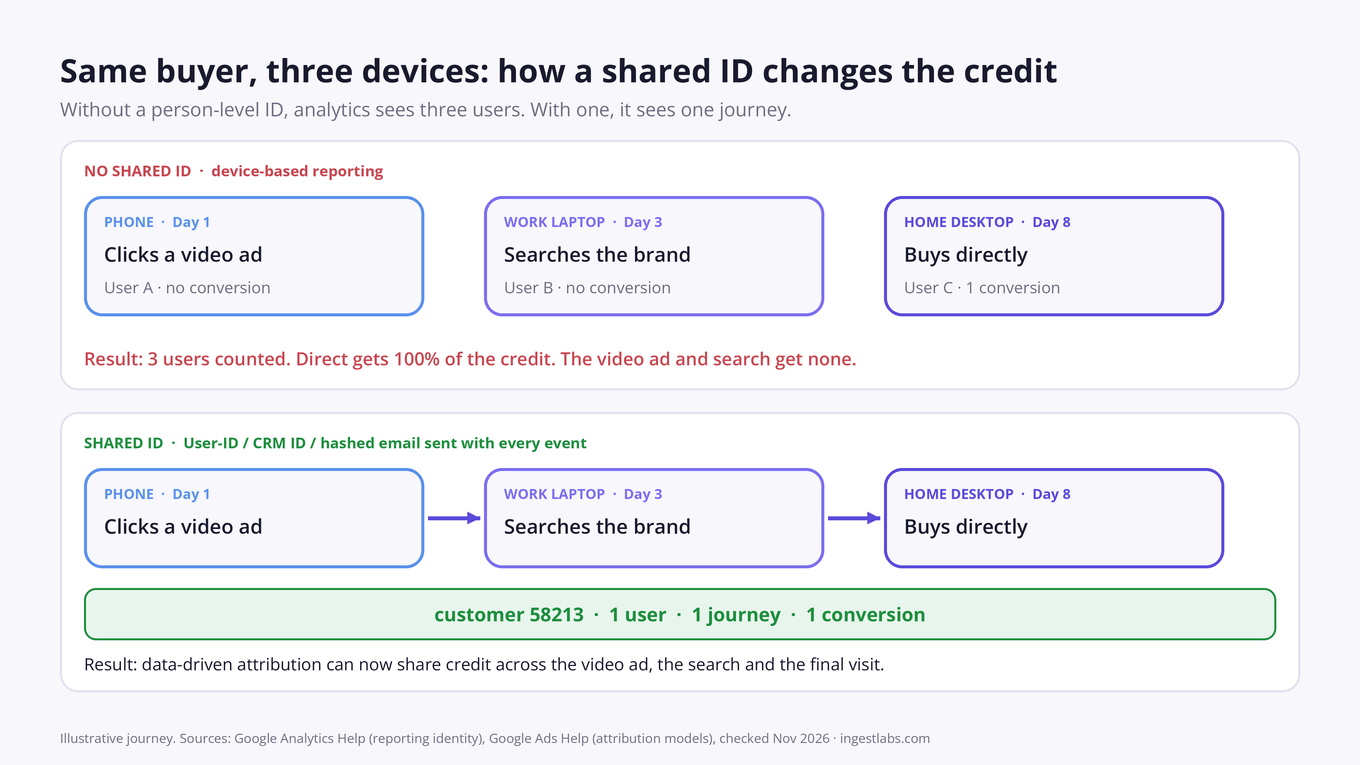
A typical journey crosses at least two devices. A buyer sees a video ad on a phone, searches for the brand on a work laptop, and buys on a home desktop a week later. Single-device measurement records three different users and gives all the credit to whichever touchpoint happened on the desktop, often "direct". Cross-device attribution joins the three into one journey, so the video ad and the search click get the credit they earned.
When devices are not linked, two errors follow:
-
Upper-funnel channels look weak. Video, social and display are often seen on phones, while purchases happen elsewhere, so their conversions go missing.
-
Direct and branded search look strong. They often close the sale on the last device, so they collect credit that belongs to earlier touchpoints.
How devices get linked: deterministic and probabilistic matching
| Method | Signal used | Accuracy | Privacy considerations |
|---|---|---|---|
| Deterministic | Login, customer ID, hashed email or phone | High: the same person confirmed the identity on each device | Needs a clear lawful basis and consent where required |
| Probabilistic | IP address, device type, timing and behavioural patterns | Lower: a statistical guess that can merge or split people wrongly | Fingerprinting-style signals face growing browser and regulatory limits |
| Platform identity | The ad platform's own signed-in users, such as Google or Meta accounts | High inside that platform, invisible outside it | Data stays in the platform's reporting |
For most brands, the practical route is deterministic. Give people reasons to sign in or share an email, then send that identifier, hashed where required, with every event.
Cross-device measurement in Google Analytics 4
GA4 decides who counts as the same user through its reporting identity setting:
| Reporting identity | How GA4 identifies users | Cross-device? |
|---|---|---|
| Blended | User-ID, then device ID, then modeling when no identifier is available | Yes, where you send User-ID |
| Observed | User-ID, then device ID | Yes, where you send User-ID |
| Device-based | Device ID only, ignoring other IDs | No |
On websites, the device ID is the client ID stored in a cookie, so each browser is a separate device. Until February 2024, GA4 could also use Google signals, data from users signed in to Google, to merge devices in reports. Google removed Google signals from the reporting identity on February 12, 2024. Signals data is still collected for features such as remarketing, but it no longer stitches users together in standard reports. Today, your own User-ID is the main way to get cross-device user counts in GA4.
What changed in Google's attribution models
In April 2023, Google announced it was retiring four rules-based models (first click, linear, time decay and position-based) in both Google Ads and GA4. At the time, Google said fewer than 3% of Google Ads web conversions used those models. They were removed from GA4 by November 2023, and conversion actions still using them were switched to data-driven attribution.
| Model | Status in Google Ads and GA4 | How it assigns credit |
|---|---|---|
| Data-driven | Default | Uses your account's path data to estimate each touchpoint's contribution |
| Last click | Available | All credit to the last click; GA4 offers paid-and-organic and Google-paid-channels versions |
| First click, linear, time decay, position-based | Retired in 2023 | No longer selectable |
GA4's default lookback window is 90 days for most key events and 30 days for acquisition events such as first visit. Older guides that recommend choosing between linear, time decay and position-based models inside Google's tools, including the earlier version of this page, are out of date.
Cross-device identity in Adobe: the Experience Cloud ID
The Experience Cloud ID (ECID) is the shared identifier Adobe uses across Adobe Analytics, Target, Audience Manager and Experience Platform. When a visitor reaches your site, Adobe's Edge Network generates an ECID and stores it in a first-party cookie.
The ECID identifies a device, not a person. To connect devices, you send a known identifier, such as a CRM ID or hashed email, alongside the ECID. Adobe Experience Platform's Identity Service then links those identities into an identity graph. That graph is the set of identifiers that represent one customer, and it feeds the Real-Time Customer Profile.
How to attribute referrals across devices
Referrals break cross-device tracking easily, because a referral link is often opened on one device and the purchase made on another. To keep credit with the referrer:
-
Use a referral code, not just a tracked link, so a buyer can enter it on any device.
-
Store the referral code against the customer account or hashed email at sign-up, not only in a browser cookie.
-
Send the code with the conversion event from your server, so it reaches analytics and ad platforms even if the browser cookie is gone.
How to set up cross-device attribution
-
Choose your person-level identifier. Usually a customer ID from your login or CRM, plus a hashed email.
-
Send it with every event. Pass it as User-ID in GA4, as a CRM ID alongside the ECID in Adobe, and as hashed customer data to ad platforms.
-
Collect events server-side. Server-side tagging keeps the identifier attached even when browser storage is cleared or blocked.
-
Set GA4's reporting identity to Blended or Observed. Device-based reporting ignores User-ID.
-
Use data-driven attribution where you have the volume, and compare it with last click to see which channels gain or lose credit.
-
Check your join rate monthly. Track the share of conversions that carry a person-level ID. That share is your effective cross-device coverage.
How Ingest Labs fits
Ingest ID assigns and maintains a durable first-party identifier for each visitor and links it to known identities such as a login or hashed email. That gives every device a shared key to join on. Ingest IQ sends events server-side with that identifier attached, so it reaches GA4, Adobe and ad platforms consistently. Event IQ brings those journeys together for analysis across channels. See also our guides to identity resolution and Google's attribution models.
FAQ
What is cross-device attribution?
Cross-device attribution gives credit for a conversion to every ad and channel that influenced it, even when the customer used several devices. It links devices to one person, usually through a login, customer ID or hashed email. That stops a phone-to-laptop journey from being counted as two users with the credit going only to the final device.
How does cross-device identity work?
Cross-device identity links several devices or browsers to one person. Deterministic methods use an identifier the person confirmed, such as a login or email. Probabilistic methods estimate links from signals such as IP address and timing. Adobe's Experience Cloud ID identifies a device, and you connect devices by sending a CRM ID or hashed email with it.
Does GA4 track users across devices?
Yes, if you send your own User-ID and use the Blended or Observed reporting identity. Google removed Google signals from GA4's reporting identity on February 12, 2024, so signals data no longer merges devices in standard reports. Without User-ID, GA4 counts each browser or app install as a separate user.
Which attribution models are still available in Google Ads and GA4?
Data-driven attribution, the default, and last click. Google retired the first click, linear, time decay and position-based models in 2023, and switched conversion actions still using them to data-driven attribution. GA4 also offers a last-click model limited to Google paid channels.
How do I attribute referrals across devices?
Use a referral code that buyers can enter on any device, not only a tracked link. Store the code against the customer's account or hashed email at sign-up. Then send it with the conversion event from your server, so the referrer keeps credit even when the purchase happens on a different device or browser.
Sources
-
Google Ads Help, "First click, linear, time decay, and position-based attribution models are going away," April 6, 2023
-
Google Ads Help, "About attribution models" (checked November 23, 2026)
-
Google Analytics Help, "Reporting identity" (checked November 23, 2026)
-
Google Analytics Help, "Advertising and attribution" (checked November 23, 2026)
-
Louder, "Google signals removed in GA4," January 12, 2024
-
Adobe Experience League, "ECID overview" (checked November 23, 2026)
-
Adobe Experience League, "Identity in Data Collection" (checked November 23, 2026)
-
Adobe Experience League, "Adobe Experience Platform Identity Service" (checked November 23, 2026)