BFCM Tracking Checklist: Get Ready for Q4 2026
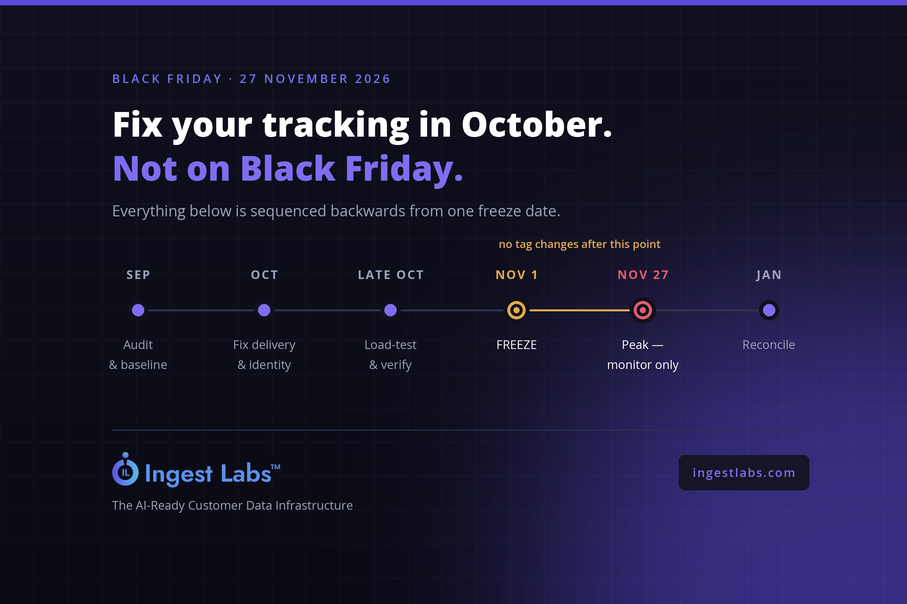
Get Your Tracking BFCM-Ready: A Week-by-Week Checklist
Last updated: 20 August 2026 · Black Friday: 27 November · Cyber Monday: 30 November
Short answer: Audit and baseline in September, fix delivery and identity in early October, load-test and verify in late October, freeze all tracking changes by 1 November, and monitor rather than modify through peak. Reconcile in January. The costly mistake isn't a bad setup — it's discovering a bad setup in late November, when fixing it is more dangerous than living with it.
Why Q4 breaks tracking specifically
Your tracking works fine in August. That's not evidence it will work in November, because peak season changes the conditions in five ways at once.
Traffic multiplies. Whatever silently fails at 1% of requests still fails at 1% — but 1% of Black Friday volume is a number that shows up in your revenue reporting.
Everyone touches the site. New landing pages, countdown timers, promo banners, a popup app someone installed for one campaign, an agency adding a pixel for a partner. Every change is a chance to break something, and Q4 has more changes in eight weeks than the rest of the year combined.
Discount codes rewrite your order data. Free shipping thresholds, stacked promos, gift cards and bundles all affect what value gets sent with a purchase event. A purchase reporting the pre-discount total teaches your ad platforms to bid for the wrong customer.
Bot traffic spikes with promotional activity. Scrapers monitoring competitor pricing, checkout bots on limited drops, click fraud following the money into higher-CPC auctions. Peak season is when invalid traffic is worst and when its cost is highest.
Nobody is watching dashboards. The team is running campaigns and handling support. A tag that stops firing on 28 November may not be noticed until December.
The consequence compounds. Q4 is where most stores generate the data their algorithms train on for the following quarter. Bad Q4 data doesn't just misreport Q4 — it degrades Q1 targeting.
The principle that matters more than any item on this list
Nothing gets changed after 1 November.
This is the discipline most teams skip and most regret. A tracking change in mid-November carries all the risk of a normal change with none of the recovery time, and you can't A/B a broken purchase event during your highest-volume week.
That single rule is why the work has to happen in September and October. Everything below is sequenced backwards from a hard freeze date.
September: audit and baseline
Find out what's actually on your site.
Most teams can name four to eight tracking tools. Most sites are running fifteen to thirty — accumulated agency tags, expired trials, duplicate pixels from a developer working around a slow tag manager. Any of them can break under load, and you can't monitor what you don't know exists.
Do this properly rather than from memory: open DevTools, Network tab, preserve log, disable cache, and hard-reload your homepage, a product page and — most importantly — your order confirmation page. That last one is where duplicate conversion tags live. The full method is here, or run Site Intelligence for the same output across your whole site in under 24 hours.
Record your baseline numbers now. This is the step people skip and the one that makes January possible:
-
Shopify orders, GA4 purchases and Meta conversions for the same seven-day window
-
Your current Meta Event Match Quality score
-
Your Direct channel share and its new-user rate
-
Average order value by channel
Without an August baseline you cannot tell in January whether a December discrepancy is new or has been there all year. Screenshot everything.
Clean up. Remove tags nobody owns. Merge duplicates. Fix anything firing before consent — the consent gating matters more in Q4 because your traffic mix shifts toward regions with stricter enforcement.
Early October: fix delivery and identity
Two different problems, commonly confused.
Delivery — are events reaching the platforms at all?
Ad blockers, ITP and consent-stripped cookies kill a meaningful share of browser-fired events. If you're still client-side only, server-side delivery is the highest-impact fix available before peak, and October is the last comfortable window to implement it. See the complete guide to server-side tracking.
If you already run server-side, verify deduplication. Client and server sending the same purchase without a shared event_id double-counts, and double-counting during peak volume produces numbers that look great and mean nothing.
Identity — are those events matching a person?
This is the one that decides whether your Q4 retargeting works, and it's where guest checkout hurts. Peak season has the highest guest-checkout rate of the year — people buying gifts for others, first-time buyers from discovery campaigns, shoppers who won't create an account for one purchase.
An event that arrives but matches on too few parameters still counts as a conversion and still fails to build a usable audience. If your match quality is weak, more delivery won't fix it — the fix is richer identity data resolved before the event is forwarded. That's what Ingest ID does, and it's why match quality and delivery are separate line items on this checklist.
The stakes are specific: audiences you build in November are what you retarget in December and what your algorithms learn from in Q1.
Late October: load-test and verify
Test at volume, not at desk-traffic levels. A tag manager container that responds fine at 200 sessions an hour can behave differently at 20,000. Ask your platform what its throughput limits are and where it queues.
Verify every conversion event end to end. Place a real test order and follow it: Shopify order → GA4 purchase → Meta CAPI event → Google Ads conversion. Check the value, the currency, the item IDs and the event ID. Then do it again with a discount code applied, because that's where value mismatches appear.
Check your promotional pages. New landing pages, gift guides and bundle pages often skip the tracking the theme applies elsewhere.
Turn on bot filtering before promotions start. Invalid traffic rises with promotional spend, and a server-side pipeline forwards a bot session to your ad platforms as faithfully as a real purchase. Filtering it at peak protects both your budget and the data your Q1 optimisation will be built on. That's Ad Shield.
Set up alerting. You want to know within an hour if a conversion event stops firing, not in December. If your platform doesn't alert, a simple daily check against Shopify order counts catches most catastrophic failures.
1 November: freeze
No new tags. No container changes. No new apps that inject scripts. No theme edits touching tracking.
If something genuinely must ship, the bar is: someone tests it on staging, someone verifies the full conversion path afterwards, and someone is available to roll back the same day. In practice that bar is rarely met in November, which is the point.
Publish the freeze internally. Agencies, contractors and the dev team all need to know, because the tag that breaks your Black Friday is usually added by someone who didn't know there was a freeze.
Through peak: monitor, don't modify
A daily fifteen-minute check is enough:
-
Shopify orders versus GA4 purchases versus Meta conversions. Watch the ratio, not the absolute numbers. A ratio that was stable in October and moves sharply overnight means something broke.
-
Event Match Quality. A sudden drop usually means a parameter stopped being passed.
-
Any conversion event that reports zero for a full day. Zero is almost never real during peak.
Resist the urge to fix mid-peak. Log it, work around it in reporting, fix it in December. The exception is a total conversion-tracking failure — that's worth an emergency change, because the alternative is losing the week's data entirely.
January: reconcile
Your three platforms will disagree. That's expected — they count different things over different windows with different attribution models. The job isn't making them match; it's understanding the gap well enough to trust one of them.
Compare against your August baseline. If the gap between Shopify and Meta is roughly the same proportion it was in August, your tracking held. If it widened, something changed during Q4 and you now have four weeks to find it before the next cycle.
Then answer the question the whole quarter was for: which channels actually drove revenue, as opposed to which platforms claimed credit for it. Each ad platform reports on its own contribution using its own attribution window, and the sum of their claims routinely exceeds your actual orders. Reconciling that into one view is what Event IQ is for.
Whatever you find, write it down. Next year's September audit starts from this document.
The condensed checklist
September
- [ ] Full tag audit — homepage, product page, confirmation page
- [ ] Remove unowned and duplicate tags
- [ ] Record baseline: orders, purchases, conversions, EMQ, Direct share, AOV
- [ ] Fix pre-consent firing
Early October
- [ ] Server-side delivery live and deduplicated
- [ ] Identity resolution verified — check match quality
- [ ] Confirm event IDs shared between client and server
Late October
- [ ] Load-test at expected peak volume
- [ ] End-to-end test order, with and without a discount code
- [ ] Verify tracking on all promotional pages
- [ ] Bot filtering enabled
- [ ] Alerting configured
1 November
- [ ] Freeze declared and communicated to agencies and devs
Through peak
- [ ] Daily ratio check
- [ ] Daily EMQ check
- [ ] Watch for zero-firing events
January
- [ ] Reconcile against the August baseline
- [ ] Build the single-source revenue view
- [ ] Write next year's notes
Frequently asked questions
When should I stop making tracking changes before Black Friday?
1 November, or roughly four weeks before peak. A tracking change in mid-November carries full risk with no recovery time, and you cannot safely test a purchase event during your highest-volume week.
What tracking should I check before BFCM?
Audit every tag firing on your site, verify each conversion event end to end with a real test order, confirm client and server events share an event ID, test with a discount code applied, check tracking on promotional landing pages, and record baseline numbers you can reconcile against in January.
Why do my Shopify orders and Meta conversions never match?
They count different things. Shopify counts orders. Meta counts conversions it can attribute within its window, only for events that reached it and matched a person. Ad blockers, ITP and consent all reduce what arrives, and attribution windows differ. A gap is normal; a gap that widens suddenly is not.
Does discount code stacking affect conversion tracking?
It can. If your purchase event sends pre-discount value, you report revenue you didn't earn and teach ad platforms to bid for the wrong customers. Test a real order with codes applied and confirm the value sent matches the amount actually charged.
Is bot traffic worse during Black Friday?
Promotional periods attract more scrapers, checkout bots and click fraud, and higher CPCs make fraud more profitable. Because peak-season events disproportionately train your Q1 optimisation, invalid traffic during BFCM costs more than the same volume in June.
What should I check daily during peak season?
The ratio between Shopify orders, GA4 purchases and platform conversions; your Event Match Quality; and any conversion event reporting zero for a full day. Watch ratios rather than absolute numbers — volume swings wildly during peak, but a stable ratio breaking overnight means something failed.
Should I fix a tracking problem discovered during Black Friday?
Usually no. Log it, work around it in reporting, fix it in December. The exception is total conversion-tracking failure, where the risk of changing something is lower than losing the week's data.
How long does it take to get tracking BFCM-ready?
Plan roughly eight weeks: September for audit and cleanup, early October for delivery and identity, late October for testing and verification, with a freeze on 1 November. Starting in November means choosing between shipping untested changes at peak or living with whatever you have.