Shopify A/B Testing in 2026: Rollouts, Apps and Test Sizing
Updated November 23, 2026
Short answer: To A/B test on Shopify, write one hypothesis, pick a single page or theme change, split traffic 50/50 between the current version and the variant, and run the test until each version has enough visitors to detect the lift you care about. Shopify now has a native option. Rollouts, under Markets > Rollouts in the admin, can A/B test whole themes and checkout configurations, and its experiments need the Grow plan or higher. For price, offer or single-element tests you still need an app such as Intelligems, Shoplift or VWO. Google Optimize is no longer an option: Google shut it down on September 30, 2023. Most stores need tens of thousands of visitors per variant to detect a 10% lift, so size the test before you launch it. Finally, record which variant each order saw, so analytics and ad platforms report results by variant.
What A/B testing on Shopify means
An A/B test shows two versions of the same experience to randomly split groups of visitors at the same time. Version A is the control, your current store. Version B changes one thing. Because the groups are random and run in parallel, a difference in conversion rate can be put down to the change rather than to the season, a promotion or a traffic source.
A multivariate test changes several elements at once and measures every combination. It needs far more traffic, because each combination is its own group. Most Shopify stores should start with A/B tests.
| A/B test | Multivariate test | |
|---|---|---|
| What changes | One element or one whole version | Several elements at once |
| Groups | 2 (control and variant) | One per combination, e.g. 2 × 2 × 2 = 8 |
| Traffic needed | Lower | Several times higher |
| Best for | Most Shopify stores | High-traffic stores refining a page |
Your three ways to run tests on Shopify in 2026
| Option | What it can test | Plan or cost | Main limits |
|---|---|---|---|
| Shopify Rollouts (native) | Whole themes, checkout and customer account configurations | Rollouts on Basic or higher; experiments on Grow or higher | No vintage themes, no Liquid template changes, online store only, fixed metrics |
| Shopify testing apps (e.g. Intelligems, Shoplift, ABConvert) | Theme sections, templates, prices, offers and shipping, depending on the app | Paid app subscription | Each app covers different test types; check before you commit |
| General experimentation platforms (e.g. VWO, Convert, Optimizely) | Almost any front-end change, multi-page tests, custom goals | Paid, usually priced on traffic | Client-side scripts can cause flicker or slow pages if set up badly |
Shopify Rollouts: the native option
On June 5, 2026, Shopify added scheduling, gradual publishing and A/B testing of themes and checkout and customer account configurations to Rollouts. You can run an A/B test between two entirely different themes or checkout setups. Shopify copies your published theme when the rollout starts, so you can keep editing the live store while the test runs. Mutually exclusive experiments let you run several live tests without the same visitor seeing two of them.
Know the limits before you plan a calendar:
-
Plan: rollouts need the Basic plan or higher; experiments need Grow or higher.
-
Scope: no vintage themes, and you can't change Liquid templates as part of a rollout. Headless and custom storefront checkouts are not supported.
-
Metrics: theme experiments report conversion rate, bounce rate, reached-checkout rate and add-to-cart rate. Checkout experiments report checkout conversion rate only. You can't add custom goals such as revenue per visitor or subscription sign-ups.
-
Channels: results cover the online store, cart and checkout. POS and headless traffic are excluded.
Rollouts suits big, whole-experience questions, such as a new theme or a new checkout layout. For a product-title test, a price test or a free-shipping threshold, use an app.
What happened to Google Optimize
Older guides, including the earlier version of this page, still list Google Optimize. Google shut down Optimize and Optimize 360 on September 30, 2023, and any experiments still running on that date ended. Google now points users to third-party testing tools that integrate with Google Analytics 4.
How much traffic you need
The most common mistake is stopping a test too early or running it on too little traffic. A standard rule of thumb for 95% significance and 80% power is:
Visitors per variant ≈ 16 × p × (1 − p) ÷ d²
Here p is your baseline conversion rate and d is the absolute change you want to detect.
Worked example (illustrative): a store converts at 2.5% and gets 4,000 sessions a day, split evenly between two versions.
| Lift you want to detect | Absolute change (d) | Visitors per variant | Total visitors | Days at 4,000 sessions/day |
|---|---|---|---|---|
| 20% relative (2.5% → 3.0%) | 0.5 points | about 15,600 | about 31,200 | 8, so run 14 (two full weeks) |
| 10% relative (2.5% → 2.75%) | 0.25 points | about 62,400 | about 124,800 | 32, so run 35 (five full weeks) |
| 5% relative (2.5% → 2.625%) | 0.125 points | about 249,600 | about 499,200 | 125, which is too long for most stores |
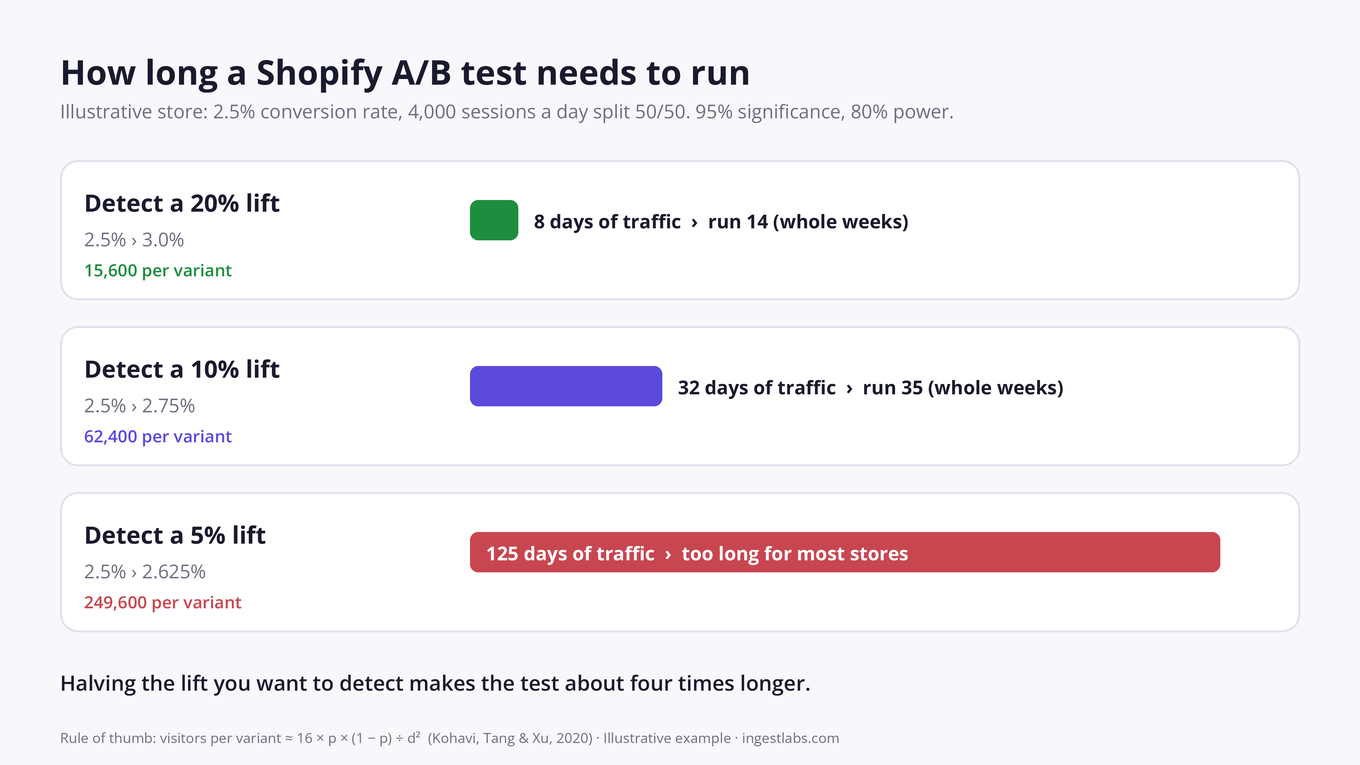
Halving the lift you want to detect makes the test four times longer. If the number of days is impractical, test a bolder change, test on a higher-traffic page, or measure an earlier step such as add-to-cart rate.
Three timing rules:
-
Run whole weeks. Weekday and weekend shoppers behave differently, so stop on the same weekday you started.
-
Avoid sales events. Black Friday, Diwali or a site-wide discount changes who visits and why. A winner during a sale may lose afterwards.
-
Decide the sample size up front and stick to it. Checking daily and stopping at the first "significant" result inflates false positives.
How to start A/B testing on Shopify: six steps
-
Write one hypothesis. "Showing delivery dates under the price will raise add-to-cart rate, because shoppers hesitate over shipping time." Name the metric you expect to move.
-
Choose the page with the most traffic and the clearest problem. Product pages and the cart usually have both. Check your analytics for high-exit steps.
-
Pick the tool that matches the change. Use Rollouts for a whole theme or checkout. Use a Shopify testing app for prices, offers or template sections. Use a general platform for multi-page or custom-goal tests.
-
Set one primary metric and a few guardrails. For example: primary is conversion rate; guardrails are average order value, page load time and refund rate.
-
Size the test, then run it untouched. Use the formula above. Don't change the variant, the traffic split or your ad spend mid-test.
-
Read the result, then ship or learn. If the variant wins on the primary metric without hurting a guardrail, launch it. If it's flat, you've learned the change doesn't matter and can move to the next idea.
What to test first on a Shopify store
| Page | Test idea | Primary metric | Tool type |
|---|---|---|---|
| Product page | Delivery date or returns policy shown under the price | Add-to-cart rate | App or general platform |
| Product page | Main image: lifestyle photo vs product on white | Add-to-cart rate | App or general platform |
| Collection page | Filters shown open vs collapsed on mobile | Product page views per session | App or general platform |
| Cart | Free-shipping progress bar vs none | Checkout start rate | App |
| Pricing | Price point or bundle discount | Profit per visitor | Price-testing app |
| Whole store | Current theme vs a new theme | Conversion rate | Shopify Rollouts |
| Checkout | One-page vs current checkout configuration | Checkout conversion rate | Shopify Rollouts |
For cart-stage ideas, see our guide to reducing cart abandonment. If a variant adds scripts or images, check speed against our Shopify performance guide.
Keep test results consistent across analytics and ad platforms
A test tool reports its own winner, but your analytics and ad platforms don't know which variant a buyer saw unless you tell them. That gap causes two problems. GA4 and ad-platform reports can't be split by variant, and a variant that wins on conversion rate may lose on returns or repeat purchases, which you only see later in other systems.
The fix is to label every session and order with its variant:
-
Send the variant name as an event parameter, registered as a custom dimension in GA4.
-
Write it to a cart attribute so it is stored on the order.
-
Send purchase events from the server, so the variant label survives ad blockers and short browser cookie lifetimes.
How Ingest Labs fits
Ingest IQ sends Shopify events server-side, so the variant label you add reaches GA4 and ad platforms with each purchase. Event IQ lets you compare variants on the metrics a test tool doesn't track, such as repeat purchase or revenue by channel. See our Shopify integration, and our roundup of split testing tools if you're still choosing a platform.
FAQ
Does Shopify have built-in A/B testing?
Yes. Shopify Rollouts, under Markets > Rollouts in the admin, can A/B test whole themes and checkout and customer account configurations. Rollouts need the Basic plan or higher, and experiments need Grow or higher. It can't test Liquid template changes, vintage themes, prices or offers, so stores that want those tests still use a third-party app.
How long should a Shopify A/B test run?
Long enough to reach the sample size you calculated, and always in whole weeks. A store converting at 2.5% needs about 15,600 visitors per variant to detect a 20% lift, or about 62,400 to detect a 10% lift. Avoid sales events, and don't stop early because a dashboard shows a winner on day three.
What is the best A/B testing tool for Shopify?
It depends on the change. Use Shopify Rollouts for full theme or checkout comparisons. Use a Shopify testing app such as Intelligems, Shoplift or ABConvert for prices, offers and template sections. Use a general platform such as VWO, Convert or Optimizely for multi-page tests or custom goals. Google Optimize shut down on September 30, 2023.
How do I A/B test product images and titles on Shopify?
Rollouts can't test individual product images or titles unless you build a whole separate theme. A Shopify testing app or general experimentation platform can show a different main image or title to each group. Measure add-to-cart rate as the primary metric, and size the test for your product page traffic before you launch.
Does A/B testing slow down a Shopify store?
It can. Client-side tools that change the page in the browser may cause flicker or extra script weight if they're set up badly. Native Rollouts serves each version as a normal theme, which avoids that problem, and some apps take a similar theme-based approach. Whatever you use, add page load time as a guardrail metric and compare it across variants.
Sources
-
Shopify Changelog, "Schedule, publish and A/B test new themes and checkout and customer account configurations," June 5, 2026
-
Shopify Help Center, "Rollouts," "Requirements and considerations for using rollouts" and "Rollout analytics" (checked November 23, 2026)
-
Google Optimize Help, "[Sunset September 2023] Google Optimize" (checked November 23, 2026)
-
Ron Kohavi, Diane Tang and Ya Xu, Trustworthy Online Controlled Experiments, Cambridge University Press, 2020 (sample-size rule of thumb)