




With over 5.56 billion internet users globally as of February 2025, you face immense challenges in identifying individual visitors. Tracking unique users accurately ensures you understand the real audience size, instead of relying on inflated session counts or unreliable metrics. Without proper tracking, marketing efforts often target the wrong people, wasting budget and lowering conversion rates.
Your analytics can become fragmented when users switch devices, browsers, or clear cookies frequently. Streamlining unique user tracking helps you gain actionable insights, personalize experiences effectively, and optimize campaigns with confidence. Understanding these users is essential for measurable growth and performance improvement.
Quick Overview
- Unique users are distinct individuals who interact with your site or app within a specific time period, offering a more accurate count than total visits.
- Tracking unique users helps estimate real audience size, track marketing performance, and avoid overcounting, giving you a clearer picture of engagement.
- Identification methods like cookies, logins, and device IDs help match user activity across sessions and devices, though challenges like cookie deletion can arise.
- Use first-party tracking, filter bots, and implement identity stitching across devices to ensure accurate user counts and meaningful insights into engagement trends.
What Are Unique Users?
A unique user (also called a unique visitor) is a distinct individual who interacts with your website or app within a defined time window. Unlike total visits or pageviews, unique users aim to count people, not sessions or hits.
- If Alice visits your site three times during June, she counts as one unique user in June, not three.
- If Bob visits once in June and once in July, he is one unique user in June and one unique user in July (depending on your reporting window).
Because unique users deduplicate repeat visits, this metric gives you a clearer sense of the actual reach of your website or app, how many distinct users you're touching.
But what exactly makes this metric stand out from other measurements? Let's break down why tracking unique users matters.
Why Unique Users Are Important
Counting unique users provides a clear picture of your actual audience, revealing real reach and engagement across campaigns and channels. Counting unique users is important because:
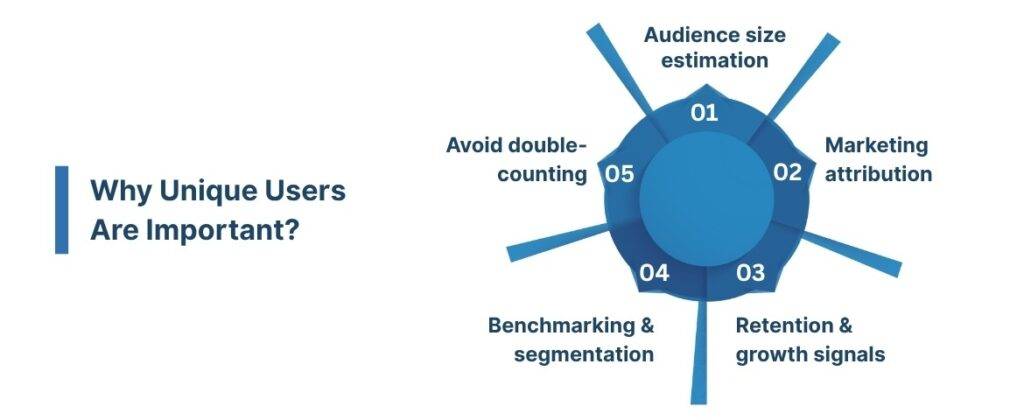
- Audience size estimation: It helps you understand how many real people you engage, not just how many sessions.
- Marketing attribution: If a campaign drives new users, you can see how many new individuals it brought in.
- Retention & growth signals: Trends over time (growth, plateau, decline) in unique users can signal acquisition or retention issues.
- Benchmarking and segmentation: You can compare unique users by source (organic, referral, paid) or geography to spot where your site is underperforming.
- Avoid double-counting: A user with 100 sessions shouldn’t distort your understanding of reach; unique users help prevent that.
But there's more to it; let’s look into the various user metrics you’ll likely encounter and how they fit into the bigger picture.
Also read: Web Analytics vs Mobile Analytics: Key Differences Explained
Terminology: Active Users, New Users, Returning Users
When you look inside analytics tools, you’ll also see related metrics. It’s useful to know how they relate:
Now, it’s important to understand how each metric interacts with unique users. Let’s look deeper into how tracking mechanisms work to tie users’ actions across different platforms and sessions.
How Tracking of Unique Users Works?
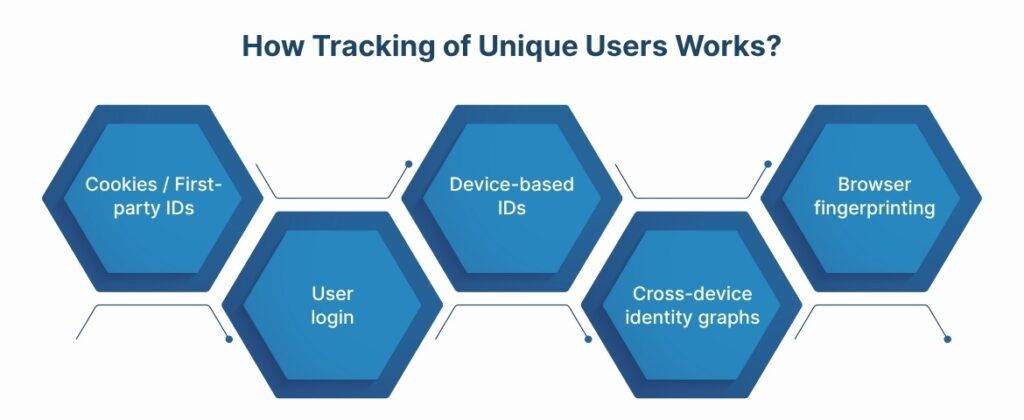
To deduplicate users, analytics systems rely on identifiers and heuristics. Here are the common mechanisms and challenges.
Common Identification Methods
- Cookies / First-party IDs
- The most common approach for web analytics. A JavaScript tracking snippet issues a first-party cookie (e.g., a client ID) tied to the user’s browser.
- Future visits from that same browser (with the cookie intact) map to the same user.
- If a user clears cookies or blocks them, you lose continuity.
- User login or authenticated ID
- If users log in, their account ID can serve as a stable identifier across devices and sessions.
- This helps unify their behavior across browsers, mobile apps, etc.
- Device-based IDs
- Cross-device identity graphs
- More advanced systems attempt to resolve that “Alice on mobile, Alice on desktop” is the same person.
- These systems use probabilistic or deterministic matching (shared login, email, fingerprinting).
- Browser fingerprinting / probabilistic matching
- Some systems use fingerprinting (browser version, plugins, IP, UA string) to heuristically infer uniqueness.
- Because of privacy constraints, fingerprinting is controversial and is less reliable across privacy settings.
Let's take a closer look at the challenges involved in keeping track of distinct users across different touchpoints.
Also read: Bounce Rate vs Exit Rate: Key Differences Explained
Challenges and Limitations of Tracking Unique Users
Unique user counts provide an estimated measure of distinct individuals, offering insight into trends rather than exact totals. Here are some of the major challenges:
- Browser or device switching: A user switching from mobile to desktop might be counted as two unique users unless tied by login or identity matching.
- Cookie deletion/blocking & privacy settings: If cookies are cleared or blocked, continuity is lost.
- Multiple users on one device / shared devices: E.g., siblings sharing a tablet may ambiguously map to one or multiple users.
- Stateless tracking gaps: Non-cookie-based tracking is harder, especially with browser privacy changes.
- Temporal definition: Unique is always defined within the reporting window. Someone can be unique in one month but not in the next.
- Data sampling & thresholds: Some analytics systems under high volume may sample or threshold results, which introduces inaccuracy.
While tracking users sounds simple enough, several factors can interfere with accurate counting. We’ll examine some common issues you may face and how they can skew your data.
How to Track Unique Users (Step-by-Step)?
Tracking unique users helps you understand distinct visitor behavior and optimize engagement and marketing strategies effectively. Here’s a step-by-step workflow you can follow to set up, monitor, and interpret unique user data properly.
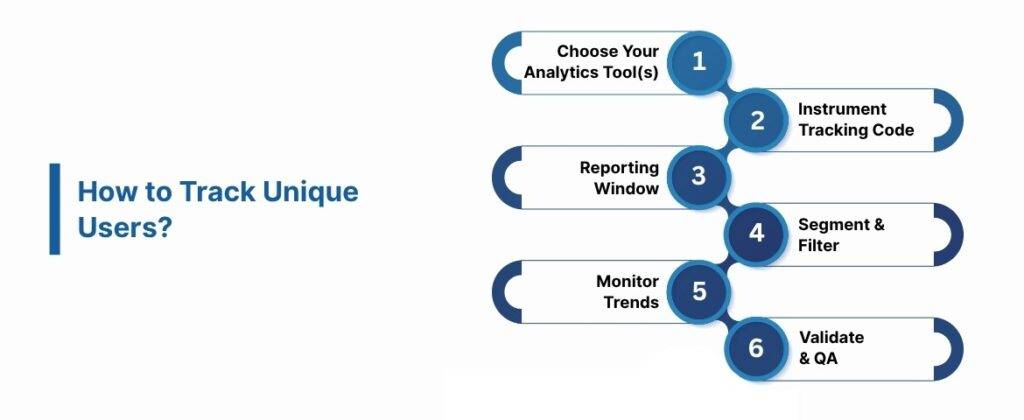
1. Choose Your Analytics Tool(s)
Picking the right analytics platform ensures accurate tracking and deduplication of user data across devices and channels.
Here are the popular tools commonly used:
- Google Analytics 4 (GA4)
- Matomo (open source)
- Amplitude
- Mixpanel
- Adobe Analytics
Each platform handles identity differently; for instance, GA4 uses first-party cookies and an event-based model, while Amplitude combines device ID, user ID, and Amplitude ID.
Ingest Labs’ Ingest IQ enables server-side tracking, ensuring precise data capture across web and mobile platforms to complement these tools.
2. Instrument Tracking Code & Identify Users
Embedding analytics scripts correctly captures user activity while preventing duplication or missing data.
- Embed the analytics SDK or script on all pages or app screens.
- Pass login IDs to the analytics system when users authenticate.
- Implement identity stitching for advanced setups, merging past anonymous activity with logged-in sessions.
Ingest ID assigns a first-party identifier to each unique visitor, helping you unify data and improve attribution across sessions and devices.
3. Configure Your Reporting Window
Setting a clear reporting window ensures unique users are counted meaningfully over a defined period.
- Decide on day, week, month, or quarter granularity.
- Example: “100,000 monthly unique users” represents 100,000 distinct users across 30 days.
Event IQ supports accurate reporting and segmentation, helping you analyze unique users within your chosen time frames seamlessly.
4. Segment & Filter
Segmenting helps identify audience trends, growth, and retention across different user groups.
- Break down by traffic source (organic, paid, social)
- Device type (mobile, desktop)
- Geographic region
- User cohorts (e.g., campaign-specific acquisition)
Event IQ enables cross-channel marketing and segmentation, providing actionable insights into audience behavior and campaign performance.
5. Monitor Trends & Anomalies
Monitoring user trends ensures you can quickly spot unusual patterns or potential tracking issues.
- Track month-over-month and year-over-year growth
- Watch for sudden spikes or drops in unique users
- Compare unique users to session counts to see average sessions per user
Ingest IQ offers real-time tag monitoring and data streaming, helping you detect anomalies immediately for more reliable insights.
6. Validate & QA
Validation ensures your tracking setup correctly identifies unique users and eliminates duplicates or errors.
- Use debug or real-time modes to verify counts
- Test by clearing cookies or switching devices
- Filter out bots and crawlers to maintain clean data
Ingest ID and Event IQ unify customer data and support QA processes, providing accurate and actionable user insights.
Practical Example: GA4 Unique Users
Understanding GA4’s handling of unique users clarifies how metrics reflect real user activity.
- Total users = unique users who triggered at least one event
- Users must trigger an engaged session to count as active
- New users are tracked via first_open or first_visit events
- Reports available under Engagement → Events and Conversions
Example scenario:
- Alice visits in June → counts as 1 unique user
- Alice returns in June → session increments, unique user still 1
- Alice visits in July → counts as 1 unique user in July
- Bob visits in July → counts as 1 unique user in July
With Ingest Labs products like Ingest IQ, Ingest ID, and Event IQ, you can track, segment, and analyze unique users effectively across devices and campaigns.
Let’s explore how these systems specifically handle user data in practice and what it means for your reporting.
Best Practices for Tracking Unique Users
Following best practices helps you track unique users more accurately and understand your audience better. Here are some tips to make your tracking smarter and easier to act on.
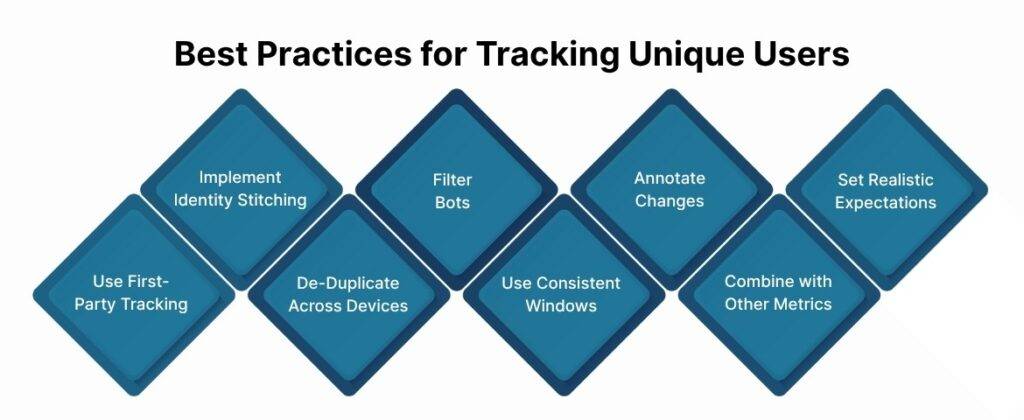
1. Use First-Party Tracking & Cookieless Fallback
Relying on first-party tracking means you don’t have to depend on third-party cookies, which are being phased out. Using cookieless methods ensures you still capture user activity even if cookies are blocked or deleted. This way, your data stays reliable while respecting privacy.
Ingest IQ makes this simple by tracking users server-side, keeping your data accurate and consistent without slowing down your site.
2. Implement Identity Stitching
Identity stitching connects anonymous visits to users once they log in, giving you a complete picture of their journey. This reduces double-counting and helps you see how people actually interact with your site or app. It makes your marketing insights more meaningful.
Ingest ID assigns a unique first-party ID to each visitor, making identity stitching and proper attribution easy.
3. De-Duplicate Across Devices
When the same person visits from multiple devices, they could be counted as separate users. De-duplicating across devices fixes this and gives you a more accurate view of real user activity. This helps you understand engagement without overestimating your audience.
Ingest IQ and Ingest ID work together to merge users across devices, showing the true number of unique visitors.
4. Filter Bots & Internal Traffic
Bots, crawlers, and your own team’s internal traffic can mess up your numbers. Filtering them out ensures your unique user counts reflect real people, not fake or test activity. This keeps your analytics clean and trustworthy.
Event IQ can filter out bots and internal traffic, so your data only reflects genuine user behavior.
5. Use Consistent Windows
Always compare numbers using the same time periods—daily, weekly, or monthly. This avoids confusion and makes trends easier to spot. Consistent reporting helps you understand growth patterns more clearly.
Event IQ and Ingest IQ let you set flexible reporting windows so your trends are always easy to follow.
6. Annotate Changes
Whenever you update tracking code or make analytics changes, make a note of it. This helps you understand why your numbers might suddenly go up or down. Clear notes prevent guesswork when analyzing data.
Ingest IQ offers version control and live debugging, so you always know what changed and when.
7. Combine with Other Metrics
Unique users are just one piece of the puzzle. Look at session counts, conversions, retention, and other metrics too. Combining insights gives a fuller picture of user behavior and campaign effectiveness.
Event IQ and Ingest IQ integrate with other analytics tools to give you a complete view of performance across metrics.
8. Set Realistic Expectations
Remember, unique user counts are estimates. Use them to track trends, not for precise billing or decision-making. Knowing this keeps your goals realistic and prevents overanalyzing small fluctuations.
Ingest Labs’ products work together to give you accurate, privacy-compliant, and actionable data for smarter decisions.
Conclusion
Tracking unique users is crucial for understanding real audience behavior, measuring engagement, and optimizing digital strategies. Accurate insights into individual user activity help you make informed decisions, improve website performance, and drive better marketing outcomes. By focusing on unique user metrics, you can identify trends, uncover growth opportunities, and enhance personalization efforts across platforms.
Ingest Labs offers powerful solutions to simplify this process and maximize data accuracy. With Ingest IQ, you get robust server-side tracking and real-time analytics. Ingest ID provides precise identity resolution for seamless cross-device tracking, while Event IQ unifies data for actionable insights and personalized experiences. Together, these tools enable privacy-compliant, data-driven decisions that enhance user engagement and conversion performance.
Start your 30-day trial with Ingest Labs and track unique users accurately for smarter, data-driven decisions.
FAQ
1. What is a unique user in analytics?
A unique user represents an individual who visits your website or app at least once during a specific reporting period. Tracking unique users helps you measure real audience size, engagement, and growth trends over time.
2. How do I track unique users effectively?
You can track unique users using analytics tools like Google Analytics, Amplitude, or Ingest Labs’ solutions. Combining first-party identifiers, server-side tracking, and identity stitching ensures accurate counts across devices and sessions.
3. Why do unique user counts sometimes differ from session counts?
Sessions measure interactions, while unique users count distinct individuals. A single user may have multiple sessions, so comparing both metrics provides a clearer view of engagement and user behavior.
4. Can cookies affect unique user tracking?
Yes, relying solely on cookies can lead to undercounting if users block or delete them. First-party tracking and server-side solutions like Ingest IQ help capture user activity even without cookies.
5. How can tracking unique users improve marketing performance?
Monitoring unique users allows you to identify high-value audiences, optimize campaigns, and personalize experiences. Tools like Ingest ID and Event IQ provide actionable insights for increasing conversions and ROI.