




Forms are often the first handshake between your business and a potential customer. Whether it’s a demo request, a quote form, or a newsletter signup, each submission carries intent and value. In fact, 49.7% of marketers say that web forms are their highest-converting lead generation tool.
But capturing that value accurately isn’t as easy as it sounds.
With privacy updates, consent frameworks, and cookie restrictions reshaping digital tracking, traditional form-tracking methods are becoming less reliable. In many cases, marketers think their campaigns are underperforming when in reality, their tracking setup is missing half the data.
This guide explains five practical and reliable ways to track form submissions across different platforms and analytics tools. Each method is designed for modern marketing stacks that prioritize compliance, data accuracy, and a complete view of user behavior.
Key Takeaways
- Accurate form tracking is the foundation of reliable analytics and conversion measurement.
- Traditional tracking methods like cookies and redirects often fail due to privacy restrictions and browser limitations.
- Using server-side and first-party tracking ensures data accuracy, compliance, and long-term visibility.
- Avoid common tracking mistakes such as misfiring tags, duplicate submissions, and client-side dependency.
- Adopt privacy-compliant practices with consent-based setups and secure tag management.
- Platforms like Ingest Labs help marketers track, attribute, and activate first-party form data with greater accuracy in a cookieless world.
What Is A Form Submission, And Why Does It Matter
A form submission happens when a visitor fills out and sends a form on your website, whether it’s a demo request, pricing inquiry, contact form, or newsletter signup. Each submission is more than just a completed field; it’s a signal of user intent and a potential entry point into your sales or CRM workflow.
For many B2B, SaaS, and service-based businesses, form submissions are the primary way to capture qualified leads. When a form is submitted, the data usually flows into your CRM or marketing automation system, creating a new contact or lead for follow-up.
Here’s why it matters:
- Attribution accuracy: Identify which channels, campaigns, or landing pages drive actual conversions, not just clicks.
- Revenue insights: Connect leads from form fills to downstream revenue to understand true ROI.
- Audience optimization: Build high-value segments based on real submission data, not partial page events.
- Compliance and consent: Ensure data collection aligns with privacy regulations like GDPR and CCPA.
- Automation and routing: Trigger CRM workflows or ad audiences instantly after submission for faster follow-ups.
The Challenges of Tracking Form Submissions
Form tracking often looks simple on the surface: add a tag, set a goal, and watch the numbers. But in reality, those numbers are rarely accurate. Tracking fails quietly, leaving blind spots in your funnel and making performance data unreliable.
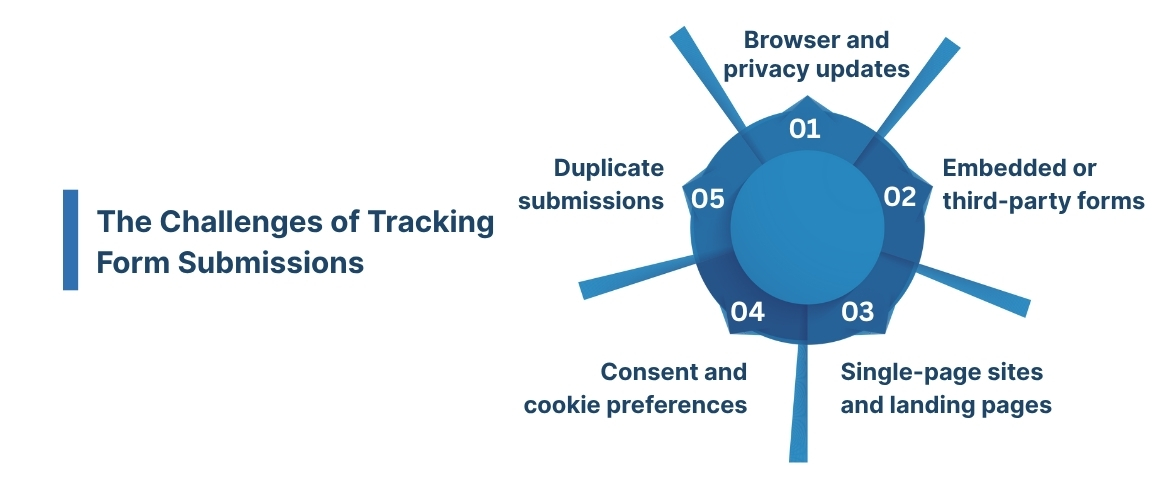
Here’s what’s really happening behind the scenes:
- Browser and privacy updates: Safari, Firefox, and Chrome are tightening how scripts and cookies work. That means form submissions that used to track perfectly may now go unrecorded.
- Embedded or third-party forms: Tools like HubSpot, Typeform, or Marketo host their forms on separate domains. When those forms are embedded on your site, they don’t always “talk” to your analytics platform.
- Single-page sites and landing pages: If your site doesn’t reload after a form is submitted, most tracking scripts won’t recognize a new event. The submission happens, but analytics never see it.
- Consent and cookie preferences: When users decline tracking cookies or certain scripts, your form completion data may never reach analytics or ad platforms.
- Duplicate or missed submissions: Triggers can fire twice or not at all, depending on tag management. This leads to inflated or incomplete reports that distort campaign performance.
These issues are easy to miss until you compare CRM data with analytics numbers and realize the gap. Accurate tracking today requires a privacy-aware, event-based approach that doesn’t rely solely on client-side tags or browser cookies.
How to Track Form Submissions: 5 Reliable and Modern Methods
Form submission tracking succeeds when it captures verified leads and ties them back to the campaigns that influenced them. When tracking fails, you get mismatched data between your CRM and analytics, making ROI measurement unreliable.
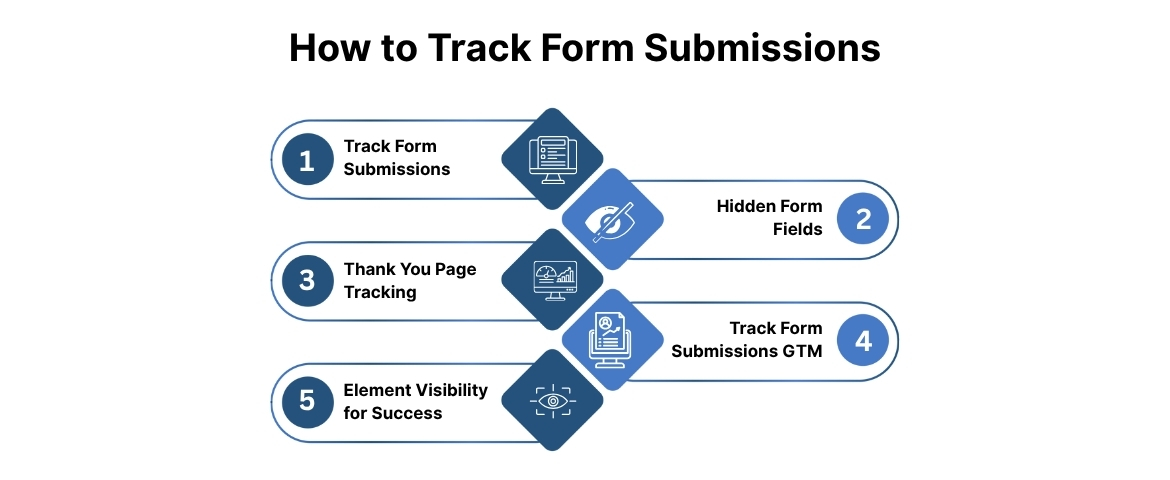
Let’s look at five proven methods that help marketers get clear, compliant, and complete form tracking data.
1. Track Form Submissions and Customer Journeys with a First-Party Platform
The most reliable way to track form submissions today is through a first-party attribution and event platform like Ingest IQ or Event IQ. These tools collect consented user data at the visitor level, record every touchpoint, and link those sessions to a specific form submission.
When a user fills out a form, the system matches the submission to their earlier sessions and marketing sources (UTMs, click IDs, campaigns, and referral data). This creates a complete view of the customer journey, from the first visit to the closed deal.
Why it works
- Tracks anonymous visitors when identifiers become available later, linking behavior to CRM records.
- Maintains compliance with GDPR and CCPA through server-side, consent-aware tracking.
- Enable you to more accurately connect revenue to marketing channels and improve ROAS insights.
Example: Instead of seeing 50 generic form submissions in Google Analytics, you’ll know exactly how many came from paid search, which campaign drove them, and how much revenue those leads generated post-conversion.
This method reduces fragmentation from cookie-reliant tracking by providing a privacy-first, unified data model built for long-term accuracy.
Best for: Marketers who need full-funnel visibility when CRM and product data are connected.
Also Read: Understanding How Server-Side Tracking Works
2. Hidden Form Fields (Source-Level Tracking)
Hidden fields are invisible form inputs that automatically populate with visitor data like UTM parameters or referral sources. When a user submits the form, those values are stored in your CRM and can be used for lead attribution.
Benefits
- Simple to set up on most landing pages.
- Captures campaign or ad-level identifiers directly within the form.
- Provides quick visibility into which traffic source drove each submission.
Limitations
- Doesn’t retain multi-touch data. Only the last session or last click.
- Breaks if users navigate to another page before submitting.
Use this method when you only need to measure top-of-funnel conversions or ad campaign effectiveness. For full-funnel accuracy, hidden fields work best as a supplement to first-party tracking.
Best for: Campaign-level source tracking and PPC attribution.
3. Thank You Page Tracking (GA4 Event Setup)
This is the classic, most straightforward form-tracking setup. Redirect users to a dedicated Thank You page (like /thank-you-demo), then mark visits to that page as conversion events in Google Analytics 4.
How to set it up
- In GA4, go to “Configure” → “Events” → “Create Event.”
- Add a condition where the event fires when the page path equals your Thank You URL.
- Save and mark that event as a conversion.
Why it works
- Every visit to the Thank You page confirms a successful submission.
- Easy for teams to monitor without developer involvement.
- Enables campaign-level ROI tracking inside GA4.
Best for: Simple lead forms that redirect after submission.
4. Track Form Submissions in Google Tag Manager (No Redirect Needed)
If your forms submit data without refreshing the page, traditional GA4 pageview tracking won’t work. Instead, use Google Tag Manager’s “Form Submission” trigger.
Setup steps
- In GTM, enable all built-in form variables.
- Create a trigger that listens for specific form IDs or classes.
- Link it to your analytics tags (GA4, Meta Pixel, or Google Ads).
Why marketers love it
- Detects real submissions, not just button clicks.
- Works on dynamic or JavaScript-heavy sites.
- Minimizes tracking gaps in multi-form environments.
This is a cleaner and more scalable setup than click tracking and helps eliminate false positives caused by multiple clicks or page reloads.
Best for: AJAX-based or single-page applications.
5. Use Element Visibility for On-Page Success Messages
Many modern websites use AJAX success banners or pop-up modals instead of loading a new page. To track these, use GTM’s Element Visibility trigger to fire an event when a confirmation message becomes visible.
Advantages
- Tracks real form completions without requiring a page reload.
- Ideal for single-page applications and embedded widgets.
- Keeps users on-page for a better experience and faster conversions.
Best for: Forms that show confirmation messages without redirects.
Here is a comparison of five methods to track form submission:
| Method | Best for | Pros | Limitations |
|---|---|---|---|
| First-party platform | Full-funnel tracking | Privacy-safe, revenue attribution | Paid or advanced setup |
| Hidden form fields | Ad or campaign-level attribution | Easy to implement | Single-touch, session-based |
| Thank You page | Simple forms | Reliable and easy to explain | Requires redirect |
| GTM Form trigger | SPA or AJAX sites | Accurate, scalable | Needs setup expertise |
| Element visibility | Inline success messages | Great UX, real completions | Needs CSS selector setup |
Common Tracking Mistakes to Avoid
Many businesses assume their form submissions are being tracked accurately, only to realize later that data gaps or double-counting are skewing reports. This usually happens when tracking setups are rushed, tags aren’t properly tested, or event names overlap across different forms.
Below are some of the most common tracking mistakes and how to fix them.
- Missing or misfiring tags: Tracking tags often fail to trigger if form IDs or submission events change after a site update.Fix: Always validate triggers in Google Tag Manager or your tag system after every deployment. Use a preview or debug mode to confirm events fire correctly.
- Overlapping event names across forms: Using the same event name (like “form_submit”) for multiple forms makes it impossible to distinguish which one performed better.Fix: Assign unique event labels that include the form type or placement (e.g., “signup_form_submit,” “demo_form_submit”).
- Using client-side only tracking: Browser-based tags can miss conversions when users block cookies or navigate away before the event fires.Fix: Pair client-side tracking with server-side delivery through tools like Ingest IQ, which ensures data is sent directly and securely.
- No validation for duplicate or spam submissions: Duplicate form entries or bot submissions inflate your metrics and distort attribution models.Fix: Implement server-side validation or deduplication rules before sending events to analytics or ad platforms.
- Forgetting to test server-side delivery: Even if server-side tracking is implemented, it needs periodic testing to ensure payloads match your schema and reach destinations correctly.Fix: Use webhook monitoring or test events to verify that submissions are consistently recorded.
Best Practices for Privacy-Compliant Tracking
Many marketers try to maintain compliance by simply adding a cookie banner or blocking tags until consent is given. While that’s a good start, it’s not enough. Browser restrictions, consent frameworks, and third-party script limitations mean that relying solely on front-end controls still risks missing valuable data or violating regulations.
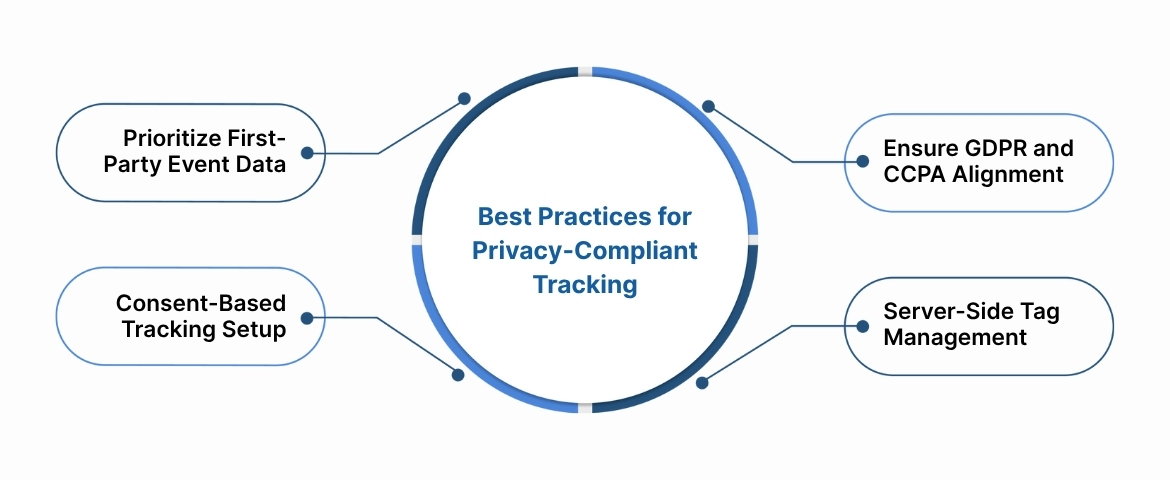
To make tracking both privacy-safe and reliable, you need a structure that respects consent and preserves first-party accuracy. Here’s how to do it right:
1. Prioritize First-Party Event Data
Third-party cookies are fading, and relying on them leads to incomplete user journeys. First-party event data, collected directly from your website or app, gives you durable, consented insights when identifiers are available, without dependency on external cookies.
2. Ensure GDPR and CCPA Alignment
Regulations demand transparency on how data is collected, processed, and shared. Non-compliance risks more than fines, as it erodes user trust.
Keep clear consent logs, define legitimate interest where applicable, and honor opt-outs automatically through your consent management system.
3. Adopt Consent-Based Tracking Setups
Don’t let tags fire blindly. Connect your tag manager or data layer with your CMP (Consent Management Platform) so that events only trigger when permission is granted.
Tip: Map your tracking to consent categories (e.g., analytics, marketing, personalization) to maintain precision without over-collection.
4. Leverage Server-Side Tag Management
Server-side tracking routes data from your own environment instead of the user’s browser, protecting user privacy and improving data accuracy.
Move client-side scripts into a controlled server container to manage consent logic, strip personal identifiers, and securely deliver data downstream.
By combining these best practices, marketers can move beyond surface-level compliance and build a future-proof data foundation, one that maintains user trust while keeping measurement reliable.
Also Read: Top 10 Tools for Website Visitor Tracking and Their Uses
Building Reliable Tracking in a Privacy-First World
Form tracking has grown increasingly unreliable as privacy laws tighten, browsers restrict cookies, and multi-touch journeys become harder to trace. Marketers face the constant challenge of missing data, broken event flows, and incomplete attribution — all of which make it difficult to understand what’s truly driving conversions.
Ingest Labs solves this with a privacy-first data foundation. Its suite, including Ingest IQ, Ingest ID, and Event IQ, brings server-side tracking, consent-aware data flows, and first-party identifiers into one ecosystem. This helps ensure form submissions and events are captured more reliably and accurately, processed securely, and connected to your marketing insights in real time.
If your tracking setup can’t keep up with evolving privacy standards, it’s time to upgrade. Talk to the Ingest Labs team to see how their first-party solutions help you maintain measurement accuracy and campaign visibility in a cookieless world.
FAQs
1. Why isn’t my form tracking working properly?
Common issues include missing or misfiring tags, incorrect event configurations, or using client-side tracking that breaks under privacy restrictions. Switching to server-side and first-party tracking improves data accuracy and reliability.
2. What’s the difference between client-side and server-side tracking?
Client-side tracking relies on browser cookies and scripts, which are often blocked or deleted. Server-side tracking processes events directly on your server, keeping your data intact while maintaining user privacy.
3. How can I make my form tracking GDPR and CCPA compliant?
Use consent-based data collection and avoid third-party cookies. First-party tracking with clear consent mechanisms helps ensure your data practices meet global privacy regulations.
4. Can I still track conversions without cookies?
Yes. Platforms like Ingest Labs offer first-party and event-based tracking methods that work independently of cookies. This approach lets you maintain attribution accuracy even in cookieless environments.
5. What tools should I use for reliable form tracking?
For basic needs, Google Tag Manager or analytics events may work. But for complete attribution, privacy compliance, and unified event data, Ingest Labs’ suite (Ingest IQ, Ingest ID, Event IQ) delivers a stronger foundation for long-term accuracy and insight.