



Is your website silently losing revenue and compromising data due to invisible visitors? Businesses heavily relying on digital marketing and e-commerce strategies face a growing threat from malicious bots, which can distort analytics, inflate ad spend, and disrupt customer journeys. With a 125% surge in AI-oriented bot activity over just six months in early 2025, these automated intrusions are expanding faster than ever, targeting high-value sites. Understanding how to identify, monitor, and block bot traffic is no longer optional; it’s essential for maintaining accurate insights, safeguarding conversions, and ensuring privacy-compliant, seamless user experiences.
Quick Overview
- Malicious bots can steal data, overload servers, and distort analytics, making it vital to detect them early.
- Track website activity regularly to spot unusual traffic spikes, suspicious IPs, or patterns that indicate automated behavior.
- Use layered defenses like CAPTCHA, Web Application Firewalls (WAFs), and rate limiting to block harmful traffic effectively.
- Keep monitoring and updating defenses continuously to stay ahead of evolving bot tactics and ensure accurate, secure data.
What Are Bad Bots?
Bad bots are automated programs designed to harm your website, scrape sensitive data, spam forms, or overload servers. You might not notice how these bots distort analytics, manipulate metrics, and interfere with your data-driven marketing strategies. Types of bad bots include scrapers stealing content, spam bots filling forms, credential-stuffing bots targeting logins, and DDoS bots overwhelming server performance. If you don’t learn how to block bot traffic, you could face lost conversions, skewed insights, and compromised user trust.
This takes us to look at why it’s so important to keep a close eye on your website’s traffic.
Why is Monitoring Website Traffic Important?
Keeping a close eye on your website traffic helps you protect revenue, optimize marketing, and prevent bot-driven disruptions before they escalate.
- Detect abnormal activity early
- Identify sudden traffic spikes or unusual patterns that may indicate malicious bot behavior.
- Pinpoint suspicious IP addresses or geographic anomalies for quick action.
- Protect website performance and server health
- Prevent slow-loading pages or crashes caused by excessive bot requests.
- Ensure APIs and integrations function smoothly under normal user load.
- Maintain accurate analytics for marketing decisions
- Avoid skewed conversion rates from automated interactions.
- Keep ROI tracking, ad targeting, and multi-channel campaigns based on real users.
- Safeguard sensitive data and compliance
Now that you understand why monitoring traffic matters, let's take a look at how to spot the signs of bad bot activity early on.
Common Signs of Bad Bot Traffic
Even the most optimized websites can be silently affected by bad bots, skewing analytics, overloading servers, and draining resources without obvious warning. Here are some common signs that bot traffic is impacting your website:
- Unusually high traffic spikes at odd hours: For example, your site suddenly receives thousands of visits at 3 a.m., far beyond normal user patterns.
- Rapid repeated actions: Multiple form submissions, login attempts, or clicks happening in seconds, indicating automated scripts rather than real users.
- Suspicious IP addresses or geographic anomalies: Traffic from regions your business doesn’t target, or repeated hits from the same IP range.
- Unexplained bandwidth spikes or server overload: Servers slowing down or crashing without an increase in legitimate user activity, often caused by DDoS bots.
But what happens when they’ve already begun impacting your site? That’s where understanding the consequences comes in.
Also read: How to Track Assisted Conversions in Google Analytics
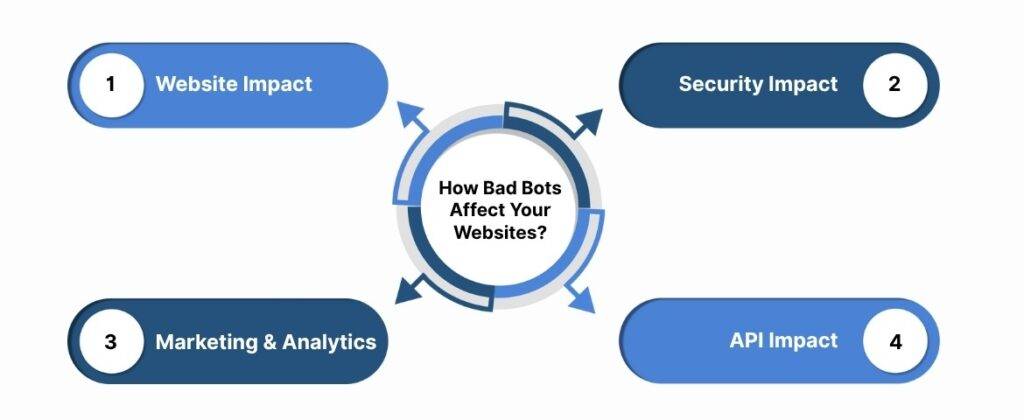
How Bad Bots Affect Your Websites & APIs?
Even a small surge of bad bot traffic can quietly sabotage your website, distort analytics, and strain APIs, affecting performance and business decisions. Understanding the various impacts is crucial before you implement strategies to block bot traffic effectively.
1. Website Impact
Bad bots can severely affect your website’s performance by causing slow page load times and unexpected downtime. Repeated automated requests overload servers, leading to crashes and frustrated users. Additionally, inflated traffic metrics from bots make it difficult to understand real user behavior and site performance.
2. Security Impact
Bots often attempt credential stuffing or scrape sensitive customer data, putting your website and users at risk. These automated attacks can lead to data breaches, regulatory penalties, and loss of trust. Without proper defenses, even a small bot intrusion can have long-lasting security consequences.
3. Marketing & Analytics
Malicious bot traffic can skew your marketing metrics, inflating conversions, bounce rates, and click-through rates. This results in wasted ad spend and misguided campaign decisions. Accurate insights become nearly impossible, undermining your ability to optimize data-driven marketing strategies effectively.
4. API Impact
Bots can abuse APIs, triggering excessive requests that slow or break services for legitimate users. DDoS attacks originating from bot traffic can cause throttling issues and disrupt integrations across platforms. Monitoring and protecting APIs is essential to maintain seamless functionality and user experience.
Once we understand the kind of harm bots can cause, it’s time to explore some of the methods available to stop them in their tracks.
Best Practices to Stop or Block Bots
Blocking bots requires practical, layered strategies to protect your website, safeguard data, and maintain accurate analytics. Below are effective techniques you can implement:
1. Implement CAPTCHA or reCAPTCHA
CAPTCHA solutions prevent automated logins and form submissions by distinguishing between human users and bots. Google reCAPTCHA v3, for example, validates users invisibly without interrupting the customer experience. Ingest Labs’ Tag Monitoring and Alerts capture and validate these interactions server-side, ensuring automated submissions are blocked while genuine users remain unaffected.
2. Use a Web Application Firewall (WAF)
A WAF filters malicious traffic at the edge, stopping harmful requests before they reach your server or application. It provides both network-level and application-level protection to reduce attacks like credential stuffing. Ingest Labs’ Server-Side Tracking works alongside this by routing event data securely through your server, ensuring suspicious activity is flagged and legitimate interactions are accurately captured.
3. Rate Limiting & Throttling
Rate limiting restricts excessive requests from the same IP or user agent, preventing overloads and API abuse. This protects your server resources while maintaining smooth access for real users. Ingest Labs’ Data Streaming and Tag Monitoring detect rapid repeated interactions in real time, allowing you to throttle suspicious traffic immediately.
4. Bot Management Tools & Services
Advanced bot management identifies and mitigates bot traffic using behavior-based detection and rule enforcement. It focuses on server-side mitigation to ensure privacy-compliant blocking without affecting user experience. Ingest Labs’ Ingest IQ suite integrates directly with your server-side tags, enabling real-time bot validation and ensuring only legitimate events flow to your analytics and CDPs.
5. IP Blocking & Geo-Restrictions
Blocking suspicious IPs or applying country-based restrictions prevents targeted scraping or malicious traffic from high-risk regions. This strategy limits exposure to repeat bot attacks and protects sensitive data. Ingest Labs’ Tag Manager and Event IQ allow you to configure conditional triggers and monitor traffic origins, ensuring blocked IPs are identified and filtered without disrupting normal users.
6. Honeypots & Trap Pages
Honeypots deploy invisible fields or decoy pages to detect and trap bots attempting automated submissions. These hidden elements catch malicious behavior without affecting real users. Ingest Labs’ Live Debugging and Tag Recording lets you monitor interactions with these trap fields in real time, helping identify and block bot activity efficiently.
7. Regular Log & Analytics Monitoring
Continuous review of server logs and analytics uncovers unusual activity patterns, such as rapid clicks or repeated form submissions. This proactive approach ensures early detection before bots disrupt performance or skew data. Ingest Labs’ Centralized Dashboard and Real-Time Analytics provide comprehensive visibility into all events, enabling instant identification and mitigation of suspicious traffic.
Let’s dig deeper into the importance of keeping your security measures up to date in a world where cyber threats are constantly evolving.
Also read: How to Track Video ROI and Conversions Effectively
The Importance of Regularly Updating Security Measures
Even the most robust defenses can become ineffective if security measures are left outdated, leaving your website vulnerable to evolving bot attacks. Regular updates ensure that new threats are mitigated, your analytics remain accurate, and user experience stays seamless.
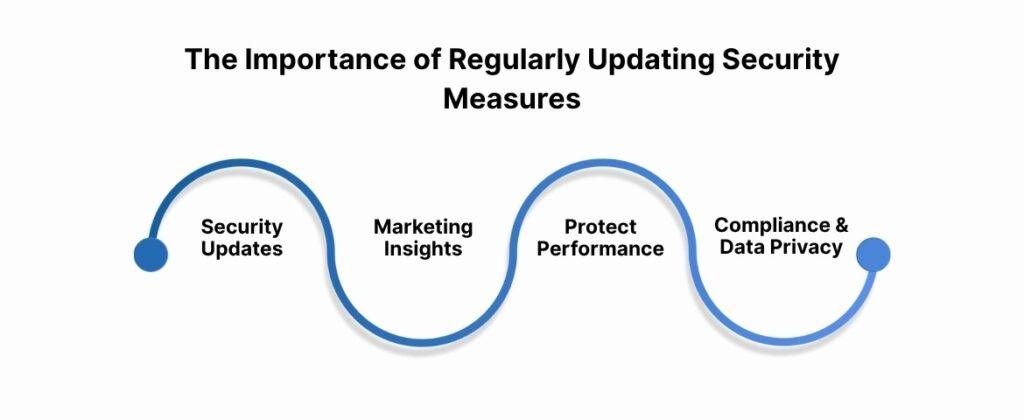
1. The Importance of Continuous Security Updates Matters
Cyber threats, including AI-driven bots, are constantly evolving, meaning yesterday’s rules may fail against today’s attacks. Updating your security protocols helps prevent credential stuffing, scraping, and API abuse before they impact performance. Ingest Labs’ Ingest IQ and Tag Monitoring continuously track data flows, alerting you to anomalies so updates can be applied proactively.
2. Maintain Accurate Analytics and Marketing Insights
Outdated security controls allow bots to inflate metrics, leading to misguided marketing decisions and wasted ad spend. Keeping your defenses current ensures that analytics reflect real user behavior, not automated traffic. Ingest Labs’ Event IQ and Dashboard Analytics provide real-time visibility into interactions, making it easier to detect inconsistencies and maintain clean data.
3. Protect Performance and User Experience
Bot traffic can slow pages, overload servers, or trigger false alerts if defenses are not maintained. Regularly updated security measures prevent these disruptions, ensuring smooth browsing and transaction flows for legitimate users. Ingest Labs’ Server-Side Tracking and Data Streaming help enforce updated security rules, blocking harmful traffic while preserving optimal site performance.
4. Compliance and Data Privacy
Regulatory requirements like GDPR and CCPA evolve, and outdated security practices can inadvertently violate privacy laws. Regular updates ensure compliance and protect sensitive customer information from automated scraping or misuse. Ingest Labs’ Identity Resolution and Privacy Controls allow you to implement compliant tracking, enforce updated privacy rules, and monitor adherence across all digital properties.
Final Thoughts
Effectively blocking bot traffic is essential to maintain website performance, protect sensitive data, and preserve accurate analytics for informed decisions. Ignoring bot management leads to inflated metrics, wasted marketing spend, and potential security vulnerabilities that harm user trust. Implementing strategies like CAPTCHA, WAFs, rate limiting, and continuous monitoring ensures your site remains secure against evolving AI-driven and malicious bots.
Ingest Labs offers privacy-first solutions to tackle bot traffic while enhancing marketing efficiency and conversion optimization. Ingest IQ enables server-side tracking, real-time tag monitoring, and accurate data streaming across web and mobile platforms. Ingest ID and Event IQ unify customer profiles, deliver behavioral insights, support cross-channel marketing, and maintain GDPR and CCPA compliance for actionable, reliable data.
Protect your website from malicious bots and ensure accurate analytics. Book your Ingest Labs demo to secure your traffic today!
Frequently Asked Questions (FAQs)
1. How to remove bot traffic?
Implementing CAPTCHA systems, using Web Application Firewalls (WAFs), and setting up rate limiting can effectively reduce bot traffic. Additionally, regularly monitoring server logs and analytics can help identify and mitigate bot activity.
2. How do I block all bots?
Utilize a Web Application Firewall (WAF) to block malicious traffic at the edge before it reaches your server. Configure your server to deny requests from known malicious IP addresses. Implementing CAPTCHA systems can also prevent automated access.
3. How to block bot traffic in Google Analytics?
In Google Analytics 4, traffic from known bots and spiders is automatically excluded. To further filter bot traffic, navigate to Admin > View Settings and check the “Exclude all hits from known bots and spiders” option. Note that this will only affect data from the point the box is checked onward.
4. How to stop AI bots?
Implementing CAPTCHA systems can help prevent automated access by AI bots. Using a Web Application Firewall (WAF) can block malicious traffic at the edge before it reaches your server. Regularly monitoring server logs and analytics can help identify and mitigate AI bot activity.
5. How to identify bot traffic?
Monitor your traffic for anomalies such as sudden spikes in page views, high bounce rates, or fake form submissions. Suspicious IP addresses or geographic anomalies can also indicate bot activity. Regularly reviewing server logs and analytics can help detect and identify bot traffic.
6. How do I deactivate a bot?
To deactivate a bot, identify its user agent or IP address and block it using your server's configuration or a Web Application Firewall (WAF). Implementing CAPTCHA systems can also prevent automated access. Regularly monitoring server logs and analytics can help detect and mitigate bot activity.