



Facebook Ads remain one of the most powerful growth channels for Shopify businesses, even in 2026. With billions of active users across Facebook and Instagram, Meta’s ad ecosystem gives ecommerce brands unmatched reach, targeting precision, and scalability.
But success with Shopify Facebook Ads doesn’t come from launching ads blindly. It requires the right setup, reliable tracking, strong creatives, and ongoing optimization.
When structured correctly, they can support more consistent revenue performance at scale. When done wrong, they drain budgets fast.
This guide walks you through everything you need to know, from setup to optimization, to make Facebook Ads work for your Shopify store.
At a glance
- Accurate tracking is essential. Without a properly set up Meta Pixel and server-side tracking, Facebook optimizes on incomplete data, making optimization and attribution less reliable.
- Winning brands run full-funnel ads. Shopify leaders use discovery for cold traffic, consideration for product viewers, and conversion campaigns for cart abandoners to reduce acquisition costs.
- Retargeting often delivers stronger ROAS than cold traffic. Since most shoppers don’t buy on the first visit, retargeting warm audiences consistently outperforms cold traffic at a lower cost.
- Creative testing beats audience tweaking. Facebook finds the audience, your edge comes from testing diverse creatives, refreshing them early, and clearly showing product value.
- Optimization fuels sustainable growth. Weekly analysis of ROAS, CPA, and conversion rates, using unified data from tools like Ingest Labs, helps identify and scale higher-performing campaigns more confidently.
What Are Shopify Facebook Ads?
Shopify Facebook Ads refer to Facebook and Instagram advertising campaigns that are directly connected to a Shopify store.
Through Meta Business Suite, Shopify merchants can:
- Sync their product catalog to Facebook and Instagram
- Track customer actions like product views, add-to-cart events, and purchases
- Run ads optimized specifically for ecommerce conversions
Common Shopify Facebook Ad formats include:
- Product and collection ads
- Retargeting ads for website visitors
- Catalog and dynamic product ads
- Awareness ads for new product discovery
The integration allows Meta’s algorithm to use on-site behavior signals, not just clicks, when optimizing delivery.
Why Shopify Businesses Should Use Facebook Ads
Facebook Ads offer unique advantages for ecommerce brands that few other channels can match.
- Massive Audience Reach: Facebook and Instagram give you access to billions of users globally. Whether you're selling to a niche market or building a mass-market brand, the audience is there.
- Advanced Targeting Capabilities: Audience size alone isn't what makes Facebook Ads powerful. It's the targeting capabilities. You can reach users based on interests, behaviors, demographics, and location.
- Powerful Retargeting Options: Facebook Ads make it easy to re-engage. You can retarget visitors to specific product pages. You can build lookalike audiences based on past customers. You can even target users who abandoned their carts.
- Measurable ROI: Unlike some marketing channels, where ROI is a guessing game, Facebook Ads Manager gives you detailed performance data. You can review reported revenue and performance signals to guide optimization decisions.
This level of control means you're not throwing ads at everyone and hoping for the best. You're putting offers in front of people who are already showing buying intent. But you need a system that actually converts. Here’s how to do it.
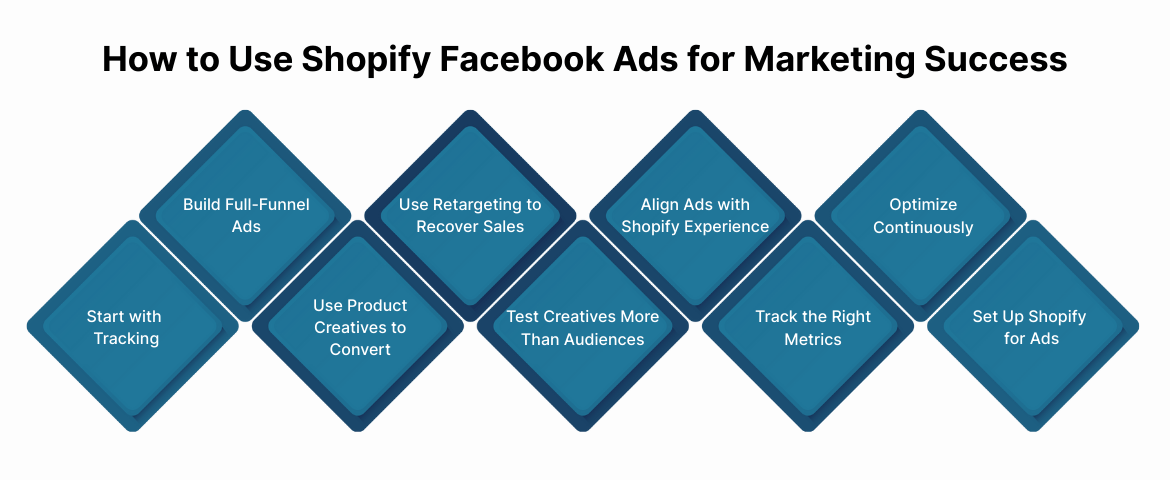
How to Use Shopify Facebook Ads for Marketing Success: 9 Practical Strategies
Using Shopify Facebook Ads successfully isn’t about running random campaigns. It’s about building a system that consistently attracts, converts, and retains customers.
1. Start With Conversion-Ready Tracking
Before scaling ad spend, ensure your tracking setup is accurate.
- Install Meta Pixel correctly on your Shopify store
- Enable server-side tracking where possible
- Verify that key events like View Content, Add to Cart, and Purchase are firing
Facebook’s algorithm optimizes ads based on event data, but browser-based tracking often misses signals due to ad blockers and privacy restrictions. Server-side tracking helps recover additional event signals, supporting more reliable optimization.
This is where Ingest IQ plays a critical role. It helps reduce fragmented tracking by capturing customer signals server-side, bypassing browser limitations and streaming clean, real-time data to your analytics platforms, with reduced development involvement.
2. Build a Full-Funnel Facebook Ads Strategy
High-performing Shopify brands don't rely on a single campaign type. They build a funnel.
- Top of funnel: Discovery ads introduce your products to cold audiences. These campaigns build awareness and test which offers resonate.
- Middle of funnel: Consideration ads retarget people who viewed products but didn't buy. These campaigns nurture interest and address objections.
- Bottom of funnel: Conversion-focused ads target cart abandoners and people who engaged heavily with your site. These campaigns recover lost sales.
This structure improves efficiency. Cold traffic is expensive. Retargeting is cheaper and converts better. By running campaigns at each stage, you reduce overall customer acquisition costs.
3. Use Product-Focused Creatives That Convert to Sell
Your ads need to sell, not just look pretty. Shopify Facebook Ads work best when the product is the hero.
- Show your product in real-world use. A skincare brand should show someone applying the product, not just the bottle on a white background. A fitness brand should show the equipment in action, not just product shots.
- Highlight benefits, not features. Nobody cares that your blender has a 1200-watt motor. They care that it makes smoothies in 30 seconds without chunks.
- Display pricing, offers, and clear calls-to-action. If you're running a sale, say so. If there's free shipping, show it. Don't make people guess.
Simple, direct creatives often outperform highly polished brand ads. You're not trying to win a design award. You're trying to drive sales.
4. Use Retargeting to Recover Lost Sales
Most shoppers won't buy on their first visit. That's normal. What separates profitable stores from struggling ones is what happens next.
Retarget users who:
- viewed a product. Show them that exact product again with a compelling offer.
- added items to their cart. These people are close to buying. A small nudge, free shipping, a discount, or urgency can push them over the line.
- started checkout but didn't complete it. These are your highest-intent users. They're one step away from becoming customers.
Retargeting campaigns often deliver higher ROAS than cold audience campaigns. The cost per acquisition is lower because these users already know your brand.
Event IQ helps you identify and segment these high-intent users with precision. It tracks user behavior in real-time across your site and unifies that data for smarter retargeting. You'll know exactly who to target and when, supporting cart recovery and improved conversion performance.
5. Test Creatives More Than Audiences
Many Shopify advertisers obsess over audience targeting. They create dozens of micro-audiences, constantly tweaking parameters, hoping to find the perfect group.
This is the wrong approach.
- Facebook's algorithm has gotten better at finding the right people. What it can't do is fix weak creative. A bad ad won't perform well, no matter how precise your targeting is.
- Keep targeting relatively broadly. Test multiple creatives simultaneously. Refresh creatives before performance declines.
If you're running the same ad for weeks, performance will drop. Ad fatigue is real. Users get tired of seeing the same thing. Refresh your creatives regularly, even if they're still performing okay.
6. Align Ads With Your Shopify Store Experience
Your ads and store need to tell the same story. If your ad promises fast shipping and your product page doesn't mention it, you've lost trust.
- Match your ad messaging to your product page content. If the ad highlights a specific benefit, that benefit should be front and center on the landing page.
- Make sure your pages load quickly, especially on mobile. Most Facebook traffic comes from mobile devices. A slow-loading page kills conversions.
- Optimize your checkout process. Remove unnecessary steps. Offer guest checkout. Make it as frictionless as possible.
Even the best-performing ads fail if the landing experience is weak. The ad gets people to click. The store experience gets them to buy.
7. Track the Right Metrics
Impressions and clicks don't pay the bills. Focus on metrics that matter.
- Return on Ad Spend (ROAS): How much revenue you generate per dollar spent on ads. This is a key metric for evaluating campaign efficiency.
- Cost per Purchase: How much you're paying to acquire a customer. Compare this to your average order value and customer lifetime value.
- Conversion Rate: What percentage of people who click your ad actually buy? A low conversion rate signals problems with your landing page or offer.
- Ad Frequency: How many times the average user sees your ad. High frequency means ad fatigue is setting in.
These metrics tell you whether your campaigns are driving sustainable growth or burning cash.
Ingest IQ provides detailed analytics and insights into your customer journey. You'll get more complete reporting on campaign performance, helping you measure what's actually working instead of guessing based on incomplete data.
8. Optimize Continuously
Shopify Facebook Ads are not "set and forget." Profitable advertisers optimize continuously.
- Pause underperforming ads quickly. If an ad isn't delivering results after spending enough to gather data, pause it. Don't keep bleeding money, hoping it will turn around.
- Scale winning creatives gradually. When you find an ad that works, don't immediately 10x the budget. Scale slowly to maintain performance.
- Review performance weekly. Set a recurring time to analyze your campaigns. Look for trends. Identify what's working and what's not.
Consistency in optimization is what separates profitable advertisers from struggling ones. However, before you can optimize anything, though, you need to set everything up correctly from the start.
9. Setting Up Your Shopify Store for Facebook Ads
Connect Shopify to Meta by installing the Facebook & Instagram sales channel in your Shopify admin. This syncs your product catalog automatically.
- Step 1: Connect Shopify to Meta: Install the Facebook & Instagram sales channel in your Shopify admin. This syncs your product catalog automatically.
- Step 2: Install Meta Pixel and Tracking: Enable Meta Pixel through Shopify. Confirm that event tracking is active for all key actions.
- Step 3: Verify Domains and Permissions: Verify your domain in Meta Business Manager. Assign the correct ad and data permissions to ensure accurate attribution.
A clean setup prevents headaches later. Get this right from the start.
For more advanced tracking needs, Ingest IQ handles server-side implementation seamlessly. It integrates with your existing tech stack and ensures you're capturing every data point that matters for campaign optimization.
Also Read: Proven Techniques to Increase Meta Ads ROAS
However, even with a perfect setup, there are common traps that kill campaigns. Here's how to avoid them
Five Common Shopify Facebook Ads Mistakes to Avoid
Even experienced Shopify advertisers lose money on Facebook Ads by repeating the same avoidable mistakes. Identifying and fixing these issues early can help improve measurement confidence and optimization outcomes.
- Poor or Incomplete Tracking Setup: Without accurate tracking, you're flying blind. Facebook can't optimize what it can't measure. Use server-side tracking to capture more accurate conversion signals and give Facebook the data it needs to optimize effectively.
- Relying On One Ad Creative For Too Long: Ad fatigue is real. Refresh your creatives regularly to maintain performance. Structure campaigns across customer journey stages to guide users toward purchase.
- Sending Traffic To Slow Or Unoptimized Product Pages: Your ad did its job by getting the click. Don't lose the sale because your page loads slowly or doesn't match the ad promise. Refresh creatives regularly and test multiple variations to maintain relevance and performance.
- Ignoring Retargeting Opportunities: Cold traffic is expensive. Retargeting converts better and costs less. Don't leave money on the table. Ensure fast load times, clear messaging, mobile optimization, and a frictionless checkout experience.
- Scaling Budgets Too Quickly Without Data: Just because an ad works at $50/day doesn't mean it will work at $500/day. Scale gradually based on consistent ROAS, cost-per-purchase, and conversion data, supported by reliable tracking and unified insights.
Avoiding these mistakes can dramatically improve your results. That’s where Ingest Labs comes in, helping brands capture every signal, unify data, and optimize campaigns with confidence.
Also Read: Complete Guide to Facebook Retargeting Strategies
How Ingest Labs Helps Shopify Brands Win With Facebook Ads
As Shopify Facebook Ads become more data-driven and privacy-restricted, accurate tracking and unified customer data are no longer optional—they’re essential.
Ingest Labs equips Shopify brands with the infrastructure needed to run high-performing Facebook Ads in a cookieless environment:
- Server-side tracking with Ingest IQ captures conversion events missed by browser-based pixels, providing more consistent event signals to support optimization.
- First-party identity with Ingest ID improves attribution and audience accuracy across sessions and devices, without relying on third-party cookies.
- Unified insights with Event IQ connect Shopify, Meta Ads, analytics, and CRM data into a single view, enabling faster optimization and smarter scaling.
- Privacy-first by design, supporting alignment with GDPR, CCPA, and global data regulations while maintaining performance.
Ingest Labs helps Shopify brands turn fragmented Facebook ad data into actionable insights, without adding technical complexity.
Instead of guessing which campaigns are driving revenue, Shopify teams gain real-time visibility into what’s working, and the confidence to scale Facebook Ads with greater confidence.
Final Thoughts
Shopify Facebook Ads remain one of the most powerful channels for ecommerce growth, but success today depends on more than creative ads and budget. Accurate tracking, strong creatives, full-funnel strategies, and continuous optimization are what make Facebook Ads a more reliable and measurable growth channel.
As privacy restrictions increase and browser-based tracking becomes less reliable, Shopify brands need better data infrastructure to stay competitive. With server-side tracking, first-party identity, and unified customer insights, platforms like Ingest Labs help advertisers capture cleaner signals, optimize faster, and scale Facebook Ads with confidence.
Ready to stop guessing and start optimizing with complete data? Contact Us to help Shopify brands improve measurement, attribution clarity, and campaign decision-making, without added technical complexity.
Frequently Asked Questions
1. Can I run Facebook Ads for my Shopify store without a Facebook Shop?
Yes, you don’t need to set up a Facebook Shop to run Facebook Ads. Ads can link directly to your Shopify product pages or landing pages, even if you haven’t created a shopping tab on Facebook.
2. How long does it take to see results from Shopify Facebook Ads?
Results can vary, but most advertisers start seeing meaningful data within 7–14 days. This gives the algorithm enough conversions to optimize delivery and improve performance.
3. Is Facebook Ads Manager free to use?
Yes. Meta’s Ads Manager platform is free to access. You only pay for the ad spend you choose to run.
4. Why did my Facebook Ads perform well at first and then suddenly stop converting?
Performance fluctuations can happen due to algorithm learning, audience fatigue, or changes in creative relevance. It’s important to refresh creatives, review targeting, and ensure tracking is accurate so the algorithm can continue optimizing.
5. Can I use my Shopify customer data for Facebook targeting?
Yes, you can create Custom Audiences using your Shopify customer lists (e.g., email subscribers) to improve targeting and retargeting performance.