



Customer data sits in many places inside your business. Your analytics tools, CRM, email platform, ad accounts, support systems, and website all capture different pieces of the customer journey. When these records don’t align, it becomes difficult to understand your audience or make accurate decisions.
This fragmentation affects reporting accuracy, campaign performance, and the way you personalize experiences. You spend more time fixing data than using it. Customer Data Integration (CDI) solves this problem by bringing all customer information into one reliable source of truth that your tools and teams can consistently rely on. It helps you create consistent profiles, strengthen identity matching, and remove duplicates across systems.
In this guide, you’ll learn what customer data integration is, why it matters in a privacy‑first environment shaped by regulations like CCPA/CPRA and PIPEDA, and how it supports better attribution, personalization, and cross‑channel visibility. You’ll also see the risks of poor data integration and how to implement CDI in a structured, scalable way.
Key Takeaways
- Customer Data Integration consolidates fragmented data into a single trusted customer profile used across all teams.
- CDI improves accuracy by eliminating duplicates, resolving identities, and standardizing data from multiple sources.
- A strong CDI layer enables better segmentation, consistent reporting, and more personalized customer experiences.
- Poor CDI leads to broken customer journeys, misaligned metrics, and inefficiencies across marketing and analytics workflows.
- Ingest Labs tools like Ingest ID, Ingest IQ, and Event IQ strengthen CDI workflows by ensuring cleaner identity data, reliable server-side tracking, and real-time activation.
What Is Customer Data Integration (CDI)?
Customer Data Integration (CDI) is the process of collecting customer data from multiple systems and consolidating it into a single, accurate, and consistent profile.
CDI ensures that all your customer information from CRMs, analytics tools, email platforms, advertising accounts, and other systems aligns into one unified dataset. This alignment resolves duplicates, standardizes data, and links identities across systems.
When You Need Customer Data Integration
Customer Data Integration becomes essential when your business experiences fragmented data and inconsistent customer insights. Key indicators include:
- Multiple disconnected systems: Customer information is scattered across CRMs, analytics platforms, email tools, and ad accounts, making it hard to get a complete view.
- Duplicate or conflicting records: Inconsistent data leads to errors in reporting, targeting, and personalization, reducing campaign effectiveness.
- Difficulty tracking customer journeys: Disconnected tools prevent a clear view of behavior, intent, and touchpoints across web, mobile, email, and advertising channels.
- Inefficient decision-making: Teams spend excessive time reconciling data instead of analyzing insights or taking action.
- Compliance risks: Managing consent, privacy, and regulatory requirements like GDPR or CCPA is challenging without centralized data control.
- Limited personalization and optimization: Fragmented data prevents accurate segmentation, campaign targeting, and real-time personalization at scale.
Also read: Understanding What is a Customer Data Platform - Ingest Labs
Core Models and Capabilities of Customer Data Integration
Customer Data Integration is built on specific models and technical capabilities that determine how well your data connects across systems. Understanding these concepts helps you choose an approach that supports accurate insights, privacy compliance, and consistent experiences.
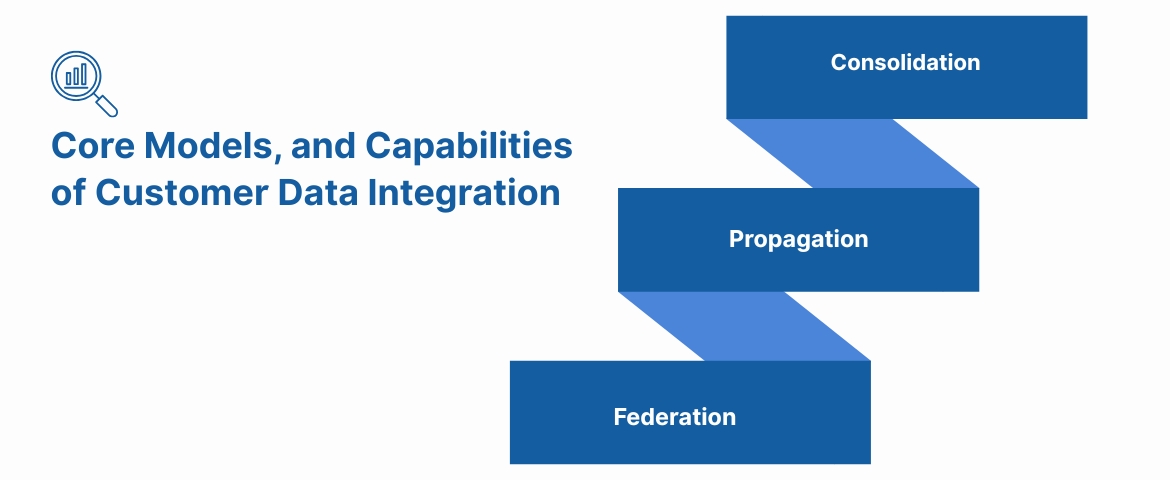
Before choosing a CDI approach, you need clarity on how each model handles data movement, identity, and access across your systems. These models guide how customer information is unified and delivered to your teams.
1. Consolidation
Consolidation centralizes all customer data from multiple systems into a single repository, where records are merged, cleansed, aligned, and stored. This approach works best when you want one governed environment for analytics, customer profiling, and advanced audience building. Because all data is processed in one place, it becomes easier to standardize formats, remove duplicates, and maintain consistent identities.
What This Enables
- Clear and reliable customer profiles that improve targeting and segmentation
- A unified data environment that supports AI models, predictive scoring, and deeper analysis
- Faster reporting by eliminating the need to stitch data from multiple systems
- Stronger governance and compliance because all changes and rules are managed centrally
2. Propagation (Synchronization)
Propagation keeps customer records aligned across all connected systems by sending updates whenever a change occurs. If a customer updates their phone number in your CRM, the update flows automatically to your email platform, support desk, advertising tools, and other systems. This ensures every touchpoint reflects the latest data, reducing friction across the customer journey.
What This Enables
- Consistent and up-to-date customer data across every tool your teams use
- Reduced customer frustration caused by outdated details during support or transactions
- More accurate campaign triggers, automations, and behavioral workflows
- Better cross-team collaboration because every system shows the same customer state
3. Federation (Virtual Access)
Federation gives you a unified view of customer profiles without copying or moving data from source systems, though it is typically best suited for analytical access rather than real-time activation. The unified profile is generated in real time through virtual queries. This model is ideal for organizations with strict data residency requirements or those managing large, distributed systems where centralization is not feasible.
What This Enables
- Real-time visibility into customer information without the delays of data transfer
- Lower storage and infrastructure costs because data is not duplicated
- Stronger compliance alignment by keeping sensitive data in its original system
- Flexible access for analytics and modeling teams without altering system architecture
Capabilities Required for Strong CDI
Effective CDI depends on technical capabilities that maintain accuracy, consistency, and governance across your entire customer data ecosystem. These capabilities ensure your teams have clean, reliable data at every stage.
- Data ingestion: Pulls data from CRMs, analytics tools, ad platforms, and internal systems to ensure every interaction is captured. This gives your teams a complete, uninterrupted view of customer activity.
- Cleaning and deduplication: Standardizes formats and removes duplicates to eliminate noise and conflicting records. This creates a clean base dataset that supports precise segmentation and reporting.
- Identity resolution: Connects events across devices, sessions, and channels into a single customer profile. This improves attribution accuracy and strengthens personalization across the entire journey.
- Real-time sync: Updates every connected platform with the latest customer information without delay. This prevents outdated messages, improves campaign timing, and supports consistent experiences.
- Governance and access controls: Manages who can access, modify, or export customer data through permissions and audit trails. This protects sensitive information and ensures privacy compliance at every step.
When these capabilities operate together, they establish a reliable foundation that improves decision-making, enhances operational efficiency, and strengthens every marketing and analytics workflow.
What Effective Customer Data Integration Looks Like
Effective Customer Data Integration turns scattered information into a single, reliable customer view that every team can trust. When CDI works as it should, your organization gains the clarity, consistency, and control needed to drive better decisions and stronger performance.
Here’s what strong CDI delivers:
- A holistic customer lifecycle view: All interactions from web, app, email, ads, and support map to one identity. Teams see the full journey instead of disconnected touchpoints, enabling better optimization at every stage.
- Accurate measurement and attribution: Campaign sources, conversion paths, and channel influence are tracked without gaps. Reports stay consistent across tools, helping teams allocate budget confidently and identify what truly drives revenue.
- Personalization at scale: Unified profiles are enriched with real-time signals, enabling timely, relevant messages across marketing, product, and retention channels. Every interaction feels more tailored and consistent.
- Real-time, reliable insights: As customers act, data updates instantly. This supports fast campaign decisions, rapid troubleshooting, and more proactive engagement across analytics and growth teams.
- Cleaner data and fewer duplicates: Standardized, unified records eliminate conflicting customer information. This reduces manual stitching, limits errors, and improves the accuracy of downstream analytics.
- Stronger team alignment: Marketing, sales, analytics, and support all work from the same customer truth. Conflicting reports disappear, and collaboration becomes smoother and more efficient.
- Privacy-first data governance: Consent, permissions, and compliance rules are consistently enforced. Sensitive information stays protected, meeting modern US and Canadian privacy expectations.
Strong CDI creates a dependable data foundation that powers smarter decisions, clearer reporting, and more meaningful customer experiences.
Risks of Poor Customer Data Integration
Even with the clear benefits of CDI, many organizations face challenges when customer data isn’t properly integrated. Understanding these pitfalls helps you plan better and avoid costly mistakes:
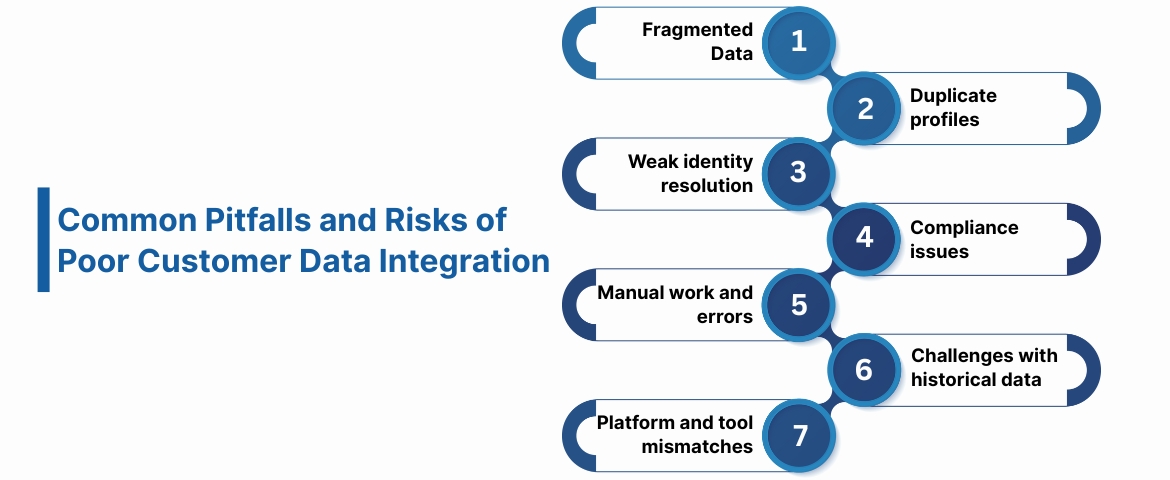
- Fragmented customer information: Data spread across CRMs, analytics tools, email platforms, and support systems makes it difficult to get a complete picture of your audience.
- Duplicate profiles: Without proper deduplication, multiple records for the same customer create confusion, inaccurate reporting, and misaligned marketing efforts.
- Weak identity resolution: Poor linkage across devices, channels, and sessions prevents accurate tracking and personalization, reducing engagement and attribution precision.
- Compliance issues: Inconsistent data management increases the risk of violating regulations like GDPR and CCPA, exposing your business to fines and reputational damage.
- Manual work and errors: Teams spend excessive time reconciling mismatched or messy data, which slows decision-making and increases operational inefficiencies.
- Challenges with historical data: Old, inconsistent, or incomplete datasets complicate integration and require auditing and cleaning before meaningful insights can be achieved.
- Platform and tool mismatches: Using multiple systems with incompatible formats or outdated technologies can hinder seamless integration and scalability.
By anticipating these risks, you can implement a structured, proactive CDI strategy that ensures accurate data, reduces compliance risks, and empowers teams to focus on delivering actionable insights and better customer experiences.
Best Practices of Customer Data Integration
Implementing customer data integration effectively goes beyond picking the right tool. A solid foundation, clear ownership, and ongoing optimization are essential to ensure clean, unified, and actionable data. Follow these best practices to maximize the impact of your CDI efforts:
1. Inventory All Data Sources
Start by identifying every source of customer data in your business: CRMs, email platforms, spreadsheets, e-commerce systems, advertising platforms, support tools, and legacy databases. Document what each source contains, how it’s used, and who manages it.
This step ensures nothing important is overlooked. Missing even a single source—like a customer support platform, can result in incomplete profiles and missed opportunities. Mapping all sources lays the foundation for accurate and comprehensive integration.
2. Assign a Data Steward
Integration is an ongoing process that requires clear ownership. A data steward or dedicated team ensures data quality, resolves inconsistencies, and enforces compliance with privacy regulations.
Think of the steward as the guardian of your customer data. They oversee deduplication, error correction, and sensitive data security, preventing the pitfalls of “set it and forget it” integrations while maintaining accountability across your organization.
3. Audit and Optimize Regularly
Customer data, systems, and business needs constantly evolve. Conduct regular audits to uncover inefficiencies, integrate new data sources, and refine workflows.
For example, new tools may introduce social media engagement metrics, IoT data, or unstructured information such as call transcripts. Auditing ensures your integration stays current, scalable, and capable of supporting automation, analytics, and advanced personalization.
4. Define Clear Goals and Priorities
Start integration with a purpose. Identify specific objectives, such as improving segmentation, linking marketing and sales data, or enhancing attribution.
Clear goals prevent overwhelm from the sheer volume and complexity of data. They guide decisions around which sources, models, and tools to prioritize, ensuring meaningful results from your CDI efforts.
5. Choose the Right Integration Tool
Selecting the right platform is critical for long-term success. Focus on these factors:
- Scalability: Ensure the tool can handle growing data volumes, integrate new systems as you expand, and support evolving operational needs.
- Security: Look for enterprise-grade encryption, compliance with GDPR and CCPA, and advanced privacy controls, including role-based access.
- Usability: A low-code or no-code interface empowers teams to use data directly without heavy IT support, speeding up workflows and reducing errors.
A well-chosen tool simplifies integration, supports compliance, and allows teams to focus on insights rather than technical setup.
6. Prepare Historical Data
Legacy data can be messy, incomplete, or duplicated. Audit and clean historical records before integration to ensure accuracy and consistency.
A structured approach to historical data prevents downstream errors, supports accurate attribution, and strengthens identity resolution, providing a reliable foundation for analytics and personalization.
7. Treat CDI as an Ongoing Process
Integration isn’t “set it and forget it.” Systems, data types, and business needs evolve, requiring continual updates and monitoring.
Proactive maintenance, such as automated sync checks, periodic audits, and integration of new sources, ensures your CDI framework remains effective, enabling faster insights, better decision-making, and improved customer experiences.
How Ingest Labs Strengthens Customer Data Integration
Customer Data Integration depends on accurate identity, reliable event capture, and real-time data availability. Ingest Labs supports CDI across all three layers.
Following CDI best practices is essential, but having a strong identity layer is what makes integration accurate, scalable, and future-proof. That’s where Ingest ID fits in.
- Ingest ID gives businesses a persistent, first-party identity framework that keeps customer data consistent across systems, channels, and devices, even as privacy standards evolve.
- Ingest ID assigns a durable, first-party identifier to every user, ensuring your CDI workflows start with a clean, stable identity.
- Identity resolution becomes significantly stronger because anonymous, known, cross-device, and cross-session behaviors are linked automatically before data reaches your CDI layer.
- Customer journeys stay complete and uninterrupted, with pre-login and post-login activity stitched into a unified profile that downstream tools can trust.
- Your CDI processes receive cleaner inputs, reducing duplicate profiles, conflicting records, and manual stitching across marketing, analytics, and CRM systems.
- Real-time updates ensure all connected tools can be kept in sync through downstream activation and pipelines, so teams always work with the most current customer information.
With Ingest ID, your CDI strategy becomes easier to maintain, more accurate at scale, and fully aligned with first-party data standards, providing a dependable identity foundation for every team.
Conclusion
Building a reliable customer data foundation isn’t just about collecting information; it’s about connecting every touchpoint with accuracy, privacy, and long-term scalability. As marketing teams shift toward first-party data and server-side tracking, having the right infrastructure becomes the difference between fragmented analytics and a complete, unified understanding of your customers.
That’s exactly what Ingest Labs delivers.
With a streamlined, privacy-first MarTech suite, Ingest Labs helps businesses strengthen CDI workflows and future-proof their data strategy through:
- Ingest ID: A durable first-party identity layer that unifies customer profiles across sessions, devices, and channels for accurate attribution and cleaner data pipelines.
- Ingest IQ: Server-side tracking that ensures every conversion event is captured reliably, securely, and without the limitations of browser-based tracking.
- Event IQ: Real‑time event intelligence that gives teams immediate visibility into performance, user behavior, and ROI across all customer touchpoints.
Whether you're preparing for the cookieless future or eliminating inconsistencies in your current data architecture, Ingest Labs provides the tools to do it confidently and at scale.
Book a demo today and see how Ingest Labs can transform your customer data strategy.
FAQs
1. How do you handle legacy and historical data during CDI implementation?
Legacy data should be audited, cleaned, and standardized before integration. Removing duplicates, aligning formats, and validating accuracy ensures historical records do not introduce errors into your unified customer profiles.
2. Can small or mid-sized businesses benefit from CDI?
Yes. Even smaller teams use multiple tools that generate fragmented data. CDI helps consolidate this information early, improving attribution, personalization, and reporting without requiring enterprise-level complexity.
3. How does CDI support compliance with privacy regulations?
CDI centralizes customer data, consent records, and access controls. This makes it easier to manage permissions, track data usage, and respond to privacy requests while reducing the risk of inconsistencies.
4. What types of data sources can CDI unify?
Modern CDI unifies structured data like CRM records, semi-structured analytics logs, unstructured support notes, real-time event streams, and offline sources. This creates a more complete customer picture across channels.
5. Is CDI a one-time project or an ongoing process?
CDI is ongoing. Tools change, data sources grow, and business needs evolve. Regular audits, source updates, and quality checks keep your customer data reliable and operationally useful.