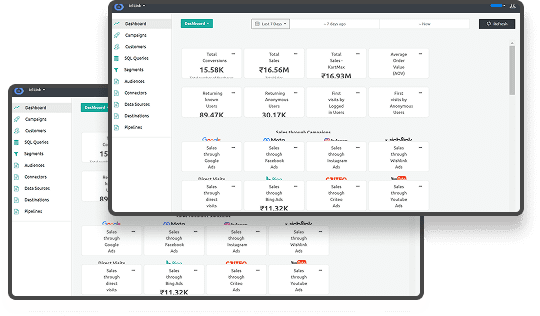




Split testing changed how businesses optimize digital experiences in 2026. Companies using A/B testing see a 49% average boost in conversion rates. Still, many marketing teams find it hard to choose the right tool.
Split testing software helps you compare different webpage versions. This way, you can see which one works better. Gather real user data to make smart choices instead of arguing over button colors or headlines. The right tool saves time, boosts conversions, and removes guesswork.
In this guide, you'll find the top 15 split testing tools for 2026. You’ll discover important features, common mistakes to skip, and tips for picking software that suits your team and budget.
Key Takeaways
- Split testing software helps you compare webpage variations to increase conversions through data-driven decisions rather than guesswork.
- Top tools include Ingest Labs for privacy-first tracking, VWO for comprehensive testing, and Optimizely for enterprise experimentation.
- Essential features include visual editors, statistical significance calculators, audience targeting, real-time reporting, and integration capabilities.
- Ingest Labs combines server-side tracking with first-party data collection, ensuring accurate split test results in a cookieless environment.
What is Split Testing?
Split testing, also known as A/B testing, compares two versions of a webpage to determine which performs better. You show version A to half your visitors and version B to the other half. Then you measure which version achieves your goal, whether that's more signups, purchases, or clicks.
Here's how it works in four simple steps:
1. Identify what to test: Choose one element like a headline, button color, or form length.
2. Create variations: Build version A (control) and version B (variation) with that single change.
3. Split your traffic: Show each version to a random sample of visitors simultaneously.
4. Analyze results: Compare performance metrics to determine which version wins.
Why businesses need split testing in 2026:
Consumer behavior shifts faster than ever. Privacy regulations like GDPR and the deprecation of third-party cookies changed how we track users. Browser restrictions and ad blockers make accurate data collection harder. Split testing software adapts to these challenges through server-side tracking and first-party data solutions.
Without testing, you're optimizing based on opinions or outdated best practices. Split testing turns assumptions into evidence. It helps you understand what resonates with your actual audience, not generic personas from five years ago.
Also Read: How to Start A/B Testing on Shopify
The tools below give you accurate tracking, statistical confidence, and actionable insights. Let's explore which one fits your needs.
15 Best Split Testing Software Tools To Boost Your Conversions in 2026
Choosing the right split testing software depends on your technical capabilities, budget, and testing goals. Some tools excel at visual editing for marketers. Others offer server-side capabilities for developers. This list covers options for every team size and sophistication level.
Each tool below includes an overview, key features, ideal use cases, and pricing information. We've organized them to help you quickly identify which platforms match your requirements.
Not all split testing tools do the same job. Some run experiments, others explain behavior, and some ensure the data behind tests is accurate. The tools below span all three categories.
1. Ingest Labs
Ingest Labs supports privacy-first split testing by ensuring accurate, server-side data collection and attribution. The platform captures accurate user signals even as browsers block third-party cookies and tracking scripts. This matters because incomplete data leads to false test conclusions.
Key features:
- Server-side tracking via Ingest IQ for precise data collection across web and mobile
- First-party identifiers through Ingest ID for accurate attribution without cookies
- Real-time tag monitoring and event tracking with Event IQ
- Direct integration with CDPs, data lakes, and analytics platforms
- GDPR and CCPA-compliant data collection by design
- No-code implementation reduces dependency on development teams
Best for: Marketing teams running tests in a cookieless environment who need accurate tracking without privacy violations.
Pricing: Contact IngestLabs for custom pricing based on traffic volume.
2. Hotjar
Hotjar combines heatmaps, session recordings, and feedback tools to show you why visitors behave in certain ways. The visual insights help you understand user interactions before and during split tests. This context makes the test hypotheses stronger.
Key features:
- Heatmaps show where users click, scroll, and hover on pages
- Session recordings reveal friction points in user journeys
- Feedback widgets collect qualitative data during tests
- Funnel analysis identifies where visitors drop off
- Integrates with Google Analytics, HubSpot, and Slack
Best for: UX teams that need behavioral insights to inform split test hypotheses.
Pricing: Starts at $48/month. Free plan available with limited features.
3. Crazy Egg
Crazy Egg offers visual analytics paired with straightforward A/B testing capabilities. The platform works well for marketing teams that want to test layout changes without writing code. Setup takes minutes, not weeks.
Key features:
- Visual editor creates test variations through drag and drop
- Click tracking and scroll maps reveal user behavior patterns
- A/B testing engine compares page variants
- Traffic analysis segments visitors by source and device
- Snapshots capture session-level interactions
Best for: Small marketing teams seeking quick insights and simple testing tools.
Pricing: Starts at $29/month.
4. Microsoft Clarity
Microsoft Clarity provides free behavioral analytics, including heatmaps, session recordings, and rage click detection. While it doesn't run A/B tests directly, it helps you identify what needs testing. The insights guide your optimization priorities.
Key features:
- Click and scroll heatmaps at no cost
- Session recordings with filtering options
- Instant insights dashboard highlights problems
- JavaScript error tracking spots technical issues
- Privacy features include automatic data redaction
Best for: Budget-conscious teams that need behavioral data to inform testing decisions.
Pricing: Free forever with no traffic limits.
5. VWO
VWO delivers a complete optimization suite including A/B testing, session recordings, heatmaps, and personalization. The platform scales from simple button tests to complex multivariate experiments. Marketing and product teams can collaborate within one dashboard.
Key features:
- Visual and code editors for flexible test creation
- A/B, split URL, and multivariate testing capabilities
- Behavioral targeting segments audiences by actions and attributes
- Funnel analysis tracks conversion paths
- Server-side testing through VWO FullStack
- Integrates with GA4, Mixpanel, Shopify, and HubSpot
Best for: Growth teams wanting testing and UX insights in a single platform.
Pricing: Starts at $393/month based on monthly tracked users.
6. Optimizely
Optimizely handles enterprise-level experimentation across web, mobile, and backend systems. The platform supports feature flags, gradual rollouts, and advanced segmentation. Large organizations use it to coordinate testing across multiple teams and brands.
Key features:
- Full-stack experimentation with SDKs for all platforms
- Feature flag management for controlled releases
- Real-time analytics with statistical modeling
- Audience targeting by behavior, geography, and custom traits
- Integration with Segment, Amplitude, and Adobe Analytics
- Role-based permissions for team collaboration
Best for: Mid to large companies running experiments at both product and marketing levels.
Pricing: Custom pricing based on usage and platform access.
7. Convert Experiences
Convert Experiences focuses on privacy compliance and testing precision. The platform gives CRO specialists granular control over test setup, targeting, and analysis. It's designed for professionals who want detailed reporting without bloat.
Key features:
- Visual editor with advanced CSS and JavaScript control
- A/B, multivariate, split URL, and multipage testing
- Advanced audience segmentation with multiple conditions
- GDPR, HIPAA, and enterprise compliance built in
- High performance with minimal page load impact
- Agency workflow features for managing multiple clients
Best for: Agencies and privacy-focused teams requiring precise control and compliance.
Pricing: Starts at $299/month.
8. Adobe Target
Adobe Target powers personalization and testing for enterprise brands already using Adobe Experience Cloud. The platform combines AI-driven optimization with deep audience targeting. Seamless integration with other Adobe tools creates a unified optimization workflow.
Key features:
- A/B, multivariate, and auto-allocation testing
- AI-powered personalization through Adobe Sensei
- Real-time behavioral targeting across channels
- Recommendations engine for content and products
- Mobile app and OTT platform support
- Enterprise access controls and governance
Best for: Enterprises needing omnichannel personalization within the Adobe ecosystem.
Pricing: Custom pricing based on traffic and Adobe stack usage.
9. Dynamic Yield
Dynamic Yield specializes in ecommerce personalization at scale. The platform tests and optimizes product recommendations, category pages, checkout flows, and promotional content. Retailers use it to create individualized shopping experiences.
Key features:
- Visual editor for page layout and content tests
- Algorithmic product and content recommendations
- Server-side APIs for full-stack testing
- Omnichannel orchestration across web, mobile, and email
- Real-time segmentation and targeting
- Integration with CDPs and data warehouses
Best for: Ecommerce and media brands optimizing the entire customer journey.
Pricing: Custom pricing based on business size.
10. Kameleoon
Kameleoon combines AI-powered personalization with robust testing capabilities. The platform uses predictive targeting to show variations to users most likely to convert. This accelerates test results and improves overall performance.
Key features:
- Visual and code editors for all test types
- AI-based predictive targeting and personalization
- Full-stack experimentation with mobile SDKs
- Real-time segmentation with 45+ targeting criteria
- Built-in privacy and consent management
- Collaboration tools for large teams
Best for: Data-driven teams in regulated industries needing AI-enhanced optimization.
Pricing: Custom pricing based on requirements.
11. Evolv AI
Evolv AI runs continuous optimization using evolutionary algorithms. Instead of testing two variations, it explores hundreds of combinations simultaneously. The AI identifies winning patterns and automatically allocates traffic to top performers.
Key features:
- Evolutionary testing across numerous variations
- Continuous deployment of best-performing combinations
- AI-based optimization with real-time traffic feedback
- Visual editor and developer integrations
- Works across web, mobile, and connected devices
- Dedicated services for enterprise implementations
Best for: Brands wanting automated, continuous optimization beyond traditional A/B testing.
Pricing: Custom pricing with services included.
12. Apptimize
Apptimize focuses on mobile app experimentation for iOS, Android, and OTT platforms. The platform lets product teams test features and UI changes without waiting for app store approvals. Real-time updates keep testing cycles short.
Key features:
- Native SDKs for iOS, Android, React Native, and OTT
- Real-time test deployment without app resubmission
- Feature flags and phased rollouts
- In-app behavioral targeting and segmentation
- Cross-platform testing coordination
- Integrations with Mixpanel, GA4, and Firebase
Best for: Mobile-first teams testing native app experiences.
Pricing: Custom pricing based on app usage.
13. PostHog
PostHog gives developer teams full control over experimentation and analytics. The open-source platform combines feature flags, A/B testing, product analytics, and session recordings. Self-hosting options keep data completely private.
Key features:
- A/B testing with feature flag integration
- Product analytics and event tracking in one platform
- Session recordings and heatmaps
- Open-source with self-hosted options
- API and CLI for custom workflows
- No data leaves your servers in self-hosted mode
Best for: Developer-led teams wanting unified experimentation and analytics with data control.
Pricing: Pay-as-you-go. Free plan for one project.
14. GrowthBook
GrowthBook offers open-source feature flagging and experimentation with warehouse-native architecture. You can self-host the entire platform and connect directly to your data warehouse. This gives you complete transparency and control.
Key features:
- Open-source platform for experimentation and feature flags
- Server-side and client-side testing capabilities
- Self-hosting and private cloud deployment
- Direct integration with SQL-based data warehouses
- Visual dashboards with statistical analysis
- Git-based configuration for version control
Best for: Startups and technical teams prioritizing data ownership and privacy.
Pricing: Starts at $20/user/month. Free self-hosted plan for up to three users.
15. Firebase A/B Testing
Firebase A/B Testing integrates with Google's mobile development platform. Teams already using Firebase for analytics and crash reporting can add testing without extra SDKs. Tests deploy through remote config changes, avoiding app store delays.
Key features:
- Native Android and iOS testing integration
- Remote config parameter testing
- Automatic winner selection based on statistical models
- Google Analytics for Firebase integration
- Push notification testing through FCM
- Works with other Firebase modules
Best for: Mobile teams already using Firebase infrastructure.
Pricing: Pay-as-you-go based on Firebase usage. Free tier available.
Now that you've seen the leading split testing platforms, you need to understand which features separate adequate tools from exceptional ones. Let's examine the capabilities that matter most.
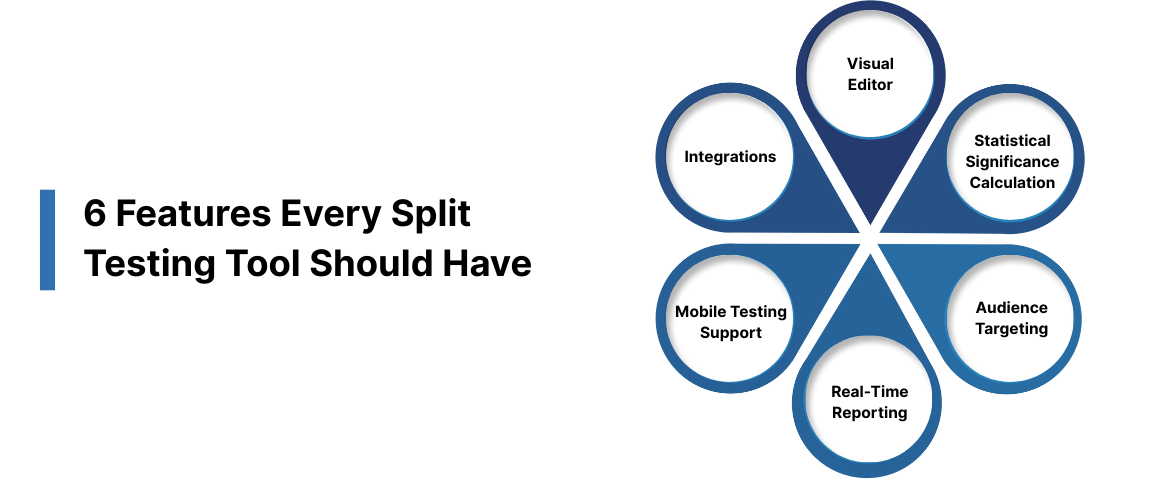
6 Features Every Split Testing Tool Should Have
Not all split testing tools are equal. Some focus on ease of use, others on statistical rigor. Before choosing a platform, make sure it includes these core capabilities—missing any of them will slow experimentation or weaken results.
1. Visual Editor
A visual editor allows non-technical teams to create test variations without code. You can click page elements, update copy or images, and launch tests quickly. This reduces developer dependency and speeds up experimentation. Mobile and desktop previews are essential.
2. Statistical Significance Calculation
Statistical significance confirms whether results are meaningful or due to chance. Tools should calculate this automatically and clearly indicate when results are reliable. Strong platforms support Bayesian or Frequentist models and explain confidence levels in plain language.
3. Audience Targeting and Segmentation
Targeting enables you to test variations on specific user groups, such as mobile vs. desktop visitors or new vs. returning users. Advanced segmentation by location, behavior, traffic source, or custom attributes makes insights more actionable.
4. Real-Time Reporting
Real-time dashboards show performance as data comes in, including conversions, revenue impact, and engagement. This helps teams identify winners faster and stop losing tests early. Reports should be easy to understand and export.
5. Mobile Testing Support
With most traffic coming from mobile, tools must support responsive sites, mobile apps, and cross-device journeys. Server-side testing and first-party data collection help maintain accuracy as privacy restrictions increase.
6. Integrations
Your testing platform should integrate with analytics, CDPs, CRMs, and marketing tools. Native integrations with platforms like Google Analytics, Segment, Shopify, HubSpot, and data warehouses enable unified reporting and smarter targeting.
Also Read: Best Practices for Local SEO A/B Testing
These features are the baseline for effective split testing. Without them, optimization efforts quickly lose speed and impact.
Conclusion
Split testing transforms guesswork into data-driven optimization. The 15 tools covered here offer capabilities ranging from simple visual editors to enterprise-grade experimentation platforms. Your choice depends on team size, technical skills, budget, and testing sophistication.
Start with clear goals and test one variable at a time. Use tools that provide accurate tracking despite privacy regulations and browser restrictions. Document every experiment to build institutional knowledge. Most importantly, commit to testing as an ongoing practice, not a one-time project.
Ingest Labs helps you maintain testing accuracy as cookies disappear and privacy rules tighten. Our server-side tracking captures complete user signals while respecting consent requirements. Book a consultation to discover how first-party data collection improves your split testing outcomes.
FAQs
1. Do I need coding knowledge to run split tests?
No. Many tools like VWO, Crazy Egg, and Hotjar offer visual editors that let you create variations through point-and-click interfaces. However, advanced tests involving backend logic or personalization might require developer assistance.
2. How much traffic do I need for reliable results?
Most tests need at least 1,000 conversions per variation to reach statistical significance. Low-traffic sites should test high-impact pages like homepages or checkout flows. Tools like Unbounce offer Smart Traffic features that optimize faster with smaller samples.
3. Can I test mobile apps with these tools?
Yes. Apptimize, Firebase A/B Testing, and PostHog specialize in mobile app experimentation. They let you test features and UI changes without app store resubmission through remote configuration updates.
4. What's the difference between A/B testing and multivariate testing?
A/B testing compares two complete page versions. Multivariate testing changes multiple elements simultaneously to find optimal combinations. Multivariate tests require significantly more traffic but reveal how elements interact rather than just which single change works best.