




In digital marketing, knowing which ads truly drive conversions is everything. That’s where Floodlight tags come in. Used within Google Campaign Manager 360 (CM360), these tags allow marketers to track user actions, measure conversions, and build remarketing audiences.
But as privacy regulations tighten and cookies fade away, Floodlight tags alone no longer guarantee accurate attribution.
This guide explains what Floodlight tags are, how they work, their common challenges, and how modern, privacy-first tracking solutions ensure accuracy, compliance, and reliability across every campaign.
Key Takeaways
- Floodlight tags help you track every conversion in Google Campaign Manager 360, from ad click to purchase.
- Traditional tagging loses accuracy as browsers block cookies; server-side tracking keeps data complete.
- Ingest Labs enhances Floodlight tracking with tools like Ingest IQ and Ingest ID for privacy-compliant accuracy.
- Regular tag audits and unified governance ensure your marketing data stays clean, compliant, and conversion-ready.
What Are Floodlight Tags: Definition & Core Purpose
Floodlight tags are tracking codes used in Google’s Campaign Manager 360 (CM360) to measure specific user actions on your website or app.
When a user completes a defined event, like making a purchase, filling a form, or viewing a page, the Floodlight tag “fires” and sends data back to CM360 for reporting and attribution.
In simple terms, Floodlight tags tell you what users did after clicking or viewing your ad.
How Floodlight Tags Work
Each Floodlight tag is tied to a Floodlight activity, representing a measurable action or goal. When triggered, it records event data such as:
- The page visited, or event triggered.
- The campaign, ad, or click that brought the user there.
- The conversion value (if it’s a purchase).
- Time and device details for attribution modeling.
Floodlight tags typically send this data via:
- JavaScript tags: Primary, most detailed format.
- Image or iFrame tags: Simpler alternatives for limited environments (like emails or static pages).
Floodlight’s Role in the Marketing Ecosystem
Floodlight tags integrate seamlessly with Google Marketing Platform (GMP), connecting CM360 with Google Ads, Display & Video 360, and Search Ads 360.
| Component | Purpose | How Floodlight Contributes |
| CM360 (Campaign Manager) | Ad serving and tracking | Records ad-driven conversions. |
| DV360 (Display & Video) | Programmatic media buying | Uses Floodlight data to optimize bids and audiences. |
| SA360 (Search Ads) | Paid search management | Aligns search clicks with conversion data. |
| Google Analytics 4 | Web analytics | Imports Floodlight event data for cross-channel analysis. |
This unified integration helps advertisers maintain consistent attribution across all Google platforms, a key reason Floodlight remains widely used.
Why Floodlight Tags Matter
Floodlight tags give marketers a centralized view of campaign performance and enable:
- Accurate conversion tracking: Know which campaigns generate revenue or leads.
- Attribution modeling: Understand the full path to conversion across multiple touchpoints.
- Audience segmentation: Build remarketing lists based on user behavior.
- Budget optimization: Shift spend toward the most profitable campaigns.
Without proper Floodlight implementation, marketers lose visibility into which ads actually work, leading to wasted budget and unreliable reporting.
Example: A Typical Floodlight Use Case
A SaaS brand runs ads across YouTube, Google Search, and LinkedIn.
- Each ad includes click trackers tied to its CM360 Floodlight activity.
- When a user clicks a LinkedIn ad and signs up for a demo, the Floodlight tag on the “Thank You” page fires.
- The conversion is sent to CM360, which links the event back to the ad campaign, proving which source drove the signup.
However, as browsers block cookies and tracking scripts, this client-side Floodlight setup can lose up to 30% of data visibility. That’s where privacy-focused, server-side tracking tools like Ingest IQ become essential for maintaining complete accuracy.
Also Read: Introduction to Server-side Tagging vs Client-side Tagging
How Floodlight Activities Work: Tags, Events, and Conversion Tracking
Floodlight tags operate around the concept of activities, predefined actions that represent key business goals, such as sign-ups, purchases, or page views. Each activity generates its own tag, which is placed on the relevant page or app event.
Floodlight Activities and Events Explained
Every Floodlight activity corresponds to one measurable user action. When a user performs that action, the tag “fires,” and data is sent to Campaign Manager 360 (CM360) for processing.
Example:
| Activity Type | Example Use | Tag Placement |
| Purchase | When a customer completes checkout | On the order confirmation page |
| Lead Capture | When a user submits a form | On the form submission confirmation page |
| Content View | When a user views a pricing or demo page | On the respective content page |
Each tag records:
- User interaction details (page URL, event name, time)
- Source campaign or ad click
- Revenue or conversion value (for purchase-type tags)
- Device and browser metadata
Floodlight Groups
Floodlight activities are often organized into groups: logical collections used to categorize similar actions across campaigns.
Example: A retail company might create two groups:
- “Ecommerce Conversions”: for sales, cart actions, and purchases.
- “Engagement Events”: for newsletter signups and product page views.
Grouping activities improves data management and simplifies reporting across multiple campaigns.
How Floodlight Tracks Conversions
Here’s how a typical Floodlight conversion flow works:
- A user clicks or views an ad served through Google Campaign Manager 360.
- The Floodlight tag on your site or app fires when the defined event happens (e.g., “Purchase Completed”).
- CM360 receives and matches this event to the user’s earlier ad interaction.
- The system attributes the conversion to the correct campaign, ad, or placement.
- Data is sent to other Google products like Display & Video 360 or Search Ads 360 for optimization.
Floodlight essentially connects ad interactions to measurable outcomes, closing the loop between impression → interaction → conversion.
The Role of Cookies and Identifiers
Floodlight relies on cookies or device identifiers to connect user actions across sessions. This dependency, however, poses challenges in a privacy-focused environment where cookies may expire or be blocked.
Also Read: How to Track Conversions in Google Analytics 4
Types of Floodlight Tags: Counter, Sales, and Tag Formats
Floodlight offers flexibility in tracking different types of conversions through two main activity types and multiple tag formats.
3.1 Two Primary Floodlight Activity Types
| Activity Type | Purpose | Example Scenario |
| Counter | Measures the number of times a specific action happens | Tracking video views or newsletter signups |
| Sales | Measures both event counts and transaction values | Tracking eCommerce orders or paid subscriptions |
Counter Tags
- Record non-monetary actions.
- Useful for engagement metrics or lead generation.
Sales Tags
- Capture both event count and revenue value.
- Essential for ROI reporting and campaign-level performance analysis.
Most advertisers use a mix of both, Counter tags for engagement and Sales tags for conversion value.
Floodlight Tag Formats
Floodlight tags can be implemented in different formats, depending on your platform setup and security preferences.
| Tag Format | Description | When to Use |
| JavaScript Tag | Standard, dynamic tag that captures rich event data. | Default choice for most websites. |
| iFrame Tag | Embedded HTML frame for secure, isolated tracking. | When using legacy systems or restrictive CMS. |
| Image Tag | 1x1 pixel tag for basic, no-script tracking. | When JavaScript is disabled or restricted (e.g., in emails). |
Each tag type can also include custom variables to capture specific attributes such as product category, location, or campaign ID.
Dynamic Floodlight Tags
Dynamic Floodlight tags automatically update based on context, e.g., dynamically inserting product IDs or prices during checkout.
Advantages:
- Reduce manual errors.
- Improve reporting accuracy.
- Integrate easily with ecommerce data layers.
Ingest Labs’ server-side system supports dynamic data handling, ensuring that every variable (like revenue or category) is captured securely and consistently.
Where Floodlight Tags Fit in the Marketing Tech Stack
Floodlight tags often coexist with other tracking solutions, such as:
- Google Ads conversion tags
- Meta Pixel
- Google Analytics 4 event tracking
- Ingest Labs server-side tags
Together, these systems form a comprehensive tracking ecosystem, allowing marketers to measure engagement, conversion, and attribution from multiple angles.
Also Read: Introduction to What Tag Management is and Solutions You Should Consider
Typical Use Cases: Conversions, Revenue Tracking, and Remarketing Audiences
Floodlight tags are designed to help marketers measure and optimize the impact of digital advertising campaigns.
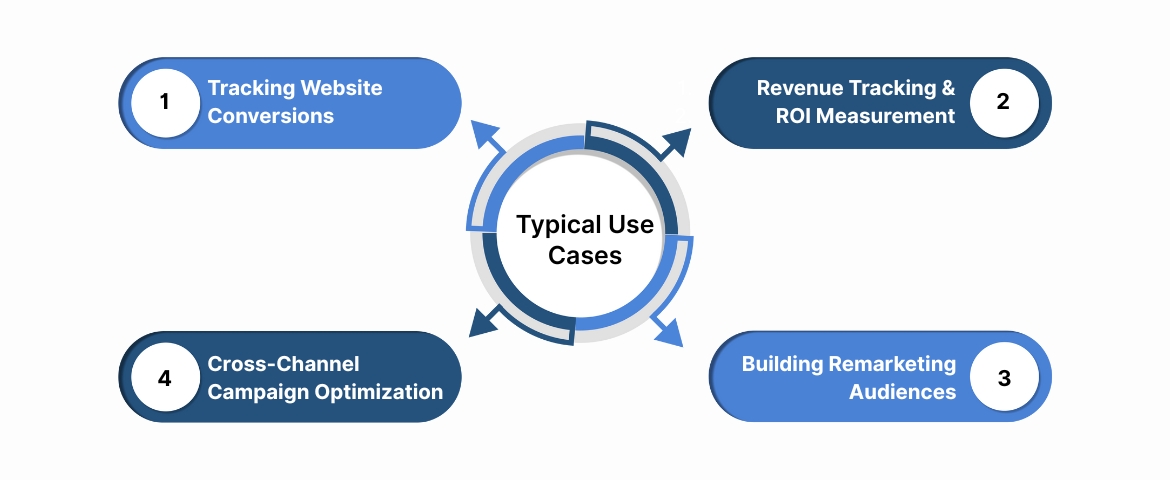
Their flexibility allows businesses to track a range of user actions, from page visits to completed purchases, all within Google Campaign Manager 360 (CM360).
Here are the most common real-world use cases:
1. Tracking Website Conversions
Floodlight tags are most commonly used for tracking conversion events, the actions that directly contribute to business goals.
Examples include:
- Form submissions: A lead completes a contact form after clicking an ad.
- Purchases: An online shopper completes checkout on an eCommerce site.
- App installations: A user downloads or opens an app after viewing an ad.
- Sign-ups: Someone subscribes to a newsletter or webinar.
Each of these actions is tracked through a corresponding Floodlight activity. This data then flows into CM360 and other Google products (DV360, SA360) for reporting and campaign optimization.
2. Revenue Tracking and ROI Measurement
Floodlight sales activities capture not just event counts but also revenue value, providing granular insight into ROI.
For example, an online fashion retailer can pass revenue variables (e.g., transaction value, product category, order ID) into its Floodlight sales tags. This enables CM360 to calculate campaign-level cost per acquisition (CPA) and return on ad spend (ROAS) metrics accurately.
Businesses using advanced Floodlight configurations often integrate these values into Google Analytics 4 or CRM platforms for deeper analysis.
3. Building Remarketing Audiences
Floodlight tags also enable audience list creation based on user behavior. When placed on key pages, such as pricing or cart pages, tags can segment users by intent.
Example Scenarios:
- Users who viewed a product but didn’t complete checkout.
- Visitors who watched a demo video but didn’t sign up.
- Customers who have completed a purchase and are ready for upsell campaigns.
These lists can then be shared across Display & Video 360 and Google Ads for retargeting.
4. Cross-Channel Campaign Optimization
When Floodlight data is shared across multiple Google platforms, advertisers gain a unified view of how different channels contribute to conversions.
This allows marketing teams to:
- Identify which platforms or creatives generate the highest ROI.
- Reallocate budget toward top-performing sources.
- Adjust bids dynamically in DV360 using real-time Floodlight conversion data.
When integrated with a server-side system like Ingest IQ, cross-channel data becomes even more reliable, unaffected by ad blockers or browser privacy rules.
Also Read: Understanding Third-Party Cookie restrictions and the way forward
Common Limitations & Challenges with Floodlight Tags
While Floodlight tags remain a powerful tool within Google’s ecosystem, they are not without limitations. Many businesses face accuracy, privacy, and scalability issues when relying solely on traditional Floodlight implementations.
Below are the most frequent challenges marketers encounter, and why a modern, first-party tracking approach is becoming essential.
1. Reliance on Browser Cookies
Floodlight uses cookies to track user sessions and conversions. However, with Safari, Firefox, and soon Chrome restricting third-party cookies, Floodlight can lose track of returning users.
Impact:
- Lost conversions from users who return after cookie expiration.
- Incomplete attribution data in multi-touch journeys.
- Decline in campaign optimization accuracy.
Solution: Server-side, first-party tracking (as offered by Ingest Labs) stores data securely on your own server, ensuring conversions remain traceable even without cookies.
2. Cross-Device and Cross-Browser Tracking Gaps
Floodlight tags struggle to connect users across devices or browsers, for instance, a user who views an ad on mobile and later converts on desktop.
Result:
- Over-counting or under-counting conversions.
- Inconsistent user journey mapping.
Fix: Tools like Ingest ID bridge these gaps using a first-party identifier that maintains a consistent profile across platforms, without violating privacy laws.
3. Ad Blockers and Script Restrictions
Many users employ ad blockers or privacy tools that prevent tags from firing. This directly reduces the number of conversions reported in CM360.
Example: A B2B SaaS company found that ad blockers led to nearly 18% data loss in its Floodlight reporting, underrepresenting ad effectiveness.
Workaround: Server-side tracking bypasses browser-level interference, ensuring every event is captured accurately in real time.
4. Limited Non-Google Ecosystem Integration
Floodlight tags work seamlessly within Google’s platforms but provide limited data sharing with external systems like CRMs, CDPs, or third-party analytics tools.
Problem: Marketers using multi-channel stacks (LinkedIn Ads, Meta Ads, HubSpot) find it difficult to unify attribution data.
Better Alternative: Integrating Floodlight data into Ingest IQ or Event IQ allows businesses to send standardized event streams into their CDP or data warehouse, creating a single source of truth.
5. Compliance and Data Privacy Risks
Floodlight tags often depend on client-side data collection, which may not always align with GDPR or CCPA requirements if implemented incorrectly.
Risks include:
- Lack of explicit user consent before tracking.
- Unclear data retention or storage policies.
- Exposure to data transfer restrictions (especially in EU regions).
Modern Approach: Ingest Labs’ privacy-first architecture ensures that all data collected via Floodlight or similar tags is processed ethically and compliantly within your first-party infrastructure.
In short, Floodlight tags work well inside the Google ecosystem but face challenges with cookies, cross-device visibility, and compliance.
Combining Floodlight with Ingest Labs’ server-side, first-party solutions ensures marketers maintain full tracking accuracy, without sacrificing privacy or compliance.
Also Read: Setting Up Offline Conversion Tracking in Google Ads
How to Implement Floodlight Tags Correctly
Implementing Floodlight tags requires both technical precision and strategic alignment. A poorly implemented tag setup can lead to inaccurate data, duplicate tracking, or missing conversions, which undermines your entire attribution model.
Below is a structured process to ensure correct, compliant, and efficient Floodlight implementation.
Step-by-Step Implementation Process
Step 1: Define Your Conversion Goals
Start by identifying the key user actions you want to track: purchases, sign-ups, downloads, or lead submissions.
Each goal should correspond to a Floodlight activity in Campaign Manager 360 (CM360).
Step 2: Create Floodlight Activities in CM360
Within the Floodlight configuration, set up your activity type (Counter or Sales) and assign a meaningful, consistent name, such as:
signup_lead_form or product_checkout_complete.
Step 3: Generate the Floodlight Tag
After creating the activity, CM360 automatically generates the tag snippet (JavaScript, iFrame, or Image).
You can find it under Floodlight Configuration → Tags → Tag Code.
Step 4: Add the Tag to Your Website or App
Embed the tag on the page or event corresponding to your conversion goal. For dynamic events, integrate it with your tag management solution (e.g., Google Tag Manager, or Ingest Labs’ tag management module).
Step 5: Pass Custom Variables (U-Variables)
Floodlight tags allow custom variables (U1–U100) to capture additional metadata such as:
- Product category
- Order value
- Campaign ID
- Region or device type
These variables enrich your attribution data and improve audience segmentation.
Step 6: Test and Validate Your Tags
Use CM360’s Tag Validation Tool or server-side monitoring (like Ingest IQ) to confirm the tag fires correctly, sends accurate data, and doesn’t duplicate events.
Step 7: Ensure Privacy Compliance
Integrate consent management, ensure tags fire only after a user has granted permission.
This can be managed easily via Ingest Labs’ server-side privacy filters.
Also Read: How Cookieless Tracking Works and Its Impact on Data Collection
Audit & Maintenance Best Practices for Long-Term Tag Health
Floodlight tag implementation is not a one-time setup. Like all data systems, it requires regular monitoring, auditing, and maintenance to ensure consistent accuracy and compliance.
Floodlight Tag Audit Checklist
| Check Item | Purpose | Recommended Frequency |
| Tag placement validation | Ensure tags fire on the correct pages | Monthly |
| Custom variable review | Confirm U-variables match reporting needs | Quarterly |
| Conversion duplication check | Prevent double-counted conversions | Monthly |
| Consent trigger validation | Maintain GDPR/CCPA compliance | Monthly |
| Cross-domain test | Confirm tracking continuity between subdomains | Quarterly |
| Data match test | Verify Floodlight data aligns with analytics/CDP | Quarterly |
Tip: Automate this process using Ingest IQ’s tag monitoring dashboard, which alerts you when a tag fails, misfires, or produces duplicate data.
Tag Governance for Multi-Team Environments
When multiple teams or agencies share campaign responsibilities, data consistency can easily break down. Implement tag governance policies to standardize:
- Naming conventions for activities and UTM parameters.
- Who owns each Floodlight configuration?
- Review and approval processes for any tag changes.
Also Read: How to Set Up Tracking Templates in Google Ads
Why Floodlight Alone May Not Be Enough: The Case for Server-Side Tracking with Ingest Labs
Floodlight remains an essential tracking system within Google’s marketing suite, but it was built for an era when cookies and browser tracking were reliable. That’s no longer the world we live in.
To maintain accuracy, compliance, and data ownership, modern businesses are shifting to server-side, first-party data architectures, exactly where Ingest Labs leads the way.
The New Reality: Cookieless Tracking and Data Loss
Today’s marketers face:
- Ad-blockers and tracking prevention that stop tags from firing.
- Regional privacy laws (GDPR, CCPA) limit browser-based tracking.
Traditional Floodlight tags, which rely on cookies and client-side JavaScript, are losing visibility into user journeys, causing 10–30% data gaps in many accounts.
Why Server-Side Tracking Fixes These Issues
Server-side tracking moves data collection away from the browser to your secure server.
Instead of depending on user devices, your server directly communicates event data to platforms like Google, Meta, and your analytics tools.
Benefits:
- 100% Data Reliability: No data lost to ad blockers or browser restrictions.
- Privacy Compliance: Data handled ethically under first-party consent logic.
- Speed Optimization: Reduces browser scripts, improving site performance.
- Cross-Platform Accuracy: Connects user actions across devices seamlessly.
How Ingest Labs Enhances Floodlight Tagging
Ingest Labs strengthens Floodlight tracking through three integrated solutions:
| Product | Capability | How It Supports Floodlight |
| Ingest IQ | Server-side event tracking | Captures Floodlight conversion data directly on your server for higher accuracy. |
| Ingest ID | First-party identity resolution | Links multiple user sessions into a single ID, ensuring accurate multi-device attribution. |
| Event IQ | Real-time analytics & AI insights | Analyzes Floodlight events and uncovers trends to optimize ad spend and conversion paths. |
Together, these tools replace fragmented browser-based tracking with a unified, compliant, and future-ready infrastructure.
The Future of Tagging and Attribution
Floodlight remains a valuable foundation for campaign tracking, but the future lies in hybrid setups, where client-side tags trigger server-side events for enhanced accuracy.
Ingest Labs offers this bridge: integrating Floodlight with modern, privacy-first infrastructure to future-proof your marketing analytics.
Conclusion
Floodlight tags remain one of the most powerful tools in a marketer’s tracking arsenal. They offer detailed conversion visibility and enable audience retargeting across Google platforms.
But the digital landscape has evolved, cookies are disappearing, browsers are limiting scripts, and data privacy is now a strategic priority. To maintain accuracy, compliance, and performance, businesses need more than traditional tags.
Ingest Labs helps future-proof your marketing stack:
- Ingest IQ delivers server-side event tracking that complements your Floodlight setup.
- Ingest ID unifies user sessions under privacy-safe, first-party identifiers.
- Event IQ transforms tracking data into real-time attribution insights.
Together, they create a cookieless, compliant, and reliable measurement system, so your Floodlight tags continue to deliver results even as digital privacy evolves.
Contact Ingest Labs to see how you can enhance Floodlight tracking accuracy while staying privacy-first and data-driven.
FAQs
These FAQs address popular questions marketers ask on Google and Reddit, focusing on real confusion points about Floodlight tags and tracking accuracy.
1. Are Floodlight tags and Google Ads conversion tags the same thing?
Not exactly. Floodlight tags are part of Campaign Manager 360, while Google Ads tags track conversions within the Ads platform.
Both can track conversions, but Floodlight provides a cross-channel, centralized view across all Google Marketing Platform products.
2. Do Floodlight tags use cookies?
Yes, Floodlight relies on cookies or device identifiers to connect user actions. However, with cookies being phased out, server-side and first-party tracking (like Ingest IQ) ensures continued accuracy.
3. Can I use Floodlight tags without Google Tag Manager?
Yes, you can manually implement Floodlight tags directly on your site or through other tag managers. However, using a centralized system like Ingest Labs’ tag management or GTM streamlines deployment, reduces errors, and simplifies maintenance.
4. What happens if a user blocks third-party cookies?
Floodlight may not be able to attribute that user’s actions correctly. To prevent this data loss, you should adopt server-side event tracking, which captures conversion data independent of browser settings.
5. Are Floodlight tags compliant with GDPR and CCPA?
They can be, but compliance depends on implementation. Ensure you collect consent before tags fire and store data under first-party control. Using Ingest Labs automates this process and ensures every event respects regional privacy rules.
6. Do Floodlight tags work for non-Google platforms?
By default, Floodlight works best within Google’s ecosystem. However, Ingest Labs can bridge that gap by streaming Floodlight event data to CRMs, analytics platforms, or customer data platforms (CDPs).
7. How often should I review my Floodlight configuration?
Review it quarterly, especially before launching major campaigns. Frequent audits ensure accuracy and compliance as your site, campaigns, and data requirements evolve.