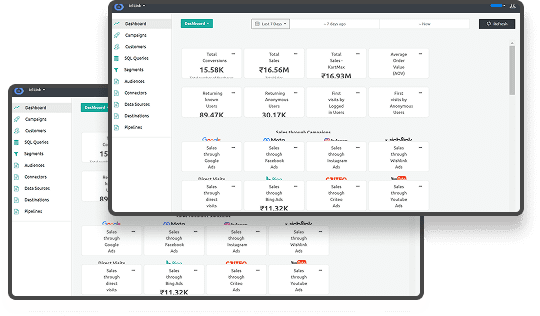





Consider a brand measuring user engagement across its website. A visitor views multiple products, reads reviews, and returns two days later from an email. On the surface, analytics may show a clean journey, but behind the scenes, identifiers reset, scripts fail to load, and blocked cookies break the connection between visits. What looks like one user often becomes three different sessions.
This isn’t rare. Safari blocks most third-party cookies by default, and Firefox’s Enhanced Tracking Protection blocks most known trackers. These restrictions remove critical signals long before they reach analytics tools.
Web tracking has become one of the biggest challenges in digital marketing. This guide explains what’s changing, why traditional methods fail, and how to build a privacy-aligned tracking setup that keeps your measurement accurate.
Key Takeaways
- Web tracking captures user interactions across sites but requires governance to ensure accuracy, consistency, and compliance.
- Server-side tracking and first-party identifiers prevent missing or duplicated events caused by browser restrictions.
- Standardized event naming and cross-tool schemas maintain reliable data for analytics, attribution, and personalization.
- Consent-aligned tracking reduces regulatory risk while preserving actionable insights for marketing optimization.
- Unified ownership, monitoring, and automated audits turn web tracking from fragile scripts into a stable, trustworthy framework.
What Web Tracking Really Means
Web tracking refers to the collection, monitoring, and analysis of user interactions across websites and apps. It encompasses pageviews, clicks, form submissions, video plays, scroll depth, and other digital behaviors. While analytics tools make it easy to capture raw events, tracking governance ensures the data is accurate, consent-aligned, and actionable.
Modern websites use dozens of tracking scripts, including analytics tags, advertising pixels, personalization tools, session recorders, A/B testing scripts, and consent frameworks. Without proper oversight, these scripts often overlap, misfire, or collect inconsistent data, creating gaps that can mislead marketing and product teams.
At its core, web tracking answers key questions like:
- Which user interactions are being captured?
- Are events firing consistently across browsers and devices?
- Are tracking scripts compliant with privacy regulations?
- Does the data collected reflect true user behavior?
How Web Tracking Works
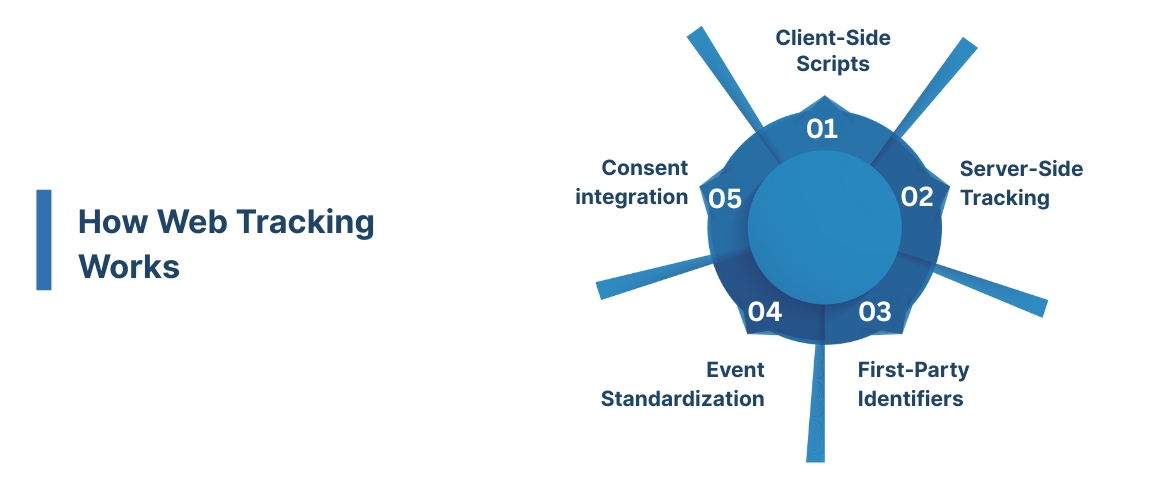
Web tracking collects user interactions through a combination of client-side and server-side methods:
- Client-side scripts: JavaScript tags on your site capture clicks, form submissions, and scroll depth, sending events to analytics and ad platforms.
- Server-side tracking: Events are collected on your servers, bypassing browser restrictions and improving accuracy for key conversions.
- First-party identifiers: Cookies or hashed IDs recognize returning visitors consistently while respecting consent.
- Event standardization: All captured interactions are structured and labeled consistently, creating a unified event stream across tools.
- Consent integration: Tracking only fires after verifying opt-in preferences, ensuring privacy compliance while maintaining actionable insights.
This combination ensures marketers receive complete, accurate, and privacy-aligned signals to drive analytics, personalization, and optimization strategies. To learn how this fits into a modern data stack, see our guides on first-party tracking and server-side event collection, which explain why client-side scripts fail under new privacy restrictions.
Similar Read: What Data is Google Analytics Unable to Track
What Happens When Web Tracking Breaks
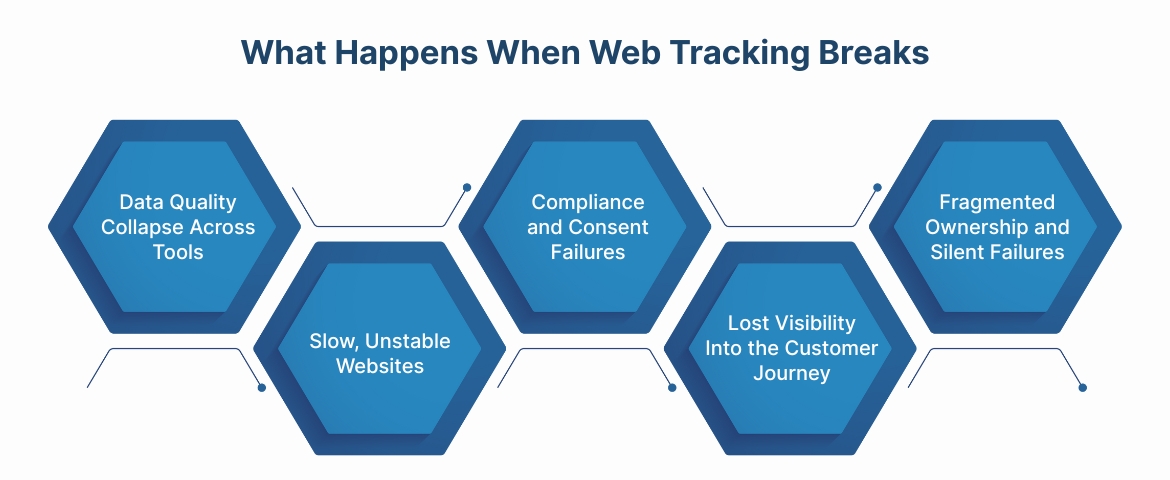
Without careful management and oversight, tracking can become unreliable. Even minor misconfigurations can cascade across analytics and marketing systems.
Data Quality Collapse Across Tools
Most analytics platforms assume events are correct. Misfired or duplicate tracking can:
- Inflate sessions or engagement metrics
- Trigger multiple conversions for a single action
- Skew attribution and A/B test outcomes
- Mislead ad platforms, causing them to optimize for the wrong signals
Slow, Unstable Websites
Tracking scripts add weight and complexity. When poorly managed, they can:
- Trigger extra network requests for unused scripts
- Load out of sequence, blocking page content
- Increase cumulative layout shift (CLS)
- Degrade Core Web Vitals, harming SEO and UX
Compliance and Consent Failures
When scripts fire before consent is collected or ignore opt-outs, organizations risk:
- GDPR, CCPA, and other regulatory violations
- Non-compliant data collection
- Inaccurate or blocked signals in advertising and personalization tools
Lost Visibility Into the Customer Journey
Broken or missing tracking leads to:
- Gaps in engagement and funnel reporting
- Misinterpretation of marketing performance
- Personalization engines receiving incomplete or inaccurate data
Fragmented Ownership and Silent Failures
Without central oversight:
- Scripts accumulate with no clear owner
- Legacy trackers remain active long after campaigns end
- Measurement breaks during site updates
- Reporting discrepancies surface only after weeks of inaccurate data
It’s common to assume that installing analytics tools or pixels is enough. However, web tracking without governance is prone to drift, misalignment, and non-compliance. While tracking captures raw events, governance ensures those events are consistent, reliable, and privacy-aligned across all tools.
Simple Analogy: Web tracking is like the instruments in an orchestra, capturing every note. Governance ensures the orchestra plays in harmony, producing accurate, useful, and compliant data.
Also Read: How to Track Conversions in Google Analytics 4
Now that you have a better idea of how web tracking works, let’s explore why it’s essential for driving accurate insights and informed marketing decisions.
Why Web Tracking Matters in 2025
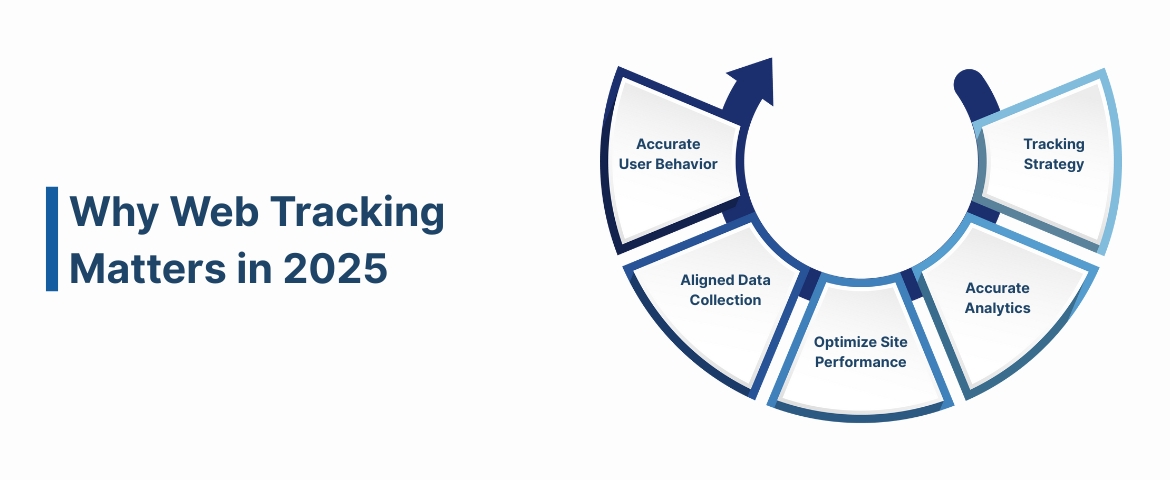
Web tracking is the foundation for understanding user behavior, measuring campaign performance, and optimizing digital experiences. Modern websites rely on multiple analytics scripts, pixels, SDKs, and personalization tools to collect signals across every page and interaction.
Without proper tracking, key user actions can go unnoticed: pages may load without event capture, scripts can misfire, and consent may be ignored. These gaps distort analytics, mislead marketing decisions, and reduce ROI.
Here’s why robust web tracking is essential:
Capture Accurate User Behavior
- Tracks every page view, click, and interaction consistently.
- Prevents missing or duplicated events that skew insights.
- Supports reliable measurement across devices and sessions.
Enable Consent-Aligned Data Collection
- Collects data only after users provide consent.
- Minimizes compliance risks with GDPR, CCPA, and other privacy laws.
- Maintains clear audit trails for regulatory purposes.
Optimize Site Performance
- Reduces unnecessary scripts and network calls.
- Minimizes page load delays and improves Core Web Vitals.
- Ensures tracking doesn’t disrupt user experience or site functionality.
Power Accurate Analytics and Attribution
- Provides clean data to analytics, advertising, and personalization platforms.
- Eliminates inconsistencies that break attribution models.
- Helps teams identify which channels, pages, or campaigns drive results.
Future-Proof Your Tracking Strategy
- Maintains visibility even with browser restrictions and third-party cookie deprecation.
- Supports server-side and first-party data collection methods.
- Ensures marketing measurement remains reliable as regulations and tech evolve.
If you want your web tracking to deliver consistent, compliant, and actionable insights across every channel, it’s not just a nice-to-have, it’s infrastructure.
Want help building a web tracking layer that captures clean, reliable data across every tool?
Ingest Labs is not a client-side tracking SDK; it strengthens your existing tracking by stabilizing event delivery and identity signals.
Challenges of Web Tracking (And How to Solve Them)
Web tracking may seem straightforward, just capturing pageviews, clicks, and interactions, but in practice, it can be surprisingly complex.
Teams face legacy scripts, fragmented tracking across tools, inconsistent event definitions, and privacy restrictions. These gaps create inaccurate analytics, poor attribution, and missed optimization opportunities.
Below are the most common web tracking challenges and how to address them:
Missing or Untracked Events
Scripts may fail to fire due to ad blockers, browser restrictions, or site redesigns. Missing events leave gaps in user data that distort analytics and decision-making. Without reliable capture, marketers cannot fully understand user behavior or optimize campaigns.
Solution: Implement server-side tracking and first-party event collection. This ensures interactions are captured consistently regardless of browser limitations.
Inconsistent Event Definitions Across Tools
Different teams or platforms may record the same action differently, e.g., "signup," "register_click," or "user_signup." These inconsistencies make cross-tool reporting unreliable and create multiple “truths” for the same action. Misaligned definitions can lead to incorrect insights and wasted marketing spend.
Solution: Standardize event names, properties, and values across all tools. Maintain a central schema and enforce checks before deployment.
Duplicate or Overlapping Events
Multiple scripts or tags may fire the same event, inflating metrics and skewing insights. This makes it difficult to identify which user actions actually drive results. Overlapping events can break attribution models and cause marketing teams to make incorrect optimizations.
Solution: Audit your tracking stack and consolidate key events. Use server-side delivery as the primary source to avoid duplicates.
Consent and Privacy Misalignment
Events may fire before user consent is given, creating compliance risks. Misaligned consent flows can result in incomplete or inaccurate datasets. This not only threatens regulatory compliance but also undermines trust in your analytics.
Solution: Integrate consent checks into all tracking logic. Ensure no event fires without recorded user permission and test flows regularly.
Vendor SDK Conflicts
Analytics, personalization, and A/B testing SDKs can interfere with each other or override cookies. These conflicts may block key events or distort data. Without careful validation, tracking can silently fail across multiple tools.
Solution: Validate new scripts for conflicts and prioritize server-side tracking. Minimize client-side dependencies for mission-critical events.
Fragmented Ownership Across Teams
Marketing, engineering, and data teams often manage tracking independently, causing gaps and repeated mistakes. Lack of ownership makes audits and troubleshooting difficult. Without accountability, errors can persist unnoticed, undermining data quality and optimization.
Solution: Establish cross-functional ownership for web tracking. Define responsibilities, maintain documentation, and review changes regularly to maintain a unified tracking strategy.
Accurate web tracking requires standardized events, server-side delivery, privacy compliance, and shared ownership across teams. By addressing these challenges proactively, brands can trust their data, improve attribution, and make better optimization decisions.
Related Read: Event Tracking Tools for Google Analytics
Conclusion
Web tracking is a critical foundation of accurate measurement in modern digital operations. But managing it consistently isn’t simple. Teams face duplicate scripts, inconsistent events, privacy gaps, and fragmented systems, which can skew insights and break analytics long before data reaches downstream tools.
Ingest Labs reduces many of these obstacles by stabilizing event delivery through server-side tracking and enforcing consistent schemas across tools. Ingest IQ captures every event reliably through server-side delivery. Ingest ID helps maintain more consistent user recognition across sessions when identifiers are available and consented. Event IQ can monitor for schema drift and flag inconsistencies when monitoring is enabled, helping teams catch issues earlier.
Together, they turn web tracking from a fragile setup into a stable, automated framework that strengthens every analytics, personalization, and optimization tool.
If you’re ready to capture all signals and improve data accuracy, explore how Ingest Labs can help. Book a demo today.
FAQs
1. How do organizations ensure web tracking systems remain fully compliant as global privacy regulations change?
Compliance requires ongoing governance and technical controls, including maintaining an up-to-date inventory of all tracking technologies (pixels, SDKs, beacons) and setting automated guardrails for consent management. Advanced privacy management platforms periodically audit data flows, trigger automated remediation for non-compliant tags, and support multi-jurisdictional consent workflows, which are especially critical for regulated industries like healthcare.
2. How does multi-device and cross-browser behavior complicate user identification and tracking?
Tracking unique users across devices and browsers is increasingly difficult as cookies are blocked and sessions are fragmented. Advanced analytics solutions use combinations of device fingerprinting, user authentication (logins), IP correlation, and session stitching to more accurately attribute behaviors to individuals, but these require technical sophistication and privacy-friendly implementation.
3. What risks arise from storing web tracking data poorly, and how do organizations address them?
Data risks include exposure to breaches, leaking of sensitive identifiers, or financial details if databases are unencrypted or poorly controlled. Effective organizations enforce rigorous access controls, use encryption at rest and in transit, and keep tracking infrastructure up to date to minimize vulnerabilities. They also conduct periodic penetration tests and monitor for security events linked to tracking data stores.
4. How can behavioral fingerprinting techniques circumvent traditional cookie-based tracking restrictions?
Even as browsers restrict cookies, behavioral fingerprinting exploits data like device type, installed fonts, browser extensions, and browsing habits to build robust user profiles, improving cross-site tracking accuracy while raising privacy questions. Regulatory guidance is evolving, but deploying these techniques must balance targeting needs with ethical and legal concerns.
5. What advanced methods are available for governing third-party tracking pixels and SDKs to prevent data oversharing?
Sophisticated governance frameworks mandate that developers restrict pixel and SDK deployment on sensitive pages (e.g., booking appointments, financial transactions), use automated tools to monitor real-time data transmissions, and regularly review all third-party integrations. Cataloging all active partners and limiting data elements shared based on user consent and policy enforcement helps prevent accidental sharing of protected information.
6. Is web tracking illegal?
Web tracking is not illegal, but it is regulated by privacy laws like the GDPR in Europe and CCPA in California. These laws require websites to inform users about tracking practices, obtain explicit consent in many cases, and allow users to control their data. Tracking without transparency or consent, especially when collecting personal or sensitive information, can lead to legal penalties. Therefore, web tracking is legal only when done transparently, with proper consent, and in compliance with applicable data privacy regulations.